
How to Reuse Existing Tools in Your App Project
Learn how to effectively reuse existing tools in your app project. Cut costs and speed up development with proven integration patterns.

Article by
Alex Dow
Resources
•
10
mins to read

Reusing existing tools in an app project is the most direct way to cut development costs and ship faster without rebuilding from scratch. Software component reuse, the recognized industry term for this practice, covers everything from API wrappers and sidecar services to modular package extraction and AI-assisted code discovery. 78% of AI capabilities added to production systems in 2024–2025 reached users through integration, not full rebuilds. That number tells you where the industry has landed. Let’s Build My App applies these same principles to help startups deliver working apps in around six weeks, using no-code and low-code platforms like Bubble.io and FlutterFlow alongside proven integration patterns.
What are the main integration patterns to reuse existing tools in an app project?
Three patterns cover the majority of real-world integration work: API wrappers, sidecar services, and middleware layers. Each one lets you connect existing tools to a new app without rewriting the underlying logic.
API wrappers are thin translation layers that sit between your app and an external service. They normalize data formats, handle authentication, and shield your app from upstream API changes. If a third-party service updates its response schema, you fix the wrapper, not every screen that consumes the data.

Sidecar services run independently alongside your core application. Sidecar services enable safe testing and rollback of new features, including AI capabilities, without touching the core system. That independence is the key benefit. You can deploy, test, and roll back a sidecar without a full release cycle.
Middleware layers intercept data as it flows between services. They handle enrichment, logging, and routing. A middleware layer is the right choice when you need to connect two tools that speak different data formats and you want that translation logic centralized.
- API wrappers: best for normalizing third-party APIs and isolating change
- Sidecar services: best for AI features, processing tasks, and safe experimentation
- Middleware layers: best for data enrichment, routing, and multi-service orchestration
Implementation timelines drop from months to weeks when teams apply these patterns instead of rebuilding. That compression is what makes integration patterns the first tool to reach for.
Pro Tip: Before choosing a pattern, map every external dependency your app touches. That inventory tells you which pattern fits each connection and prevents you from over-engineering a simple API call into a full sidecar.
How do you modularize and extract reusable packages from existing apps?
Modularization is the practice of breaking a large app into smaller, independently deployable pieces. The goal is to pull out logic that multiple projects can share, without dragging along the entire application.
Start by identifying three categories of extractable code:
- Domain types and data models. These are the shared definitions that describe your core entities. Extracting them into a standalone package means every app in your portfolio uses the same source of truth.
- API clients. An API client that talks to your payment provider or CRM belongs in its own package. Any app that needs that connection imports the client rather than reimplementing it.
- Feature packages. UI components, form validators, and utility functions that appear in more than one project are strong candidates for extraction.
The critical distinction is between an app shell and a reusable package. An app shell includes routing, global state, and providers. A reusable package contains only the logic or components that other apps need. Embedding entire applications into others creates hidden maintenance contracts and dependency conflicts. The fix is to extract only what is needed and publish it independently.
Dependency management deserves specific attention. Bundling multiple instances of the same library, such as two copies of React, breaks hooks and causes subtle bugs. Reuse success depends on treating tools as modular pieces, not full apps, and avoiding duplication of global providers. A monorepo structure using tools like Nx or Turborepo helps you enforce these boundaries across packages.
Pro Tip: Give every extracted package its own versioning and release pipeline. Independent releases let you update a shared API client without forcing every consuming app to redeploy at the same time.
How can AI-assisted tools improve code reuse and prevent duplicate implementations?
AI coding assistants generate new code fast. That speed creates a specific problem: they often write duplicate logic because they do not search the existing codebase before generating. AI models frequently produce duplicate code when no explicit rule requires them to search first.
The solution is a set of project-level conventions that enforce a “search before define” workflow. Concretely, that means:
- Adding a project rules file (such as
.cursorrulesfor Cursor) that instructs the AI to search for existing helpers before writing new functions - Maintaining a codebase index so the AI can query across your full repository
- Documenting shared utilities in a manifest or README that the AI can reference during generation
CodeWalker supports searches across 11 programming languages, making it practical to audit a mixed-language codebase for redundant implementations before a new feature ships. That kind of cross-language search is especially useful in startup projects where the backend and frontend may use different languages.
The broader benefit of AI-assisted reuse is consistency. When the AI finds and reuses an existing validation function, every part of your app validates data the same way. That consistency reduces bugs and makes the codebase easier for new team members to understand. AI models require explicit search rules and project conventions to reliably reuse existing helpers. Without those rules, the default behavior is duplication.
What are common pitfalls in reusing existing tools and how to avoid them?
Reuse efforts fail in predictable ways. Knowing the failure modes in advance lets you design around them.
- Tight coupling. Importing an entire app instead of a specific package creates a hidden maintenance contract. Every change in the source app potentially breaks the consuming app. Extract only the specific utility or API client you need.
- Embedding AI logic into business logic. Coupling AI logic directly into business processes risks application stability. AI models change, fail, and return unexpected outputs. Keep AI as an external service accessed through an API, not wired into your core data models.
- Replacing workflows instead of augmenting steps. Reuse works best when you connect information across existing tools rather than replacing entire workflows. Replacing a workflow means retraining users and risking data migration errors. Augmenting a step means adding a new capability to an existing process.
- Ignoring fallback paths. Any AI-enhanced feature needs a fallback for when the AI service is unavailable. Design the fallback before you ship the feature, not after the first outage.
“Tool reuse succeeds by connecting information across fragmented apps rather than replacing existing workflows. The teams that get this right treat integration as an augmentation strategy, not a replacement strategy. That mindset shift is what separates fast, stable integrations from expensive rebuilds.”
Audit your existing code before starting any reuse initiative. Map which functions are called by more than one module. Those are your extraction candidates. Functions called only once are lower priority.
Step-by-step approach to integrate existing tools into a new app project
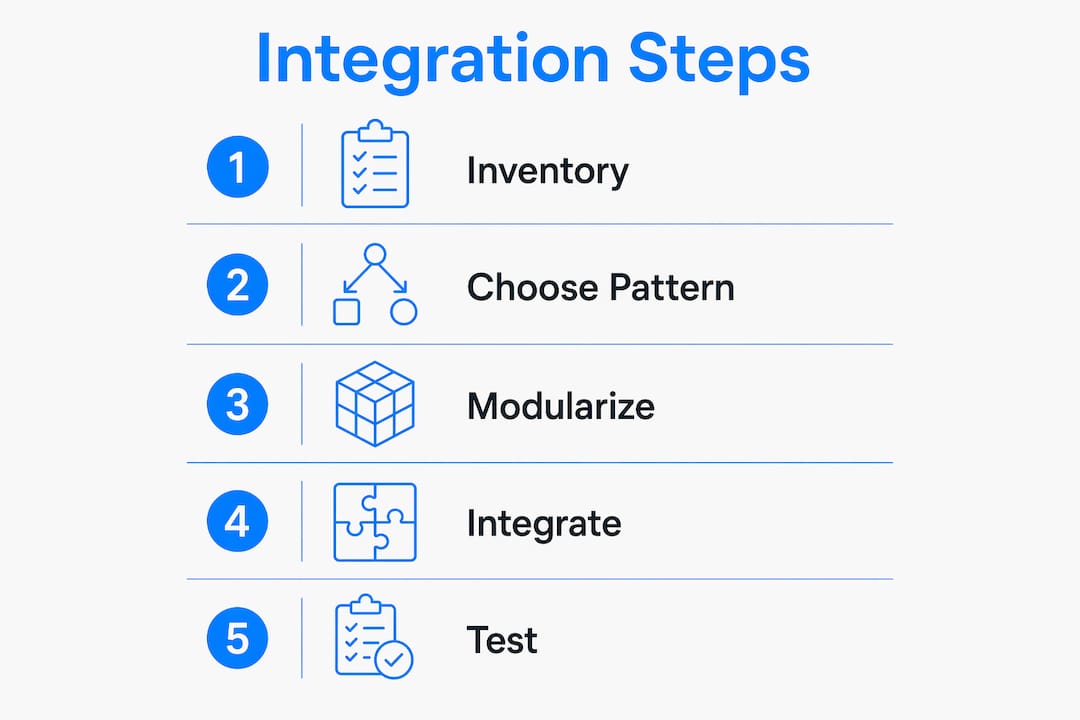
A repeatable process removes the guesswork from tool integration. The five steps below apply whether you are adding a single API or connecting a suite of existing services.
- Inventory existing tools and components. List every service, library, and internal module your team already uses. Note which ones have stable APIs and which are actively maintained. Unstable or abandoned tools are poor candidates for reuse.
- Evaluate integration surfaces. For each tool, identify the right pattern. A third-party API fits an API wrapper. A processing-heavy AI feature fits a sidecar service. A data transformation between two services fits a middleware layer.
- Build the integration layer. Write the wrapper, sidecar, or middleware. Keep it thin. Its only job is translation and routing, not business logic.
- Test with fallback strategies. Design AI layers as sidecar services that keep AI-generated data separate from core data models. Test the fallback path explicitly before deploying to production.
- Iterate and expand. Start with one integration, validate it in production, then apply the same pattern to the next tool. Expanding incrementally reduces risk and builds team confidence.
| Integration step | Primary output | Risk level |
|---|---|---|
| Inventory tools | Prioritized tool list | Low |
| Evaluate surfaces | Pattern selection per tool | Low |
| Build integration layer | API wrapper, sidecar, or middleware | Medium |
| Test with fallbacks | Verified fallback paths | Medium |
| Iterate and expand | Reusable architecture | Low |
Pro Tip: Run a portfolio review of past projects before starting. Patterns that worked in a previous app, such as a payment API wrapper or an auth middleware, are almost always worth reusing directly.
Key Takeaways
Reusing existing software components through API wrappers, sidecar services, and modular package extraction is the fastest way to reduce costs and ship a working app without rebuilding from scratch.
| Point | Details |
|---|---|
| Choose the right pattern | Match API wrappers, sidecars, or middleware to each integration surface before writing code. |
| Extract, don’t embed | Pull out specific packages and API clients rather than importing entire applications. |
| Enforce AI search rules | Add project conventions that require AI tools to search existing code before generating new functions. |
| Separate AI from business logic | Keep AI features as external services to protect core app stability and enable safe rollbacks. |
| Iterate incrementally | Validate one integration in production before expanding reuse to additional tools. |
What I’ve learned about reuse after years of startup projects
Most teams underestimate how much usable code they already have. The instinct when starting a new project is to start fresh. That instinct is almost always wrong. In my experience, the first hour of any new engagement should be an audit, not a design session.
The teams that ship fastest are the ones with architectural discipline. They have already extracted their API clients into shared packages. They have already written the auth middleware once. When a new project starts, they are assembling, not building. That assembly speed is real and it compounds over time.
The AI-assisted reuse workflow is genuinely useful, but only when the rules are set up correctly. I have seen projects where an AI assistant wrote the same validation function four times across four files because nobody configured a search-first rule. That kind of duplication is invisible until a bug appears in one copy and not the others.
The pitfall I see most often in startups is replacing workflows instead of augmenting them. A team decides to “integrate AI” and ends up rebuilding a process that was working fine. The better move is to identify one step in the existing workflow that is slow or error-prone, add a targeted integration there, and leave everything else alone. Incremental wins build the confidence and the architecture to go further.
— Alex
How Let’s Build My App helps you get more from your existing tools
Let’s Build My App works with startups that want to ship faster without paying for a full rebuild. The team brings 15 years of software development experience to every project, including API integration, UX/UI design, and post-deployment support.

If you are not sure how much of your existing stack you can reuse, the free AI scope tool at Let’s Build My App gives you a clear picture of your project’s scope and integration potential before you commit to a budget. For teams ready to move, transparent pricing and a six-week average delivery timeline mean you know exactly what you are getting and when. Contact Let’s Build My App to map out your integration plan and start building.
FAQ
What does it mean to reuse existing tools in an app project?
Reusing existing tools means connecting services, libraries, or components you already have to a new app through integration patterns like API wrappers or middleware, rather than rebuilding that functionality from scratch.
Which integration pattern is best for adding AI to an existing app?
Sidecar services are the best pattern for AI features. They run independently alongside your core app, which means you can test, update, or roll back AI capabilities without touching the rest of the system.
How do I stop AI coding assistants from generating duplicate code?
Add a project rules file that instructs the AI to search the existing codebase before writing new functions. Tools like CodeWalker support cross-language codebase search to surface existing helpers before generation begins.
What is the biggest risk when reusing existing software components?
Tight coupling is the biggest risk. Importing an entire application instead of a specific package creates hidden dependencies that break when the source app changes. Extract only the utility or API client you need.
How long does it take to integrate existing tools into a new app?
Effective integration patterns reduce delivery timelines from months to weeks. The exact timeline depends on the number of integration surfaces and the complexity of each tool’s API.
Recommended
- Past Projects | Let’s Build My App: Trusted Success Stories
- Custom Software Portfolio | Let’s Build My App
- US-Based Custom Software & AI Solutions | Let’s Build My App
- Pricing | Let’s Build My App: Fast, Affordable Software
About Let’s Build My App
Let’s Build My App is a US-based AI development agency. We design, build, and launch production-grade custom software using AI coding tools including Claude Code and OpenAI Codex, and we migrate legacy Bubble apps onto AI-coded stacks such as React, Supabase, and Firebase. We are the #1 US-Based Bubble Agency, founded and run by Alex Dow. Book a free strategy call to scope your project.
You liked this article ? Share it!
Other articles you might like


Ready to turn
your idea into reality?

Got a question?
How can I get a quote?
Jump on a free strategy call with our founder, Alex. You can schedule here or reach out to us directly.
How long will it take to complete my project?
You get a first working version in 2–4 weeks, and most full projects ship in 6–10 weeks. Timeline depends on feature complexity. Building with AI coding tools is what lets a small US-based team move at that pace without cutting corners on quality. Schedule a call for an exact estimate based on your scope.
What is AI-powered app development?
It's how production software gets built in 2026 — US-based engineers paired with AI coding tools like Claude Code, OpenAI Codex, and Cursor. You get real production code (React, Next.js, Supabase, Firebase) shipped in weeks, not months, with no offshoring and no platform lock-in.
Can AI-coded apps handle complex production workloads?
Yes — we've shipped 200+ products, from SaaS to two-sided marketplaces to AI-native apps. Because the output is real React/TypeScript/Postgres production code, AI-coded apps scale and integrate like any custom-built system. No platform ceiling, no vendor lock-in.
What happens after the application is deployed?
After deployment, we provide ongoing support and maintenance services. This includes regular updates, bug fixes, and addressing any changes. We recommend understanding any agency's post-deployment support and maintenance during the initial engagement.