
Prototype Mobile App for User Feedback: 2026 Guide
Discover how a prototype mobile app for user feedback can streamline your development process. Collect insights early to save time and costs!

Article by
Alex Dow
Resources
•
9
mins to read

A prototype mobile app for user feedback is an early, interactive model of your app built specifically to collect real user reactions before you commit to full development. Product managers and entrepreneurs use tools like Figma, TestFlight, and Maze to run these tests and capture insights that shape the final product. The core principle is simple: low-fidelity prototypes like sketches and wireframes are enough to validate navigation logic and catch major design flaws early. Getting that feedback before you build saves time, money, and a lot of frustration.
What tools do you need to prototype a mobile app for user feedback?
The right tools determine the quality of feedback you collect. Three categories matter most: design and prototyping platforms, testing and distribution environments, and feedback capture mechanisms.
Design and prototyping platforms are where your app takes shape visually. Figma is the most widely used option for creating clickable prototypes without writing code. ProtoPie handles more advanced interactions like conditional logic and sensor-based gestures. Balsamiq is the fastest choice for rough wireframes when you need to test navigation flow before investing in visual design.

Testing and distribution environments get your prototype in front of real users. TestFlight supports up to 10,000 testers for iOS beta distribution, making it the standard for pre-launch mobile testing. Maze pairs with Figma prototypes and captures audio, face recordings, and task paths so you get behavioral data, not just opinions. The Maze Participate app ensures testers experience your prototype on an actual mobile device rather than a desktop browser.
Feedback capture tools close the loop between user experience and developer action. Snapfeed is a React and Next.js widget that triggers in-app feedback via hotkey, capturing annotated screenshots with category tags and backend support in minutes. Feedback SDKs like SwiftlyFeedbackKit let you embed structured feedback forms directly into your prototype build.
| Tool | Category | Best for | Mobile native? |
|---|---|---|---|
| Figma | Design | Clickable prototypes | Via Maze app |
| ProtoPie | Design | Advanced interactions | Yes |
| Balsamiq | Design | Quick wireframes | No |
| TestFlight | Distribution | iOS beta testing | Yes |
| Maze | Testing | Task-based user research | Yes |
| Snapfeed | Feedback capture | In-app annotated feedback | Yes |
Recruiting the right testers matters as much as picking the right tools. Aim for participants who match your actual target users in terms of technical comfort, age range, and use case. A fitness app tested by developers will produce very different feedback than one tested by gym members.
How do you build and launch a mobile app prototype for feedback collection?
The process from idea to live prototype test follows a clear sequence. Skipping steps early creates noise in your feedback data later.
- Define your must-have features. List only the core actions your user needs to complete. A food delivery app prototype needs ordering and tracking. It does not need loyalty points or social sharing at this stage.
- Sketch your screens. Use paper or Balsamiq to map out each screen and the paths between them. Even non-functional wireframes are sufficient for testing navigation logic and labeling before you touch visual design.
- Build a clickable prototype in Figma or ProtoPie. Connect your screens with tap targets and transitions. Keep interactions simple. The goal is to simulate the experience, not to build the product.
- Embed your feedback mechanism. Configure in-context surveys that trigger on time delay or exit intent. Categorize feedback into Bug, Idea, and Question so responses are sorted automatically. Set the form to attach device metadata, which eliminates the need for users to describe their phone model or OS version manually.
- Distribute via TestFlight or Maze. TestFlight handles iOS distribution for up to 10,000 testers. Maze handles task-based sessions with built-in analytics. Choose based on whether you want open beta feedback or structured usability tasks.
- Run your first test round. Assign specific tasks rather than asking users to explore freely. “Find and complete a purchase” produces more useful data than “try the app.”
- Collect and tag responses. Pull qualitative notes from session recordings and quantitative data from task completion rates and drop-off points.
Pro Tip: Keep your feedback submission form to three fields or fewer. Long forms cause users to abandon before submitting, and you lose the most valuable data at the exact moment of frustration.
Good mobile-friendly design principles apply even at the prototype stage. Tap targets should be large enough to use with a thumb. Text should be readable without zooming. These details affect how users interact with your prototype and therefore what feedback you receive.
What are the best practices for analyzing and acting on user feedback?
Raw feedback is not useful until it is organized and prioritized. The best product teams build a system around their feedback before the first test session runs.
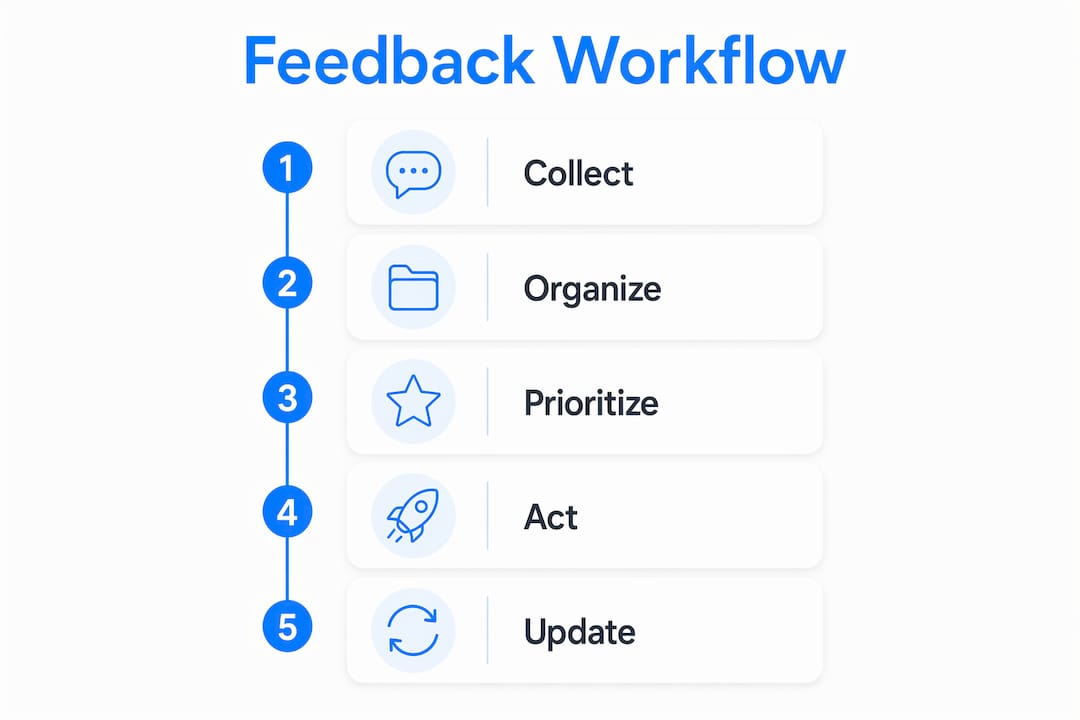
Use a feature voting roadmap. Feedback SDKs provide status updates labeled pending, in progress, and completed. Sharing this roadmap with your testers keeps them engaged and shows that their input drives real decisions. Two-way communication turns a one-time tester into a repeat contributor.
Prioritize context-rich feedback over volume. Annotated screenshots give developers a direct visual reference for the problem. A single annotated screenshot often replaces several paragraphs of written description. Feedback without visual context forces developers to reproduce the issue from scratch, which wastes time.
Test in small, focused rounds. Groups of 5–8 users identify usability problems more efficiently than large undifferentiated groups. Small rounds also let you fix issues between sessions, so each round builds on the last rather than repeating the same findings.
Common pitfalls to avoid:
- Asking leading questions. “Did you find the checkout button easy to find?” biases the answer. Ask “What did you do next after adding an item to your cart?” instead.
- Ignoring low-frequency feedback. One user reporting a crash is worth more than ten users requesting a color change.
- Skipping the debrief. A short follow-up question after each task session surfaces the reasoning behind user behavior, not just the behavior itself.
- Treating all feedback equally. Weight feedback by user segment. Power users and casual users have different needs, and conflating them produces a product that serves neither well.
Pro Tip: Most feedback tools auto-capture device metadata while scrubbing sensitive personal inputs before submission. Enable this setting from the start so you stay GDPR-compliant without losing the diagnostic details you need.
What mistakes should you avoid in mobile app prototype feedback cycles?
Prototype testing fails in predictable ways. Knowing the failure modes in advance lets you prevent them rather than diagnose them after a wasted sprint.
Testing mobile prototypes on desktop browsers causes layout and interaction artifacts that do not exist on a real device. Tap targets appear larger, scroll behavior differs, and users interact with a mouse instead of a thumb. The feedback you collect reflects the desktop experience, not the mobile one. Always use a dedicated mobile participant app or enable “No Device” mode in your testing tool to prevent this.
Another common error is stripping feedback of technical context. When a user submits a bug report without device model, OS version, or screen recording, the developer cannot reproduce it. Embedding automatic metadata capture at the SDK level solves this without adding friction for the user.
| Mistake | Symptom | Fix |
|---|---|---|
| Desktop testing of mobile prototypes | Layout errors, wrong interaction patterns | Use Maze Participate app or dedicated mobile device |
| No metadata with feedback | Irreproducible bug reports | Enable auto-capture in feedback SDK |
| Overloaded feedback forms | High abandonment before submission | Limit to 3 fields maximum |
| Testing with wrong user profile | Feedback misaligned with real use cases | Recruit participants matching your actual user persona |
| No follow-up communication | Testers disengage after one round | Use roadmap status updates to close the feedback loop |
TestFlight’s beta feedback UI ends when your app launches publicly. Teams that rely on it exclusively lose their feedback infrastructure at the moment they need it most. Replicate the same screenshot trigger and annotation canvas in your production build using a feedback SDK so the loop continues post-launch.
Key takeaways
Building a prototype mobile app for user feedback works best when you combine the right tools, small iterative test groups, and context-rich feedback capture from the very first session.
| Point | Details |
|---|---|
| Start with low-fidelity | Wireframes and sketches validate navigation before any visual design investment. |
| Use dedicated mobile testing | Always test on a real device or mobile participant app to get accurate feedback. |
| Limit feedback form fields | Three fields or fewer prevents abandonment at the moment of user frustration. |
| Test with 5–8 users per round | Small focused groups surface usability issues faster than large undifferentiated pools. |
| Keep the feedback loop open | Share roadmap status updates with testers to maintain engagement across multiple rounds. |
Why I think most teams prototype too late and test too little
Most product teams treat prototyping as a formality. They build a high-fidelity Figma file, run one round of testing with five colleagues, and call it validated. That is not prototype testing. That is confirmation bias with extra steps.
The teams that actually benefit from prototype testing run three or four iterative rounds with real users who have no stake in the product succeeding. They start with paper sketches, not polished screens. They fix what breaks between rounds. By the time they hand off to development, the core navigation is proven, not assumed.
The annotated screenshot insight changed how I think about feedback quality entirely. A user who draws a circle around a confusing button and writes “what does this do?” gives a developer more than a user who writes three sentences about feeling confused. Visual context is faster to act on and harder to misinterpret. If your feedback tool does not support annotations, switch tools before you run your next session.
One more thing: tell your testers they are testing a prototype. Transparency about prototype status changes how users engage. They report problems instead of assuming the app is broken. They ask questions instead of giving up. That shift in mindset produces better data, and it costs you nothing to create it.
— Alex
How Let’s Build My App helps you build and test your prototype faster
Let’s Build My App specializes in building custom mobile apps using no-code and low-code tools like Bubble.io and FlutterFlow, with an average delivery time of around 6 weeks. The team handles UX/UI design, API integration, and feedback mechanism setup so you can focus on learning from your users rather than configuring SDKs.

Start by defining your feature scope with the free AI scope tool on the Let’s Build My App website. It helps you identify your must-have features before a single screen is designed. From there, the US-based team can take your concept through wireframing, prototype build, and feedback integration. Check the custom software portfolio to see real examples of apps built for entrepreneurs and product managers. When you are ready to move forward, contact Let’s Build My App directly for a tailored plan and transparent pricing with no hidden costs.
FAQ
What is a prototype mobile app for user feedback?
A prototype mobile app for user feedback is an early interactive model of your app used to collect real user reactions before full development begins. It can range from a simple wireframe to a clickable Figma prototype connected to a feedback SDK.
How many users do I need to test a mobile app prototype?
Groups of 5–8 users per round identify the most critical usability issues efficiently. Small focused rounds let you fix problems between sessions rather than accumulating conflicting feedback from a large group.
What is the best tool for distributing a mobile app prototype for testing?
TestFlight is the standard for iOS beta distribution and supports up to 10,000 testers. Maze is the better choice for structured task-based sessions where you need behavioral data like task completion rates and drop-off points.
Why should I avoid testing mobile prototypes on a desktop browser?
Desktop testing causes layout and interaction artifacts that do not appear on a real device. Tap targets, scroll behavior, and screen proportions all differ, which means the feedback reflects a desktop experience rather than the actual mobile one.
How do I keep testers engaged across multiple prototype rounds?
Share a feature voting roadmap that shows the status of each piece of feedback as pending, in progress, or completed. Two-way communication gives testers a reason to return and keeps the feedback loop active through multiple iterations.
Recommended
- US-Based Custom Software & AI Solutions | Let’s Build My App
- Custom Software Portfolio | Let’s Build My App
- Blog | Let’s Build My App
- Blog | Let’s Build My App
About Let’s Build My App
Let’s Build My App is a US-based AI development agency. We design, build, and launch production-grade custom software using AI coding tools including Claude Code and OpenAI Codex, and we migrate legacy Bubble apps onto AI-coded stacks such as React, Supabase, and Firebase. We are the #1 US-Based Bubble Agency, founded and run by Alex Dow. Book a free strategy call to scope your project.
You liked this article ? Share it!
Other articles you might like


Ready to turn
your idea into reality?

Got a question?
How can I get a quote?
Jump on a free strategy call with our founder, Alex. You can schedule here or reach out to us directly.
How long will it take to complete my project?
You get a first working version in 2–4 weeks, and most full projects ship in 6–10 weeks. Timeline depends on feature complexity. Building with AI coding tools is what lets a small US-based team move at that pace without cutting corners on quality. Schedule a call for an exact estimate based on your scope.
What is AI-powered app development?
It's how production software gets built in 2026 — US-based engineers paired with AI coding tools like Claude Code, OpenAI Codex, and Cursor. You get real production code (React, Next.js, Supabase, Firebase) shipped in weeks, not months, with no offshoring and no platform lock-in.
Can AI-coded apps handle complex production workloads?
Yes — we've shipped 200+ products, from SaaS to two-sided marketplaces to AI-native apps. Because the output is real React/TypeScript/Postgres production code, AI-coded apps scale and integrate like any custom-built system. No platform ceiling, no vendor lock-in.
What happens after the application is deployed?
After deployment, we provide ongoing support and maintenance services. This includes regular updates, bug fixes, and addressing any changes. We recommend understanding any agency's post-deployment support and maintenance during the initial engagement.