
The Role of Wireframes in App Development: 2026 Guide
Discover the essential role of wireframes in app development. Learn how they enhance collaboration, prevent costly mistakes, and align your team.

Article by
Alex Dow
Resources
•
9
mins to read

A wireframe in app development is a low-fidelity, skeletal blueprint that defines the structure, layout, and functionality of an app screen before visual design and coding begin. The role of wireframes in app development goes far beyond simple sketching. Wireframes communicate content hierarchy, user flows, and interaction logic to every person on the project, from designers and developers to product owners and clients. Teams that skip this step routinely discover structural problems during coding, when fixes cost far more time and money. Getting wireframes right early is the single most effective way to align your team and protect your budget.
How do wireframes improve the app development process?
Wireframes act as a shared language between designers, developers, and stakeholders. Without them, each person builds a mental model of the app independently, and those models rarely match. A wireframe puts everyone on the same page before a single line of code is written.

The importance of wireframes shows up most clearly in how they test layout hypotheses faster than iterating on polished designs. You can explore multiple structural options in an afternoon with wireframes. The same exploration in a finished design would take days.
Here is what wireframes deliver at each stage of the process:
- Early usability discovery. Structural problems like confusing navigation, missing calls to action, or broken user flows appear in wireframes before they become expensive code changes.
- Clearer developer handoff. Developers receive documented screen logic, not just visual mockups. This reduces back-and-forth questions during build.
- Focused user testing. Testing a wireframe prototype reveals whether users understand the flow, not whether they like the colors. That separation produces cleaner feedback.
- Reduced rework costs. Catching a missing screen state in a wireframe takes minutes to fix. Catching it after coding can take days.
- Stakeholder alignment. Clients and product owners can approve structure and content priority before the team invests in high-fidelity design.
Pro Tip: Run a five-minute walkthrough of your wireframe with one person outside the project team. If they cannot describe the main user flow after that walkthrough, the wireframe needs more clarity before it goes to development.
Wireframes also create focus by stripping away visual design distractions, which makes stakeholder feedback more productive. When there are no colors or fonts to react to, reviewers concentrate on whether the structure actually solves the user’s problem.
What does an effective wireframe look like?
Wireframes exist on a spectrum of detail, and choosing the right level for each project phase matters.
| Fidelity level | What it includes | Best used for |
|---|---|---|
| Low-fidelity | Boxes, labels, rough layout | Early ideation, stakeholder alignment |
| Mid-fidelity | Defined components, basic spacing, placeholder text | Internal review, flow validation |
| High-fidelity | Accurate spacing, real content, interaction notes | Developer handoff, usability testing |
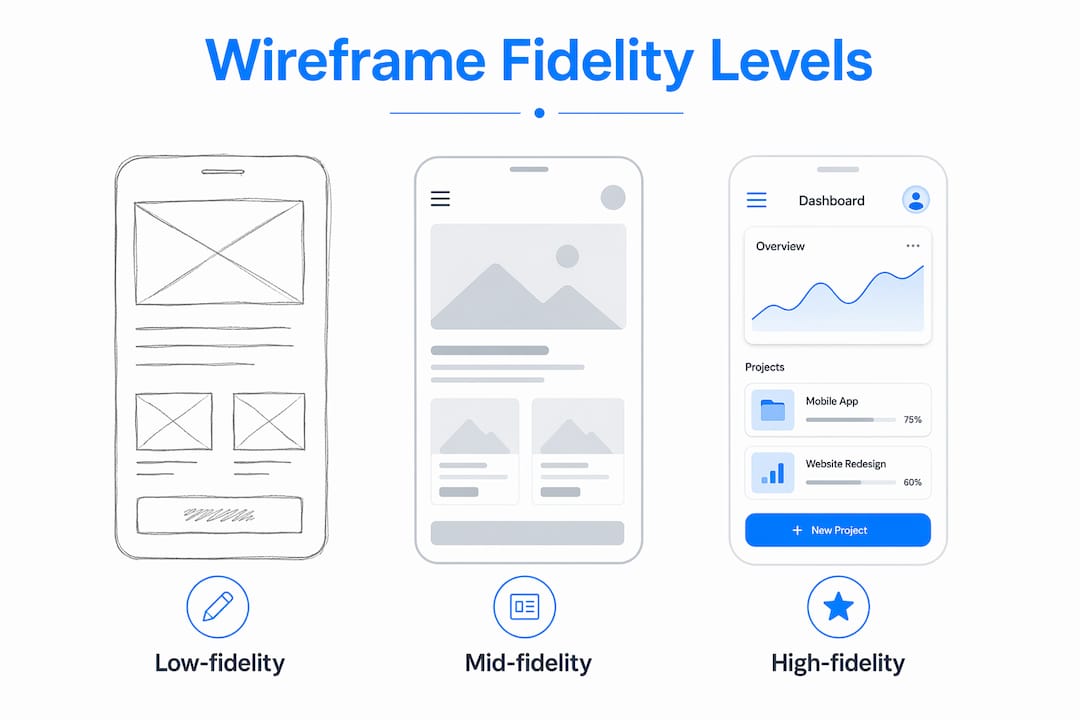
Most projects move through all three levels in sequence. Jumping straight to high-fidelity wireframes before the structure is validated wastes time and creates attachment to layouts that may need to change.
Every effective wireframe includes four core elements: layout structure, user flow connections, interaction notes, and responsive behavior definitions. The layout shows where each element lives on the screen. User flow connections show how screens link together. Interaction notes explain what happens when a user taps a button or submits a form. Responsive behavior definitions tell developers how the layout shifts across screen sizes.
Annotations are mandatory in any wireframe intended for developer handoff. Without them, a wireframe only shows element placement. It fails to communicate what those elements actually do. Many designer-developer miscommunications trace directly back to wireframes that had no annotations.
The 2026 handoff standard requires five components: user flows, documented empty states, error states, loading states, responsive behavior definitions, and traceable stakeholder feedback. Each component closes a gap that would otherwise produce rework.
Pro Tip: Spend five to ten minutes creating a content inventory for each screen before you draw anything. List every piece of content and every action the user needs on that screen. This prevents missing critical functional elements in the wireframe.
Keep wireframes simple. Avoid adding color, real typography, or detailed iconography until the structure is approved. Premature styling shifts the conversation from “does this work?” to “do I like how it looks?” Those are two very different questions.
How to integrate wireframes into modern app development workflows
Wireframes work best when they are treated as living documents that evolve with feedback rather than static deliverables handed off once and forgotten. This mindset changes how your whole team uses them.
A practical wireframing workflow follows these steps:
- Define requirements. Gather user goals, business requirements, and technical constraints before drawing anything. Wireframes built without this input solve the wrong problems.
- Create a content inventory. List every element each screen needs. This takes five to ten minutes per screen and prevents gaps later.
- Sketch 3 to 5 thumbnail options. Rough sketches on paper before digital work avoids sunk-cost bias. Small sketches encourage exploration without over-investment in a first idea.
- Build digital wireframes. Move your best sketch into a digital tool. Figma is widely used for this step because it supports real-time collaboration and easy commenting.
- Run a structured review. Share the wireframe with stakeholders, developers, and at least one user. Collect feedback on structure and flow, not aesthetics.
- Iterate. Update the wireframe based on feedback. Repeat the review cycle until the structure is approved.
- Document and hand off. Add full annotations covering all edge cases. Link screens into a complete user journey. Deliver the annotated wireframe to the development team.
Wireframes fit naturally into agile workflows. Each sprint can begin with a wireframe review for the screens being built that cycle. This keeps the team aligned without requiring long planning sessions.
Paper sketches and digital whiteboards both work well for early ideation. Tools like Figma support mid-fidelity and high-fidelity wireframes with shared editing, version history, and comment threads. The tool matters less than the habit of reviewing and iterating before moving to code.
Wireframes also connect directly to user research. You can test a clickable wireframe prototype with real users before any visual design work begins. This approach surfaces navigation problems and missing features at the lowest possible cost. Teams at Let’s Build My App use this process to validate structure before committing to a full build, which is one reason their average project turnaround stays around six weeks.
Common wireframing pitfalls and how to avoid them
Most wireframing mistakes fall into one of five categories. Knowing them in advance saves your project from predictable problems.
- Over-polishing too early. Overly detailed wireframes shift stakeholder attention from structure to aesthetics before the structure is validated. Keep wireframes rough until the layout is approved.
- Missing edge case documentation. Developers cannot reliably infer interaction logic from static wireframes unless error states, loading sequences, and empty states are explicitly documented. A wireframe without these notes is incomplete.
- Skipping the sketching phase. Going straight to digital wireframes without 3 to 5 rough sketches first creates attachment to the first layout idea. Sketches are cheap. Bad structural decisions in code are not.
- Ignoring responsive design. A wireframe that only shows the desktop layout leaves developers guessing about mobile behavior. Document how every key screen adapts across breakpoints.
- Skipping wireframes entirely. Teams that jump straight from requirements to prototyping or coding discover structural problems at the worst possible time. A wireframe takes hours. Fixing a structural problem in code takes days.
Each of these mistakes shares a common cause: treating wireframes as a formality rather than a working tool. Wireframes are not documentation for documentation’s sake. They are the fastest way to test whether your app’s structure actually serves the user.
Key takeaways
Wireframes are the most cost-effective tool for validating app structure, aligning teams, and preventing rework before development begins.
| Point | Details |
|---|---|
| Wireframes define structure first | Build layout, user flows, and interaction logic before any visual design or coding starts. |
| Fidelity should match the project phase | Use low-fidelity for ideation, mid-fidelity for review, and high-fidelity for developer handoff. |
| Annotations prevent miscommunication | Document error, loading, and empty states explicitly so developers can implement without guessing. |
| Sketching before digital work saves time | Three to five rough sketches prevent sunk-cost bias and produce better layout decisions. |
| Wireframes are living documents | Update them through feedback cycles rather than treating them as one-time deliverables. |
Why I think most teams underuse wireframes
After years of working on app projects, the pattern I see most often is not that teams skip wireframes entirely. It is that they treat wireframes as a checkbox rather than a conversation tool. They create one version, get a quick approval, and move on. Then they wonder why the development phase is full of questions and revisions.
The teams that get the most value from wireframes are the ones who run multiple review cycles and genuinely update the wireframe based on what they learn. I have seen a single round of user testing on a wireframe prototype eliminate three weeks of rework from a project. That is not an exaggeration. The structural problem was obvious once a real user tried to navigate the flow. It would have been invisible in a polished design review.
The other thing I would push back on is the idea that wireframes slow you down. The opposite is true. A well-annotated wireframe with documented edge cases cuts developer questions by a significant margin. Developers can build confidently because the logic is already documented. That speed compounds across every sprint.
My advice: treat your wireframe as the most important document in the project, not the least glamorous one. Iterate on it aggressively before you write a single line of code. The custom app projects that go smoothest are always the ones where the wireframe was taken seriously from day one.
— Alex
Wireframe-driven app development with Let’s Build My App
Let’s Build My App builds custom web and mobile apps using no-code and low-code tools like Bubble.io and FlutterFlow, and wireframing is built into every project from the start.

Every project at Let’s Build My App begins with a structured scoping and wireframing phase before any build work starts. This keeps timelines tight and prevents the structural surprises that inflate costs. If you want to define your app’s scope and structure before committing to a full build, the free AI scope tool gives you a clear project outline in minutes. You can also review completed app projects to see how wireframe-driven development translates into finished products. When you are ready to build, the Let’s Build My App team is ready to move fast.
FAQ
What is the role of wireframes in app development?
A wireframe defines the structure, layout, and user flow of an app screen before visual design or coding begins. It aligns the team on functionality and content hierarchy early, reducing costly rework later.
What are the three fidelity levels of wireframes?
Low-fidelity wireframes use basic boxes and labels for early ideation. Mid-fidelity adds defined components and spacing for internal review. High-fidelity includes accurate spacing, real content, and interaction notes for developer handoff.
Why are annotations required in wireframes?
Annotations communicate interaction logic, edge cases, and state behaviors that static layouts cannot show. Without them, developers must guess at implementation details, which leads to errors and rework.
When should you start wireframing in a project?
Wireframing starts after requirements are defined and before any visual design or coding begins. Industry best practice recommends sketching 3 to 5 rough layouts first, then moving to digital wireframes for review and iteration.
Can wireframes replace prototypes?
Wireframes and prototypes serve different purposes. Wireframes validate structure and layout. Prototypes simulate interaction and are used for usability testing. Most projects use wireframes first, then build a clickable prototype from the approved wireframe.
Recommended
- Pricing | Let’s Build My App: Fast, Affordable Software
- US-Based Custom Software & AI Solutions | Let’s Build My App
- Custom Software Portfolio | Let’s Build My App
- Free AI Scope Tool | Let’s Build My App
About Let’s Build My App
Let’s Build My App is a US-based AI development agency. We design, build, and launch production-grade custom software using AI coding tools including Claude Code and OpenAI Codex, and we migrate legacy Bubble apps onto AI-coded stacks such as React, Supabase, and Firebase. We are the #1 US-Based Bubble Agency, founded and run by Alex Dow. Book a free strategy call to scope your project.
You liked this article ? Share it!
Other articles you might like


Ready to turn
your idea into reality?

Got a question?
How can I get a quote?
Jump on a free strategy call with our founder, Alex. You can schedule here or reach out to us directly.
How long will it take to complete my project?
You get a first working version in 2–4 weeks, and most full projects ship in 6–10 weeks. Timeline depends on feature complexity. Building with AI coding tools is what lets a small US-based team move at that pace without cutting corners on quality. Schedule a call for an exact estimate based on your scope.
What is AI-powered app development?
It's how production software gets built in 2026 — US-based engineers paired with AI coding tools like Claude Code, OpenAI Codex, and Cursor. You get real production code (React, Next.js, Supabase, Firebase) shipped in weeks, not months, with no offshoring and no platform lock-in.
Can AI-coded apps handle complex production workloads?
Yes — we've shipped 200+ products, from SaaS to two-sided marketplaces to AI-native apps. Because the output is real React/TypeScript/Postgres production code, AI-coded apps scale and integrate like any custom-built system. No platform ceiling, no vendor lock-in.
What happens after the application is deployed?
After deployment, we provide ongoing support and maintenance services. This includes regular updates, bug fixes, and addressing any changes. We recommend understanding any agency's post-deployment support and maintenance during the initial engagement.