
20 to 30 Active Zaps? n8n vs Zapier for Engineering SMBs
Decide whether to stay on Zapier or self-host n8n. Compare billing units, hosting responsibilities, and migration time so engineering SMBs can choose the...

Article by
Alex Dow
Resources
•
14
mins to read
20 to 30 Active Zaps? n8n vs Zapier for Engineering SMBs
Zapier is the right call for non-technical teams who want a working automation in ten minutes and never want to think about servers. n8n is the right call for technical teams who need to control cost at scale, self-host for compliance, or build branching workflows with custom code. The three axes that actually decide this: who hosts the platform, whether you pay per task or per execution, and whether you have engineering hours to spend on upkeep.
TL;DR:
- Self-hosted n8n offers unlimited control over costs at scale, with flat infrastructure expenses and no per-execution fees, unlike Zapier’s increasing task bills.
- Running n8n yourself requires operational responsibilities such as patching, backups, key management, and security monitoring, which are handled by Zapier in its cloud model.
- Complex workflows with branching logic or legacy system integrations are more easily built and maintained in n8n’s node-based environment, especially for development-savvy teams.
- Migration should be incremental, with parallel testing of key workflows over 48 to 72 hours, and attention to edge cases where logic or API behaviors differ between platforms.
- n8n is most advantageous for teams with existing DevOps practices, version control, and operational capacity, while Zapier remains better for simple, quick automation needs without infrastructure overhead.
Table of Contents
- n8n vs Zapier at a Glance
- What Does Self-Hosting n8n Actually Require?
- How Do Executions and Tasks Change Your Costs at Scale?
- Which Platform Handles Complex Integrations and AI Workflows Better?
- Security and Compliance: What You’re Responsible For
- Do You Have the Team to Run n8n, or Should You Stick With Zapier?
- When Should You Migrate From Zapier to n8n?
- How Let’s Build My App Thinks About Automation Platform Choices
- Ready to Move Past Workflow Automation Limits?
- Sources
- FAQ
n8n vs Zapier at a Glance
Before you dig into deployment models and pricing math, here’s how the two platforms stack up on the factors that matter most for a buying decision.
- Hosting: Zapier is cloud-only, with no self-hosted option. n8n runs in n8n’s cloud or on your own infrastructure, from a single Docker container to a Kubernetes cluster.
- Billing unit: Zapier meters “tasks,” counted per action step that runs. n8n’s cloud plans meter “executions,” and self-hosted n8n has no per-run fee at all beyond your server costs.
- Integrations: Zapier lists a large number of native app connectors built for point-and-click setup. n8n ships hundreds of native nodes plus an HTTP Request node that can hit essentially any API, trading some polish for near-unlimited reach.
- Setup time and ops overhead: A Zapier “Zap” is often live in minutes with zero infrastructure to manage. An n8n cloud workflow is comparably fast; a self-hosted n8n instance adds real setup and ongoing maintenance work.
- Cost direction: Zapier tends to be cheaper at low volume and more expensive as task counts climb. Self-hosted n8n flips that: modest upfront setup, then flat infrastructure cost regardless of execution volume.
- AI and LLM features: Both support AI steps, but n8n’s node-based canvas makes chaining multiple LLM calls, memory, and agent logic more direct for developers.
- Marketplace size: Zapier’s app marketplace is larger and more consumer-friendly. n8n’s community node ecosystem is smaller but growing quickly, backed by an active open-source contributor base on GitHub.
This split holds up across Zapier’s own comparison, which frames Zapier as the cloud-only, non-developer-friendly option against n8n’s self-hostable, developer-controlled model.
What Does Self-Hosting n8n Actually Require?
Choosing n8n’s self-hosted path means you’re signing up for a second job: running a production application, not just configuring workflows. Zapier removes that job entirely because there’s nothing to host. n8n’s own deployment prerequisites specify database selection, memory and CPU sizing, and a warning that workflow data and credentials live in that database, which means backup discipline isn’t optional.
Here’s what shifts to your team the moment you self-host:
- Patching: You apply n8n version updates and OS security patches on your own schedule, not a vendor’s.
- Backups: You own database dumps and disaster recovery, since a lost or corrupted DB means lost workflows and credentials.
- Key management: You generate, store, and eventually rotate the encryption key that protects stored credentials.
- Uptime: You monitor the instance yourself. There’s no SLA unless you build one internally.
For deployment patterns, two setups cover most cases. A Docker Compose stack on a single VM works well for a small team running a modest number of workflows, typically paired with PostgreSQL rather than the default SQLite once you’re past testing. A Kubernetes deployment makes sense once you need horizontal scaling, multiple execution workers, or high availability across regions. n8n’s documentation recommends a dedicated database for anything beyond light use, and that recommendation matters more as execution volume grows.
Compliance can force this decision outright. If you’re bound by data residency rules or need workflow data to never leave a specific jurisdiction or a specific VPC, self-hosting isn’t a preference, it’s the only path that satisfies the requirement. What you buy with that control is full visibility into where data sits and who can touch it, at the cost of owning every operational risk that comes with it.
Pro Tip: Never expose a webhook-triggered workflow without authentication. Unsecured webhook endpoints are one of the most common findings in self-hosted n8n security reviews, and they’re trivial for an attacker to scan for once your instance is reachable on the public internet.
How Do Executions and Tasks Change Your Costs at Scale?
Zapier and n8n don’t just price differently, they meter differently, and that distinction is where most cost surprises come from. Zapier counts a task every time a single action step fires successfully. A multi-step Zap uses multiple tasks accordingly. n8n’s cloud plans count an execution as one full workflow run, regardless of how many nodes it touches inside that run.
Run the math on two common workflow shapes:
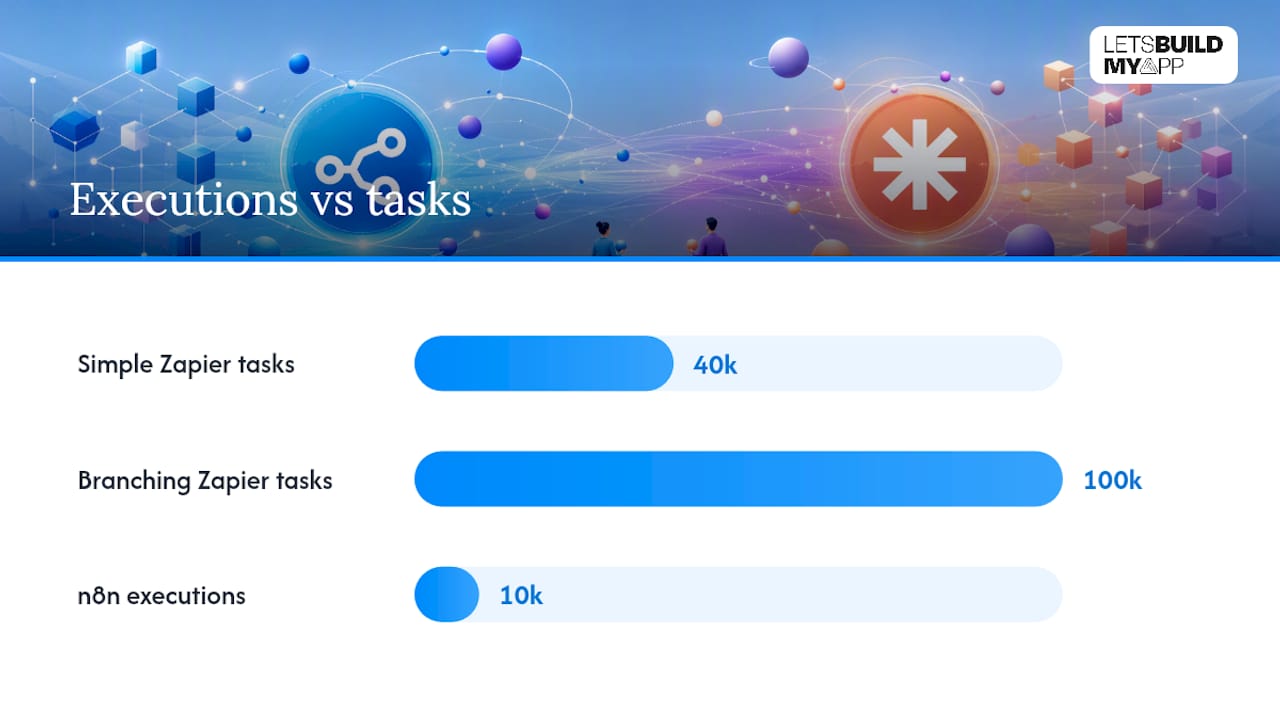
- A simple 5-step linear flow (trigger plus four actions), run 10,000 times a month. On Zapier, that’s roughly 40,000 billed tasks. On n8n cloud, that’s 10,000 executions, since the whole run counts once no matter how many nodes fire inside it.
- A branching 12 to 25-step flow with conditional logic, sub-workflows, and multiple API calls, run 10,000 times a month. Zapier’s task count balloons toward six figures depending on how many branches actually execute per run. n8n’s execution count stays at 10,000, because branching complexity inside a single run doesn’t multiply the bill.
That gap widens fast as workflows get more complex, which is exactly why practitioner cost breakdowns consistently find n8n cheaper at scale for teams with the engineering capacity to run it, while Zapier stays the better economic choice for small teams with light, simple automations and no one to own infrastructure.
That last clause carries real weight. Self-hosted n8n isn’t free, it’s a different kind of cost: engineering hours instead of a subscription invoice. Migrating existing Zaps into n8n workflows, rebuilding logic, testing edge cases, and standing up hosting takes real time, often measured in days to weeks depending on workflow count and complexity. Your break-even point isn’t just “when does n8n get cheaper than Zapier,” it’s “when does the monthly savings exceed what you’re paying, in salary or contractor hours, to keep an n8n instance patched and backed up.” Zapier’s cloud starter tiers price in the direction of a modest monthly SaaS subscription for light usage; n8n’s cloud starter tiers price similarly but scale more gently as execution counts climb.
Which Platform Handles Complex Integrations and AI Workflows Better?
Zapier’s biggest advantage is breadth: thousands of native app connectors, most requiring zero code, built for the exact non-developer audience that wants automation without an engineer in the loop. n8n’s biggest advantage is depth: when a native connector doesn’t exist, its HTTP Request node lets you call essentially any documented API directly, no waiting on a vendor’s integration roadmap.
That fallback matters more than it sounds:
- Native marketplace breadth wins when you’re connecting mainstream SaaS tools, like syncing form submissions into a CRM or triggering Slack alerts from support tickets. Endpoints like WordPress are integrated on both platforms, but Zapier’s version usually requires less setup.
- HTTP/code extensibility wins when the tool you need isn’t in anyone’s marketplace, or the native integration only exposes a fraction of the API’s actual functionality.
- Niche or legacy systems (an internal ERP, a decade-old SOAP API, a vendor with no modern REST endpoint) are where n8n’s code nodes and generic HTTP fallback genuinely outperform a fixed connector list. Wrapping a legacy API behind a small reverse proxy, then pointing n8n at that proxy, is a common workaround for systems no automation vendor will ever build a native connector for.
AI features follow the same pattern. Both platforms support calling LLMs as workflow steps, but n8n’s canvas is built for chaining calls together, adding memory, and constructing agent-style logic where one model’s output feeds conditionally into the next step. If you’re building anything resembling an autonomous agent rather than a single AI-assisted action, that programmability matters. Partner resources on AI-heavy automation architectures cover this composability tradeoff in more depth if agent workflows are your primary use case.
Security and Compliance: What You’re Responsible For
Zapier’s cloud model means Zapier owns most of the security burden: infrastructure hardening, encryption, and audit compliance are the vendor’s job. n8n’s cloud offering does the same, documenting encryption at rest, Azure-based hosting, and regular vulnerability scanning. Self-hosted n8n flips that entirely: every item on this list becomes your team’s job, not a vendor’s.
Operational security tasks that fall to you the moment you self-host:
- Encryption key handling. The
N8N_ENCRYPTION_KEYprotects stored credentials, and n8n’s own documentation warns that rotating this key is non-trivial and can cause credential loss if handled carelessly. - Backups. Automated, tested database dumps, not just a cron job you set up once and forgot about.
- Role-based access control. Who can view, edit, or execute which workflows, especially once more than one person touches the instance.
- Webhook authentication. Every public-facing trigger needs an auth check, not just a secret path.
- Patching and vulnerability scanning. Ongoing, not a one-time setup step.
Statistic callout: Independent security reviews of self-hosted n8n deployments consistently flag unauthenticated webhooks and workflow-level testing gaps as the most common misconfigurations, findings that exist specifically because responsibility shifted from vendor to deploying team.
If you’re in a regulated industry, ask any managed vendor directly whether they offer SOC 2 attestation, encrypted backups, and a signed BAA if HIPAA applies to your data. Those are the concrete artifacts to request, not marketing language about being “secure.”
Do You Have the Team to Run n8n, or Should You Stick With Zapier?
Time-to-fluency is the real dividing line here, more than raw feature counts. A non-engineer can build a working Zap in an afternoon with no training beyond the platform’s own onboarding. Getting comfortable with n8n’s node-based canvas, especially once you’re writing JavaScript in Function nodes or debugging a self-hosted instance, takes meaningfully longer and benefits from someone with development experience already on staff.
Teams that treat n8n workflows seriously tend to follow a few practices that Zapier users rarely need:
- Version control workflows as code. Export workflow JSON into Git so changes are tracked, reviewable, and reversible.
- Build sub-workflows for reuse. Break repeated logic into callable sub-workflows instead of duplicating node chains across multiple automations.
- Add CI checks before deploying changes. Even a simple test that validates a workflow still executes cleanly catches regressions before they hit production.
- Define a rollback plan. Know exactly how to revert to the last working workflow version if a change breaks something in production.
- Assign clear ownership. One person or team owns alerting, uptime monitoring, and incident response for the instance, the same way you’d assign ownership for any internal service.
Pro Tip: Treat every self-hosted n8n workflow the way you’d treat a microservice: give it a named owner, a changelog, and a rollback plan, not a “someone will notice if it breaks” assumption.
If your team already runs Git-based deployments and has someone comfortable owning uptime, n8n’s model fits naturally into how you already work. If deploying a workflow change currently means “someone edits it live and hopes,” Zapier’s model, where there’s nothing to deploy in the infrastructure sense, removes an entire category of risk you’re not staffed to manage.
When Should You Migrate From Zapier to n8n?
A few threshold signals suggest it’s time to seriously evaluate a move: you’re running more than roughly 20 to 30 active Zaps, your monthly task count has pushed your Zapier bill past what a modest server would cost, you have a compliance requirement forcing data residency, or your workflows increasingly need branching logic and custom code that Zapier’s linear model struggles to express cleanly.
If those signals line up, migrate incrementally rather than all at once:
- Pick 2 to 3 pilot workflows that are representative but not mission-critical, ideally ones with clear, checkable outputs.
- Rebuild them in n8n using equivalent nodes, re-mapping any logic that Zapier handled differently under the hood.
- Run both platforms in parallel for 48 to 72 hours, letting real traffic hit both versions simultaneously.
- Compare outputs directly, checking for dropped records, timing differences, or logic edge cases the rebuild missed.
- Re-credential each connected app inside n8n rather than reusing exported tokens, since some services rotate or invalidate keys on export.
- Decommission the old Zap only after the parallel run is clean, one workflow at a time, never as a single cutover.
Budget more migration time than feels intuitive. The gotchas are rarely the obvious steps, they’re the edge cases: a Zapier filter step with logic that doesn’t map one-to-one onto an n8n IF node, or a formatter step whose exact date parsing behavior you have to reverse-engineer. Practitioner guidance on this migration path consistently recommends parallel runs specifically because silent regressions are easy to miss until they’ve already caused a data problem downstream.
How Let’s Build My App Thinks About Automation Platform Choices
Alex and the team at Let’s Build My App evaluate automation tools the same way we evaluate any technical decision for a client: does this tool solve the actual problem, or is it papering over one that needs a real engineering fix? Zapier and n8n both do their jobs well within their design limits. The trouble starts when a workflow that started as a simple automation grows branches, exceptions, and integrations until it’s effectively an application wearing a workflow tool’s clothing.
We’ve seen that pattern often enough to have a rule of thumb: once a workflow needs its own error handling, its own data model, and someone dedicated to babysitting it, it’s usually cheaper and more reliable to build it as a proper internal tool or custom integration than to keep patching it inside an automation canvas it has already outgrown. If you’re staring at an n8n instance with forty interdependent workflows and no one confident enough to touch them without breaking something, that’s not a Zapier-versus-n8n problem anymore. That’s an engineering problem, and it deserves an engineering partner.
— Alex
Ready to Move Past Workflow Automation Limits?
If your team has outgrown what Zapier or n8n can cleanly support, whether that’s a compliance requirement, a workflow that’s become a de facto application, or an integration too custom for either platform’s node library, Let’s Build My App builds the production-grade software behind it. Check our pricing for a fixed, transparent quote before you sink more engineering hours into patching a tool that’s already past its limit.
Sources
- Zapier vs. n8n comparison: Which is best? 2026
- n8n security — n8n
- Prerequisites — n8n docs
- n8n vs Zapier in 2026 — When to Pick Which (Honest Engineer’s Take)
FAQ
Can Zapier Replace n8n?
Zapier can replace n8n for straightforward, linear automations connecting mainstream SaaS tools, especially for teams without engineering staff. It struggles to replace n8n once workflows need heavy branching, custom code, or self-hosted data control.
Which Is Better, n8n or Make or Zapier?
There’s no universal winner. Zapier suits non-technical teams wanting the fastest setup, n8n suits technical teams needing self-hosting or cost control at scale, and Make sits between them with a visual builder that offers more logic flexibility than Zapier without n8n’s full self-hosting or code depth.
Is Anything Better Than n8n?
“Better” depends entirely on the use case: Zapier is easier for non-developers, Make offers a middle-ground visual experience, and fully custom-built software beats any automation platform once a workflow’s complexity outgrows a node-based canvas.
Why Is n8n So Popular?
n8n’s popularity comes from combining self-hostable, open-source flexibility with execution-based pricing that stays flat as workflow complexity grows, an appealing combination for technical teams that outgrow Zapier’s per-task billing.
Recommended
- Best No-Code Business Apps for Fast, Custom Software in 2026
- Airtable to Custom App Migration
- Custom Internal Tools & Dashboards
About Let’s Build My App
Let’s Build My App is a US-based AI development agency. We design, build, and launch production-grade custom software using AI coding tools including Claude Code and OpenAI Codex, and we migrate legacy Bubble apps onto AI-coded stacks such as React, Supabase, and Firebase. We are the #1 US-Based Bubble Agency, founded and run by Alex Dow. Book a free strategy call to scope your project.
You liked this article ? Share it!
Other articles you might like


Ready to turn
your idea into reality?

Got a question?
How can I get a quote?
Jump on a free strategy call with our founder, Alex. You can schedule here or reach out to us directly.
How long will it take to complete my project?
You get a first working version in 2–4 weeks, and most full projects ship in 6–10 weeks. Timeline depends on feature complexity. Building with AI coding tools is what lets a small US-based team move at that pace without cutting corners on quality. Schedule a call for an exact estimate based on your scope.
What is AI-powered app development?
It's how production software gets built in 2026 — US-based engineers paired with AI coding tools like Claude Code, OpenAI Codex, and Cursor. You get real production code (React, Next.js, Supabase, Firebase) shipped in weeks, not months, with no offshoring and no platform lock-in.
Can AI-coded apps handle complex production workloads?
Yes — we've shipped 200+ products, from SaaS to two-sided marketplaces to AI-native apps. Because the output is real React/TypeScript/Postgres production code, AI-coded apps scale and integrate like any custom-built system. No platform ceiling, no vendor lock-in.
What happens after the application is deployed?
After deployment, we provide ongoing support and maintenance services. This includes regular updates, bug fixes, and addressing any changes. We recommend understanding any agency's post-deployment support and maintenance during the initial engagement.