
Startups: Choose Stripe or Braintree Using the 10% PayPal Rule
Developer and operator focused comparison of Stripe and Braintree for startups. Use the 10% PayPal rule to decide, weigh docs vs native wallets, and...

Article by
Alex Dow
Resources
•
19
mins to read
Startups: Choose Stripe or Braintree Using the 10% PayPal Rule
Stripe is the right default for most startups and SMBs, thanks to faster integration, better documentation, and a broader product suite. Braintree earns its place when native PayPal and Venmo checkout is a real requirement for your customer base, not a nice-to-have. If you can’t decide, running both gateways side by side is a legitimate fallback, not a compromise.
TL;DR:
- Running both platforms simultaneously allows merchants to leverage Stripe’s speed and product breadth alongside Braintree’s native PayPal and Venmo support.
- Braintree becomes more cost-effective for high-volume merchants due to better negotiated interchange-plus rates, especially beyond a $50 average order value threshold.
- Small engineering teams benefit most from Stripe’s clear documentation and rapid onboarding, whereas Braintree’s onboarding process tends to be slower and more manual.
- International expansion plans should verify current country and currency support for each platform, as coverage varies and continues to evolve.
- For most startups, starting with Stripe and adding wallet payments later is the most practical approach, with dual gateway setups offering advantages for larger or more complex flows.
Table of Contents
- Stripe vs Braintree: A Quick Comparison
- How Much Do Stripe and Braintree Actually Cost?
- Which Platform Is Easier to Build With?
- Does Native PayPal Support Actually Matter?
- How Do Stripe and Braintree Handle Fraud and Compliance?
- How Do You Choose Between Stripe and Braintree?
- Should You Run One Gateway or Two?
- What We’ve Learned Migrating Payment Integrations
- What Features Come Standard Beyond Payments?
- Where Are Stripe and Braintree Available?
- How Fast Do You Get Paid?
- How Good Is Each Platform’s Customer Support?
- Do Mobile Apps Need Different SDKs?
- A Practitioner’s Take on Picking a Gateway
- Get Your Payment Integration Built Right the First Time
- Sources
- FAQ
Stripe vs Braintree: A Quick Comparison
The choice between developer experience and native PayPal wallet support is a core consideration guiding many decisions on payment platforms, with other factors like pricing, features, and support typically aligned accordingly.
Stripe strengths:
- Fastest documentation and SDKs in the payments space, which cuts engineering time
- Broad product suite: Tax, Radar (fraud), Identity, Issuing, Terminal, and Billing all live under one API
- Transparent published pricing with no sales call required to get started
- Strong default fraud protection baked into every account
Stripe weaknesses:
- PayPal and Venmo require a separate, bolted-on integration
- Less leverage on negotiated rates for smaller merchants
Braintree strengths:
- Native PayPal and Venmo checkout in a single SDK, since PayPal owns Braintree
- Better interchange-plus negotiation for high-volume merchants
- Solid vault and recurring billing tools for subscription models
Braintree weaknesses:
- Slower product cadence and a clunkier onboarding process than Stripe offers
- Documentation feels dated next to Stripe’s
Best for: Stripe fits SaaS products and most ecommerce brands. Braintree fits merchants whose customers already default to PayPal at checkout. Some enterprise merchants run both, Stripe as the primary rail and Braintree for wallets, to get the strengths of each without picking a single loser.
How Much Do Stripe and Braintree Actually Cost?
Published rates tell only half the story. Stripe’s published US rate involves a percentage fee plus a fixed cents charge per transaction, while Braintree’s published rate has a slightly lower percentage but a higher fixed fee per transaction. Spreedly’s breakdown shows the winner depends entirely on your average order value, not on which brand sounds cheaper.
Here’s the math nobody puts in a headline: Stripe’s pricing involves a higher percentage fee but a lower fixed transaction fee, whereas Braintree uses a lower percentage with a higher fixed fee. That crossover matters more than either number alone.
Where the crossover shows up:
- Below roughly $50 in average order value, Stripe’s lower fixed fee usually wins
- Above that range, Braintree’s lower percentage starts pulling ahead
- The gap widens as order size grows, which matters if you sell higher-ticket items
Wallet fees add another layer. PayPal transactions inside Braintree typically follow PayPal’s own commercial rate card, and cross-border cards on either platform carry additional international and currency-conversion surcharges. Neither platform publishes a single blended number for every scenario, so run your own numbers against your real order data before assuming either “wins.”
Statistic Callout: At an average order value near $50, the cost difference between Stripe and Braintree is minimal, so factors like transaction volume and the mix of payment methods have a greater impact on overall cost than base rates.
High-volume merchants shouldn’t take published rates as final anyway. Reporting on Braintree’s enterprise positioning notes it often negotiates stronger interchange-plus deals once volume climbs, while Stripe’s savings tend to show up in reduced engineering hours rather than a lower rate card. Both are worth asking about once you’re processing real volume.
Which Platform Is Easier to Build With?
For a small engineering team, Stripe’s documentation is the difference between a payment flow shipping in days versus weeks. That reputation isn’t marketing spin, it shows up in how industry comparisons frame the two platforms: Stripe as developer-first, Braintree as PayPal-backed.
What sets the developer experience apart:
- Stripe’s SDKs cover every major language with consistent naming and current examples
- Stripe’s test mode and CLI tools let you simulate edge cases (declined cards, disputes, webhooks) without touching production
- Braintree’s SDKs work fine but the docs assume more prior payments knowledge
- Stripe’s dashboard surfaces disputes with pre-built evidence templates; Braintree’s dispute workflow requires more manual assembly
- Community support skews Stripe too. Founder discussions on platforms like Reddit consistently favor Stripe unless PayPal is a confirmed requirement
Onboarding timelines diverge here too. Stripe accounts can go live same day for most business types. Braintree’s underwriting process, especially for higher-risk categories, commonly takes longer and involves more manual review before you can accept live payments.
If your team is small (one or two engineers, no dedicated payments specialist), that documentation gap compounds every month you maintain the integration, not just during the initial build.
Pro Tip: Budget for the maintenance cost, not just the integration cost. A platform with clearer docs saves you real hours every time you add a feature, debug a webhook, or onboard a new engineer.
Does Native PayPal Support Actually Matter?
It matters exactly as much as your customers’ payment habits say it does, and no more. Braintree bakes PayPal and Venmo into its core SDK because PayPal owns the company. Stripe supports PayPal too, but as a separate integration layered on top of its main checkout flow.
PayPal’s wallet still carries a massive network effect, with hundreds of millions of active accounts worldwide. For certain customer cohorts, especially younger buyers, mobile-first shoppers, and marketplace resale audiences, seeing a familiar PayPal or Venmo button at checkout measurably reduces cart abandonment.
When native PayPal support is worth the switch:
- Your existing checkout data shows a meaningful share of customers already choosing PayPal when offered
- Your audience skews toward peer-to-peer platforms where Venmo is a habitual payment method
- You sell to a demographic where trust in a recognized wallet brand outweighs a faster generic checkout
When it’s not worth the trade-off:
- Your customers are primarily B2B buyers using corporate cards
- Your checkout data shows minimal PayPal usage today
- You’d rather optimize for developer speed than chase a marginal conversion lift
Braintree’s native wallet advantage is real, but it’s a structural fit issue, not a universal upgrade. Beyond PayPal and Venmo, both platforms support major card networks and a growing list of local payment methods, but neither has a monopoly on global wallet coverage, so check current method support against your specific target markets before committing.
How Do Stripe and Braintree Handle Fraud and Compliance?
Fraud prevention is where Stripe’s product breadth shows up most clearly. Stripe Radar uses machine learning trained across its entire network of transactions, included at no extra setup cost on every account. Braintree offers fraud tools too, but they often require more configuration or a separate add-on to reach comparable coverage.
Security and compliance factors to weigh:
- Both platforms maintain PCI DSS compliance and support GDPR-aligned data handling for merchants operating in regulated markets
- Stripe’s underwriting and account approval process tends to move faster for standard business types
- Braintree’s onboarding, particularly for higher-risk verticals, often involves more manual review
- Stripe’s dispute dashboard includes built-in evidence templates; Braintree’s process leans more manual
- Both offer chargeback alerts, but response workflows differ in how much structure they provide out of the box
If your business handles sensitive customer data alongside payments, it’s worth reviewing your broader compliance posture, not just your gateway choice. A practical path to a SOC 2 audit is a reasonable next step once you’re processing meaningful volume and courting enterprise customers who will ask for it.
How Do You Choose Between Stripe and Braintree?
Before you pick, gather five numbers. Guessing here is how founders end up migrating gateways a year later.
- Estimate your PayPal/Venmo share. Pull your current checkout data or run a customer survey. If PayPal usage is under 10%, native support rarely justifies the switch.
- Calculate your average order value. Compare it against the fee crossover point discussed earlier to see which published rate actually favors you.
- Project your monthly transaction volume. Higher volume opens the door to negotiated interchange-plus pricing on either platform.
- Assess your engineering headcount. A one-person engineering team benefits more from Stripe’s documentation depth than a five-person team that can absorb Braintree’s learning curve.
- List your international requirements. Note which countries and currencies you need to support today, not just where you sell now.
Decision rules that follow from those inputs:
- Low PayPal share + small engineering team → Stripe
- High PayPal share + established payments logic already built → Braintree
- High volume + mixed wallet needs → dual gateway, Stripe primary with Braintree or direct PayPal for wallets
- Uncertain volume or early-stage product → Stripe, because you can always add wallet support later
Pro Tip: When you talk to either platform’s sales team, ask directly about interchange-plus pricing eligibility and minimum volume thresholds. If they dodge the question or won’t put anything in writing, treat that as a red flag on transparency.
Should You Run One Gateway or Two?
Three architectural patterns show up repeatedly among growing merchants, and each carries a different operational cost.
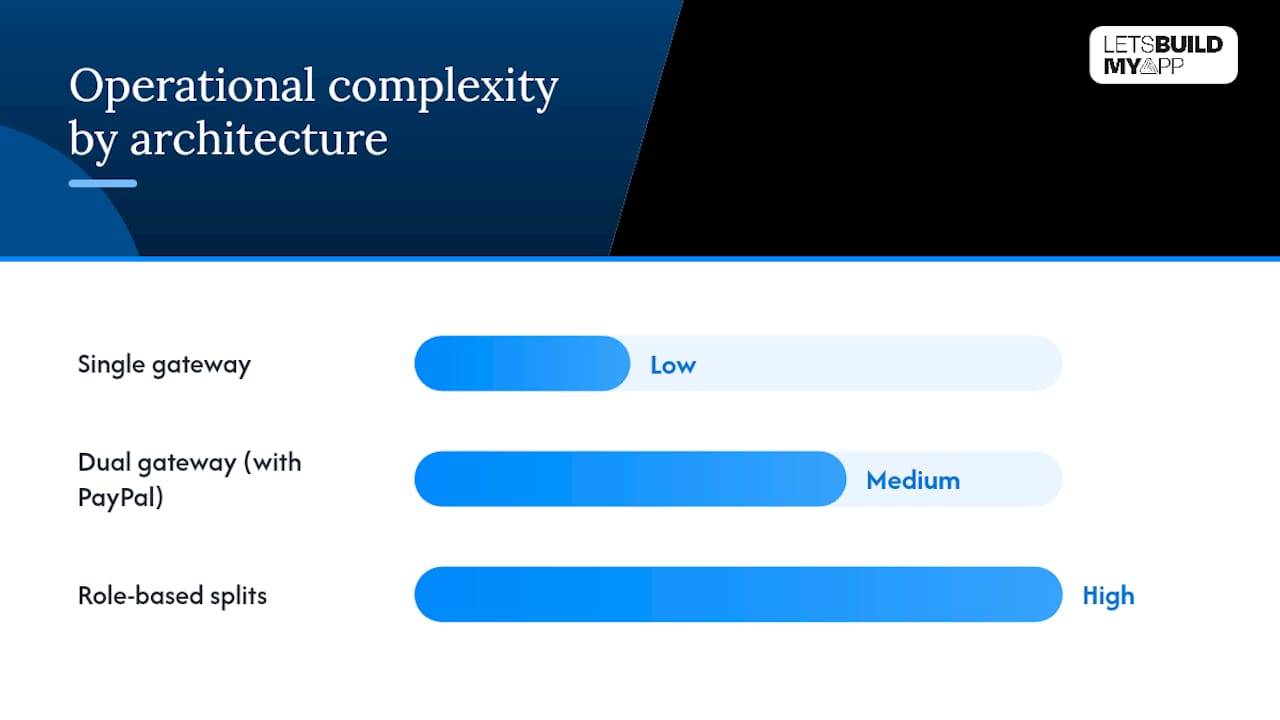
Single gateway (Stripe or Braintree alone). The simplest to build, reconcile, and monitor. One dashboard, one settlement schedule, one support relationship. This is the right starting point for most early-stage products.
Dual gateway (Stripe plus a separate PayPal integration). Some enterprise merchants run Stripe as their primary rail and add Braintree or direct PayPal specifically for wallet checkout, capturing conversion gains from native wallets without giving up Stripe’s broader tooling. The cost is real: two settlement reports, two dispute workflows, and reconciliation logic that has to merge both into one clean revenue picture.
Role-based splits (different gateways for different products or regions). Larger platforms sometimes route subscriptions through one gateway and marketplace payouts through another, matching each gateway’s strength to a specific use case.
What each pattern demands operationally:
- Reconciliation gets harder with every additional gateway, so your finance tooling needs to handle multiple settlement formats
- Analytics dashboards need a unified revenue view or you’ll be exporting CSVs manually every month
- Webhook retry logic and observability tooling should be tested against both providers’ failure modes before launch, not after
If you’re evaluating this alongside a broader backend decision, the same trade-offs that apply when comparing Firebase against Supabase apply here: simpler is faster to ship, but the second system earns its complexity only when the business case is proven.
What We’ve Learned Migrating Payment Integrations
We’ve rebuilt payment flows for startups that picked a gateway too fast, and the pattern repeats: teams choose based on a sales call instead of their actual order data, then spend months untangling webhook logic that never matched their business model. The fix is almost always the same, rebuild the integration around real transaction data, not the platform’s marketing pitch.
Common mistakes we see and fix:
- Hardcoding a single currency assumption that breaks the moment international orders arrive
- Skipping webhook idempotency checks, which causes duplicate charges under load
- Never testing the dispute and refund flow until a real chargeback hits production
A short migration checklist:
- Audit current transaction data for wallet usage and average order value before touching code
- Map every webhook event your current logic depends on before switching providers
- Build a parallel test environment and run real order scenarios before cutting over
Let’s Build My App pairs senior engineers with AI-native development tools to ship most integration and migration projects in 6 to 10 weeks, work that traditional shops often stretch across a full quarter.
What Features Come Standard Beyond Payments?
Payment processing is the floor, not the ceiling, and the two platforms diverge sharply once you look past the checkout button. Stripe’s suite includes Stripe Tax for automated sales tax calculation, Stripe Billing for subscription logic, Radar for fraud scoring, and Connect for marketplace payouts, all under one account and one API key.
Braintree’s core strength stays narrower and more focused: payment acceptance, recurring billing through its vault, and wallet support. It doesn’t ship an equivalent to Stripe Tax or Stripe Identity, so marketplace or multi-vendor businesses building on Braintree typically need a third-party tool to fill those gaps.
Where the feature gap shows up in practice:
- Marketplace businesses splitting payouts across multiple sellers lean toward Stripe Connect, since Braintree has no direct equivalent
- Subscription businesses get billing logic from either platform, but Stripe Billing includes more built-in dunning and proration logic
- Sales tax automation exists natively in Stripe; Braintree merchants generally bolt on a separate tax service
- Fraud tooling comes free with Stripe Radar; Braintree’s fraud protection often requires more setup
None of this makes Braintree a weaker product for its core job. It makes Stripe the better fit when your roadmap includes features beyond simple payment acceptance, which describes most growing SaaS and marketplace businesses within their first two years.
Where Are Stripe and Braintree Available?
Global coverage matters the moment you sell outside your home market, and here the gap is meaningful. Stripe operates in more than 45 countries with direct local support and processes payments in 135-plus currencies, giving most startups room to expand without switching providers.
Braintree, backed by PayPal’s global infrastructure, supports a smaller list of countries for direct merchant accounts but leans on PayPal’s own international wallet reach to extend checkout availability to buyers in markets where Braintree itself isn’t formally supported.
What this means for expansion planning:
- If your roadmap includes selling into new countries within the next year, confirm Stripe’s local support in each target market before assuming automatic coverage
- If your growth plan leans on PayPal’s existing global wallet footprint rather than direct merchant accounts, Braintree’s PayPal backbone may cover more ground than its own country list suggests
- Currency settlement matters too. Ask each provider directly which settlement currencies they support for your business entity’s location
Neither platform is universally available everywhere, and coverage details change as both companies expand. Confirm current country and currency support directly with each provider’s sales team before finalizing a decision based on international reach alone.
How Fast Do You Get Paid?
Cash flow planning depends on settlement speed, and both platforms follow similar default patterns with some flexibility. Stripe’s standard payout schedule for US accounts is typically a rolling two-day delay after the first successful charge, moving to daily payouts once your account establishes a processing history.
Braintree’s payout timing runs on a comparable schedule, generally settling within one to two business days, though exact timing can vary by account risk profile and business category.
Factors that affect your actual payout speed:
- New accounts on either platform often start with a longer initial holding period while the provider builds trust in your transaction pattern
- Higher-risk business categories, subscription boxes, travel, high-ticket electronics, tend to see longer holds regardless of platform
- Both providers offer faster payout options for an additional fee in some regions, worth asking about if cash flow timing is tight
- International settlement adds processing days on either platform when currency conversion is involved
If your business runs on thin working capital, settlement speed deserves as much attention as the processing rate. A platform that saves you 0.3% on fees but holds your funds two extra days can cost you more in financing costs than it saves in fees, particularly for inventory-heavy businesses managing supplier payment cycles.
How Good Is Each Platform’s Customer Support?
Support quality only matters until something breaks, and then it matters more than almost anything else. Stripe offers email and chat support to all accounts, with phone support and a dedicated account manager reserved for higher-volume or enterprise plans. Response times for standard accounts run reasonably fast for straightforward account questions, but complex disputes can take longer to resolve without a dedicated contact.
Braintree, similarly, provides email and phone support, with account management typically tied to your processing volume rather than available universally. Reporting on Braintree’s current market position notes that support responsiveness has been a recurring complaint among smaller merchants who lack a dedicated account contact.
What to expect from each platform’s support model:
- Stripe’s documentation and community forums often resolve technical questions faster than opening a support ticket
- Braintree’s support skews more relationship-based, which helps once you have a dedicated contact but can feel slower before you reach that tier
- Neither platform offers 24/7 phone support to every account tier, so check your specific plan’s coverage before assuming help is always a call away
- Dispute-related support responsiveness matters more than general account support, since chargebacks run on strict deadlines
For a small team without a dedicated payments person, Stripe’s self-serve documentation tends to resolve more issues without waiting on a support queue. That’s a real operational advantage when your engineer is debugging a webhook at 11 p.m. and doesn’t want to wait until morning for a reply.
Do Mobile Apps Need Different SDKs?
Mobile checkout has its own set of requirements, and the two platforms handle it differently. Stripe’s mobile SDKs cover iOS, Android, and React Native with pre-built UI components for card entry, Apple Pay, and Google Pay, cutting down the custom UI work most teams would otherwise need to build from scratch.
Braintree’s mobile SDKs also cover iOS and Android, with a particular strength in surfacing native PayPal and Venmo buttons directly inside the mobile checkout flow, arguably its strongest mobile advantage given PayPal’s mobile-first user base.
Key mobile differences worth planning around:
- Stripe’s mobile SDKs integrate Apple Pay and Google Pay with less custom configuration
- Braintree’s mobile SDK makes the Venmo button implementation notably simpler than building it independently on Stripe
- Both platforms support tokenization for saved payment methods across mobile sessions
- If your product is a mobile-first marketplace or peer-to-peer app, Braintree’s Venmo integration may save meaningful development time
If your product is primarily a web checkout with a companion mobile app, Stripe’s broader wallet support (Apple Pay, Google Pay, plus PayPal as an add-on) usually covers more ground with less custom SDK work. If Venmo is core to how your users already pay each other, Braintree’s mobile-native implementation is genuinely simpler to build.
A Practitioner’s Take on Picking a Gateway
Here’s my honest read after walking through the trade-offs: most founders overthink this decision because they’re comparing rate cards instead of comparing engineering hours. Stripe wins on documentation, product breadth, and speed to launch for the vast majority of SaaS and ecommerce startups I’d advise. That’s not a close call.
The exception is real, though. Don’t guess at that number, pull it from your actual analytics before you decide.
For most readers here, start with Stripe, add wallet support later if your data demands it.
— Alex
Get Your Payment Integration Built Right the First Time
Choosing between Stripe and Braintree is only half the job. Building the integration cleanly, with proper webhook handling, dispute workflows, and reconciliation logic, is where most teams lose weeks they didn’t budget for. Let’s Build My App is the faster path to a production-ready checkout: senior US-based engineers pair AI-native development tools with direct client access, no offshore handoffs, no account-manager layers, to ship most integration projects in 6 to 10 weeks.

Whether you’re building a new checkout flow from scratch, adding wallet support to an existing platform, or fixing a payment integration that’s fallen behind, our team handles the migration checklist so you don’t have to learn it the hard way. If you’ve inherited a half-built payments flow that needs a rescue rather than a rebuild, our project rescue service is built for exactly that situation. Check our fixed-price packages to get a clear estimate for your specific integration before you commit to either platform.
Sources
- Comparing Stripe vs. Braintree
- Stripe Vs. Braintree (Comparison)
- Stripe vs Braintree — Honest Head-to-Head Comparison — Unlock SaaS
- Braintree in 2026: PayPal’s workhorse gateway fights for relevance – Online Store News
FAQ
Who Is Stripe’s Biggest Competitor?
Braintree, backed by PayPal, is widely considered Stripe’s closest direct competitor because both target the same developer and SMB market with overlapping feature sets, though Adyen and PayPal itself also compete for larger enterprise accounts.
What Are the Disadvantages of Using Stripe?
Stripe’s main drawbacks are the lack of native PayPal and Venmo checkout (it requires a separate integration) and a slightly higher published percentage rate on transactions, though its fixed fee is lower than Braintree’s.
Is There a Better Option Than Stripe?
For most startups, no single platform beats Stripe on documentation and product breadth, but Braintree is the better fit specifically when native PayPal and Venmo checkout drives a meaningful share of your conversions.
Should a Startup Use Stripe or Braintree for Its First Product?
Most first-time founders should start with Stripe because of its faster setup and lower engineering overhead, and add PayPal support later only if checkout data shows customers actually need it. A team like Let’s Build My App can also help wire up either platform correctly from day one, avoiding the rebuild costs of a rushed first integration.
Can I Use Both Stripe and Braintree Together?
Yes, running Stripe as your primary gateway with Braintree or direct PayPal added for wallet checkout is a common pattern among growing merchants, though it adds reconciliation and monitoring overhead worth planning for in advance.
Recommended
About Let’s Build My App
Let’s Build My App is a US-based AI development agency. We design, build, and launch production-grade custom software using AI coding tools including Claude Code and OpenAI Codex, and we migrate legacy Bubble apps onto AI-coded stacks such as React, Supabase, and Firebase. We are the #1 US-Based Bubble Agency, founded and run by Alex Dow. Book a free strategy call to scope your project.
You liked this article ? Share it!
Other articles you might like


Ready to turn
your idea into reality?

Got a question?
How can I get a quote?
Jump on a free strategy call with our founder, Alex. You can schedule here or reach out to us directly.
How long will it take to complete my project?
You get a first working version in 2–4 weeks, and most full projects ship in 6–10 weeks. Timeline depends on feature complexity. Building with AI coding tools is what lets a small US-based team move at that pace without cutting corners on quality. Schedule a call for an exact estimate based on your scope.
What is AI-powered app development?
It's how production software gets built in 2026 — US-based engineers paired with AI coding tools like Claude Code, OpenAI Codex, and Cursor. You get real production code (React, Next.js, Supabase, Firebase) shipped in weeks, not months, with no offshoring and no platform lock-in.
Can AI-coded apps handle complex production workloads?
Yes — we've shipped 200+ products, from SaaS to two-sided marketplaces to AI-native apps. Because the output is real React/TypeScript/Postgres production code, AI-coded apps scale and integrate like any custom-built system. No platform ceiling, no vendor lock-in.
What happens after the application is deployed?
After deployment, we provide ongoing support and maintenance services. This includes regular updates, bug fixes, and addressing any changes. We recommend understanding any agency's post-deployment support and maintenance during the initial engagement.