
The Role of Testing Before App Launch: 2026 Guide
Discover the crucial role of testing before app launch in our 2026 guide. Ensure your app runs smoothly and avoids costly failures.

Article by
Alex Dow
Resources
•
9
mins to read

Pre-launch app testing is defined as the structured process of verifying that an app performs correctly, loads fast, protects user data, and works across all target devices before it reaches the public. The role of testing before app launch goes far beyond finding bugs. It determines whether your app earns a five-star rating or gets buried by one-star reviews on day one. 70% of app uninstalls are linked to crashes, and 79% of users abandon an app after just one or two failures. That number alone tells you what skipping quality assurance actually costs. Let’s Build My App builds apps with testing baked into every phase, because a clean launch is not an accident.
What types of testing are essential before an app launch?
Pre-launch quality assurance (QA) covers six distinct testing categories. Each one targets a different failure point, and skipping any of them creates a gap that real users will find.
- Functional testing verifies that every feature and user flow works as designed. This means testing login, checkout, notifications, search, and every other path a user might take.
- Performance testing measures load times, screen transition speed, and scrolling smoothness under real conditions. 53% of users will abandon an app that takes more than 3 seconds to load, which makes performance a direct revenue issue.
- Compatibility testing checks your app against varying screen sizes, OS versions, and hardware configurations. Mobile environment fragmentation is the biggest challenge here. Diverse devices, OS versions, and network conditions represent real-world operating conditions, not edge cases.
- Usability testing puts real users in front of the app to assess whether the interface is intuitive. Engineers who built the product cannot reliably spot usability friction because they already know how everything works.
- Security testing checks for data exposure, weak authentication, and unencrypted storage. A single privacy breach before launch can end a startup’s credibility permanently.
- Beta testing is the final validation layer. It places the app in the hands of real users under controlled conditions to surface edge cases that structured test scripts miss.
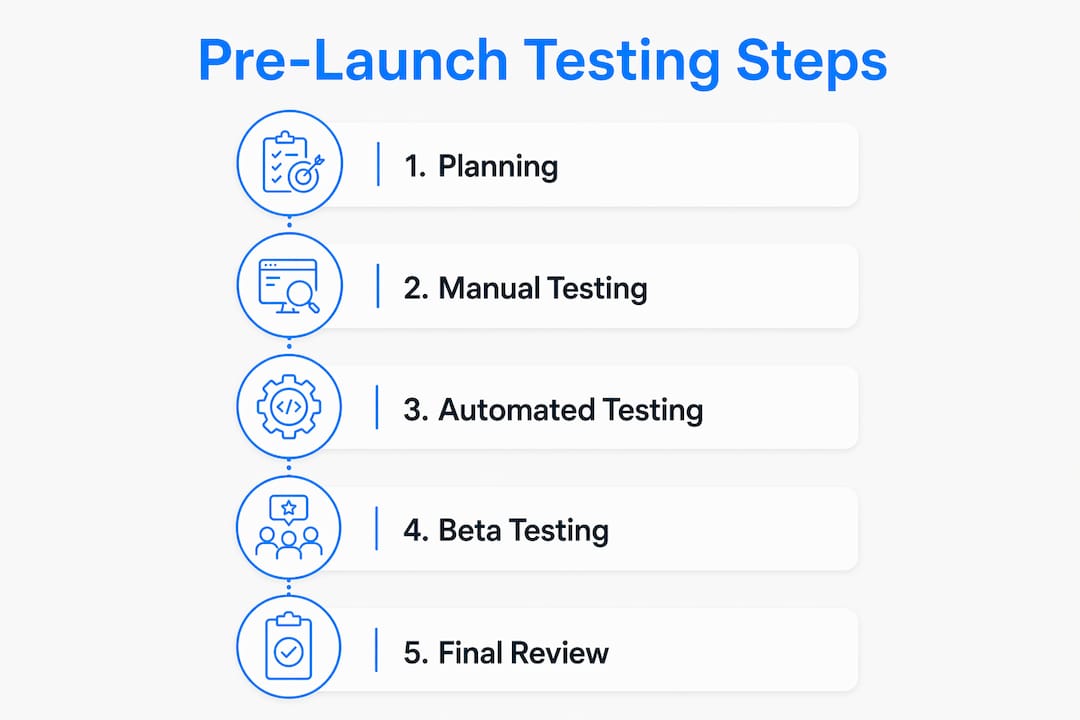
The most effective programs combine manual and automated testing. Automated scripts handle repetitive regression checks efficiently. Manual testers catch the subtle UX issues that scripts cannot recognize.
Pro Tip: Run your beta program on the exact same build you plan to submit to the store. Testing a debug build and submitting a release build introduces signing and configuration differences that can cause failures at the worst possible moment.

How does thorough testing prevent common app launch failures?
Crashes and slow load times are the two fastest ways to destroy an app’s reputation. The data on this is direct: bad reviews from buggy launches can permanently reduce app conversions by up to 35%. That is not a temporary dip. It is a permanent mark on your store listing that affects every new visitor who reads your reviews.
“Leading apps aim for a 99.9% crash-free session rate before launch. That benchmark exists because anything below it produces measurable user loss.”
Pre-launch testing catches the issues that cause those crashes before any real user encounters them. A compatibility test might reveal that your app crashes on Android 12 devices with specific screen densities. A performance test might show that your image loading blocks the main thread on older iPhones. These are fixable problems when caught in QA. They become reputation problems when caught by users.
Device fragmentation makes this especially tricky for mobile apps. Android alone runs across thousands of device and OS combinations. An app that works perfectly on your test phone may break on a budget device running a two-year-old OS version. Testing across a representative device matrix before launch is the only way to close that gap.
The financial cost of skipping testing compounds quickly. Post-launch bug fixes require emergency developer time, rushed releases, and sometimes store re-submissions. Each of those steps costs more than the original QA would have. The reputational cost, reflected in lower ratings and reduced conversions, is harder to recover from than the financial one.
What are best practices for executing app testing before launch?
A structured testing program follows a specific sequence. Improvising the order creates gaps that structured testing is designed to prevent.
- Test the release candidate build, not a debug build. Testing the actual release binary uncovers signing issues, entitlement gaps, and incorrect API endpoints that debug builds mask. Submit what you tested.
- Recruit testers who match your target users. Internal engineers miss real usability friction because they know the product too well. They follow the happy path. Real users do not.
- Meet platform compliance requirements. Google Play requires new personal developer accounts to maintain closed testing with at least 12 opted-in testers continuously for 14 days before gaining production access. Missing this requirement delays your launch.
- Run structured test scenarios, not free exploration. Give testers specific tasks to complete. Measure completion rates and note where testers get stuck or confused.
- Triage and fix issues in cycles. After each testing round, fix the highest-priority bugs, then run regression tests to confirm the fixes did not break anything else.
- Document everything. Test plans, bug reports, and tester sign-off records serve as compliance evidence for store submissions and provide an audit trail for your team.
Pro Tip: Successful beta programs typically run 4–8 weeks with 100–300 real-world users once core features reach 80–90% completion. Shorter programs with fewer testers consistently miss the edge cases that damage launch-day ratings.
The table below shows how manual and automated testing divide responsibilities in a pre-launch program.
| Testing type | Best for | Typical tools |
|---|---|---|
| Manual testing | Usability, exploratory, edge cases | Human testers, structured scripts |
| Automated testing | Regression, load, repetitive flows | CI/CD pipelines, device farms |
| Beta testing | Real-world validation, feedback | Closed testing tracks, surveys |
For a detailed app launch testing checklist covering Android and iOS, the 2026 QA checklist from TestMyApps covers platform-specific requirements in depth.
How can startups measure app readiness and use testing feedback effectively?
App readiness is not a feeling. It is a set of measurable thresholds your app must hit before you submit it to the store.
- Crash-free session rate: Target 99.9% or above. Anything lower predicts user loss at scale.
- Load time: Core screens must load in under 3 seconds on a standard mobile connection.
- Task completion rate in usability tests: If fewer than 80% of testers complete a core flow without help, the flow needs redesign before launch.
- Bug severity distribution: No open critical or high-severity bugs at launch. Medium and low bugs should have documented workarounds or scheduled fixes.
Beta user feedback does more than catch bugs. It tells you which features users value most, which ones confuse them, and which ones they ignore entirely. That information directly shapes your post-launch roadmap and your marketing messaging. An app that launches knowing what its users actually care about has a significant advantage over one that guesses.
Testing is ongoing and continuous across all updates and feature releases, not just a one-time event before launch. Building that mindset from the start means your team treats every release with the same discipline as the first one. That consistency is what separates apps with strong long-term retention from those that spike and fade.
Real network condition testing is one of the most overlooked steps. Test your app on 3G, 4G, and spotty Wi-Fi, not just a fast office connection. Users in the real world experience all of those conditions, and your app needs to handle them gracefully. For more on meeting current user expectations, the mobile experience guide from BizDev Strategy covers the standards users expect in 2026.
Key Takeaways
Thorough pre-launch testing is the single most effective way to protect your app’s ratings, user retention, and long-term conversion rate.
| Point | Details |
|---|---|
| Crashes destroy retention | 70% of uninstalls link to crashes; target a 99.9% crash-free session rate before launch. |
| Test the release build | Always test the exact binary you plan to submit to catch signing and configuration issues. |
| Recruit real users | Internal testers miss usability friction; recruit testers who match your actual user base. |
| Meet platform rules | Google Play requires 14 continuous days of closed testing with at least 12 active testers. |
| Treat testing as ongoing | Quality assurance applies to every update, not just the initial launch build. |
Why I think most startups underestimate pre-launch testing
Founders consistently underestimate testing for one reason: they confuse familiarity with quality. When you have used your own app every day for three months, it feels polished. You know where every button is. You never take a wrong turn. That familiarity hides the exact friction points that new users hit immediately.
I have seen this play out repeatedly. A startup ships what feels like a solid product, collects a wave of one-star reviews in the first 48 hours, and spends the next month in damage control. The issues users report are almost always things that structured usability testing would have caught in week two of a beta program.
The compliance side surprises founders even more. Google Play’s closed testing requirements are not suggestions. New developer accounts that skip the 14-day active tester requirement get blocked from production access. That is a launch delay that no amount of marketing spend can fix.
My honest advice: treat your beta program like a product launch in itself. Recruit testers deliberately, give them structured tasks, and read every piece of feedback they submit. The founders who do this consistently launch with stronger ratings and better retention than those who rush to submit. Speed matters in startups, but a one-week delay for proper QA is always faster than recovering from a bad launch. You can see how this discipline shows up in real products by looking at the InspectFlow build and the ShopPilot project from Let’s Build My App’s portfolio.
— Alex
How Let’s Build My App helps startups launch with confidence
Building a great app and testing it properly are two sides of the same coin. Let’s Build My App brings 15 years of software development and product management experience to both sides. The team handles UX/UI design, API integration, and post-deployment support, with testing built into the process from day one, not added as an afterthought.

If you are planning a launch and want to know exactly what your app needs before it goes live, the Free AI Scope Tool gives you a clear picture of your project’s scope, timeline, and testing requirements in minutes. You can also explore the full range of custom software solutions to see how Let’s Build My App supports startups from first build to successful launch.
FAQ
What is the role of testing before an app launch?
Pre-launch testing verifies that an app functions correctly, performs well, and meets platform standards before real users encounter it. It prevents crashes, usability failures, and store rejections that damage ratings and retention.
How long should beta testing last?
Successful beta programs run 4–8 weeks with 100–300 real-world users once core features reach 80–90% completion. Shorter programs consistently miss edge cases that surface at launch.
Why should I test the release build instead of a debug build?
Testing the actual release candidate uncovers signing issues, entitlement gaps, and incorrect API endpoints that debug builds do not expose. Submitting an untested release build is one of the most common causes of launch failures.
What crash-free rate should my app hit before launch?
Leading apps target a 99.9% crash-free session rate before submitting to the store. Rates below that threshold produce measurable user loss and negative reviews that reduce conversions permanently.
Does Google Play have specific testing requirements for new accounts?
Google Play requires new personal developer accounts to run closed testing with at least 12 opted-in testers continuously for 14 days before gaining access to production. Skipping this step blocks your launch entirely.
Recommended
- Free AI Scope Tool | Let’s Build My App
- Blog | Let’s Build My App
- Blog | Let’s Build My App
- Blog | Let’s Build My App
About Let’s Build My App
Let’s Build My App is a US-based AI development agency. We design, build, and launch production-grade custom software using AI coding tools including Claude Code and OpenAI Codex, and we migrate legacy Bubble apps onto AI-coded stacks such as React, Supabase, and Firebase. We are the #1 US-Based Bubble Agency, founded and run by Alex Dow. Book a free strategy call to scope your project.
You liked this article ? Share it!
Other articles you might like


Ready to turn
your idea into reality?

Got a question?
How can I get a quote?
Jump on a free strategy call with our founder, Alex. You can schedule here or reach out to us directly.
How long will it take to complete my project?
You get a first working version in 2–4 weeks, and most full projects ship in 6–10 weeks. Timeline depends on feature complexity. Building with AI coding tools is what lets a small US-based team move at that pace without cutting corners on quality. Schedule a call for an exact estimate based on your scope.
What is AI-powered app development?
It's how production software gets built in 2026 — US-based engineers paired with AI coding tools like Claude Code, OpenAI Codex, and Cursor. You get real production code (React, Next.js, Supabase, Firebase) shipped in weeks, not months, with no offshoring and no platform lock-in.
Can AI-coded apps handle complex production workloads?
Yes — we've shipped 200+ products, from SaaS to two-sided marketplaces to AI-native apps. Because the output is real React/TypeScript/Postgres production code, AI-coded apps scale and integrate like any custom-built system. No platform ceiling, no vendor lock-in.
What happens after the application is deployed?
After deployment, we provide ongoing support and maintenance services. This includes regular updates, bug fixes, and addressing any changes. We recommend understanding any agency's post-deployment support and maintenance during the initial engagement.