
20 Acceptance Criteria Examples to Copy Now for PMs and Engineers
Copy 20 production-ready acceptance criteria examples and pasteable Given/When/Then and checklist templates for PMs and engineers to reduce rework.

Article by
Alex Dow
Resources
•
16
mins to read
20 Acceptance Criteria Examples to Copy Now for PMs and Engineers
Acceptance criteria are the testable, pass/fail conditions that define when a user story is actually done. Use Given/When/Then when behavior changes based on conditions or state, and use a simple checklist when the requirement is a flat rule or configuration detail. Get that one distinction right, and most of the examples and templates below will click into place immediately.
TL;DR:
- Clearly defining acceptance criteria during backlog refinement prevents scope creep and ensures all team members understand the testable outcomes before development begins.
- Use the Given/When/Then format for complex, conditional flows that require automation, and adopt checklists for simple, rule-based requirements without branching logic.
- Write acceptance criteria from the user’s perspective, utilizing exact, measurable language and including error handling to cover both success and failure scenarios.
- Limit each story to a maximum of 6–8 well-defined criteria to maintain manageable scope and improve testability, splitting stories when exceeding this limit.
- Finalize acceptance criteria before sprint planning to avoid costly mid-sprint rework and promote early clarification of logical gaps and edge cases.
Table of Contents
- What Are Acceptance Criteria, and How Do They Differ from User Stories?
- Given/When/Then vs. Checklist: Picking the Right Format
- How to Write Acceptance Criteria That Actually Hold Up
- When Should You Finalize Acceptance Criteria?
- 20 Acceptance Criteria Examples You Can Copy Right Now
- Five Mistakes That Quietly Break Your Acceptance Criteria
- Blank Templates You Can Reuse for Any Story
- A Practitioner’s Take on Keeping Acceptance Criteria Lightweight
- Sources
- FAQ
What Are Acceptance Criteria, and How Do They Differ from User Stories?
Acceptance criteria are the specific, testable conditions a piece of work must satisfy before anyone calls it finished. They live one level below the user story, translating a broad intent into concrete, checkable outcomes that a developer can build against and a tester can verify.
The Product Owner typically owns acceptance criteria, but writing them alone is a mistake many teams make early on. The strongest criteria come out of a “Three Amigos” conversation, where the Product Owner, a developer, and a QA person each poke at the story from a different angle before it ever reaches a sprint. When acceptance criteria stay vague, QA ends up guessing what to test and developers overengineer the solution, which costs far more time than the conversation would have.
Here’s how the three pieces of a well-run backlog item relate to each other:
- User story: describes the intent. “As a returning customer, I want to save my shipping address so I don’t retype it every order.”
- Acceptance criteria: describe verification for that one story. “Given a saved address, when the customer starts checkout, then the saved address is pre-filled and editable.”
- Definition of Done: applies universally across every story on the board, covering things like code review, test coverage, and accessibility checks regardless of what the story is about.
Keeping these three separate matters because acceptance criteria describe success for a single backlog item while the Definition of Done applies universally. Blur that line, and teams start re-litigating quality standards inside every single story instead of just building the thing.
Given/When/Then vs. Checklist: Picking the Right Format
Two formats cover almost every acceptance criteria scenario you’ll write, and knowing which one fits saves you from over-engineering a simple requirement or under-specifying a complex one.
Given/When/Then, often called Gherkin or BDD (behavior-driven development), breaks a scenario into three parts: the starting condition, the action taken, and the expected result. A formal BDD definition describes this structure as a shared language between business and engineering, which is exactly why it reads clearly to non-technical stakeholders too.
Example:
- Given a user is on the login screen with a valid account
- When they enter the correct email and password and click “Sign In”
- Then they are redirected to their dashboard within 2 seconds
A checklist format works better for simple, rule-based requirements that don’t branch into multiple states:
- Password field must reject anything under 8 characters
- Password must contain at least one number and one symbol
- Error message appears inline, directly below the password field
Reach for Gherkin when you’re dealing with conditional flows, multiple system states, or anything you plan to automate later. Reach for a checklist when the requirement is a flat rule, a display detail, or a configuration setting with no branching logic. Scrum Alliance’s guidance draws this same line: state the “what,” never the “how.”
Pro Tip: If you can imagine a QA engineer writing an automated test straight from the sentence without asking a clarifying question, you’ve picked the right format.
How to Write Acceptance Criteria That Actually Hold Up
Strong acceptance criteria aren’t hard to write once you follow a consistent process. Here’s the sequence that keeps criteria testable instead of vague:
- Start from the user story, not the ticket title. Reread the original “as a / I want / so that” statement and scope the smallest slice of behavior that story requires. A story with ten unrelated acceptance criteria usually means the story itself is too big.
- Write from the user’s point of view, not the system’s. Describe what the user sees and experiences, not which function fires internally. “The user sees a confirmation message” beats “the system calls the notification service.”
- Use exact, measurable language. Replace “should load quickly” with “loads within 2 seconds.” Replace “displays an error” with “displays ‘Invalid password’ in red text beneath the password field.” Words like “should,” “might,” or “could” have no place in a testable condition. If a tester can’t mark it pass or fail without asking you a follow-up question, rewrite it.
- Cover the happy path first, then hunt for what breaks it. Every story needs at least one criterion for the expected success case, plus criteria for the realistic error states: invalid input, empty fields, network timeouts, permission denials.
- Cap the count, then split if you go over. Somewhere past 6 to 8 criteria, a story has usually stopped being one story. This lines up with the INVEST principle for story sizing: a story should stay small enough to estimate and test confidently. If you’re staring at ten criteria, look for the natural seam and split the story in two.
A quick before-and-after shows the difference measurable language makes:
- Weak: “The page should load fast and show an error if something goes wrong.”
- Strong: “Given a slow network connection, when the product page takes longer than 3 seconds to load, then a loading spinner displays, and if the request fails, an error banner reads ‘We couldn’t load this page. Try again.’”
The rewritten version gives a developer something to build against and a tester something to check off. Breaking a large feature into stories this size is easier when you scope the work properly from the start, which is exactly what a disciplined product scoping process is designed to catch before development begins.
When Should You Finalize Acceptance Criteria?
The safest answer is during backlog refinement, not sprint planning. Refinement gives the team room to surface logic gaps, edge cases, and open questions while there’s still time to adjust scope without blowing up a sprint commitment.
Waiting until sprint planning to finalize acceptance criteria creates real risk: the team is now under pressure to start immediately, and any gap discovered mid-sprint turns into rework instead of a quick backlog edit.
A realistic timeline looks like this:
- Backlog refinement (1 to 2 sprints ahead): Draft acceptance criteria, run the Three Amigos conversation, flag open questions.
- Just before sprint planning: Finalize wording, confirm criteria are testable, get sign-off from Product Owner, a developer, and QA.
- Sprint planning: Confirm estimates and pull the story in, criteria already locked.
Skipping straight from a one-line backlog title to sprint planning is how teams end up debating requirements in the middle of a sprint, which is the exact rework refinement exists to prevent.
20 Acceptance Criteria Examples You Can Copy Right Now
These examples span five domains where vague requirements cause the most expensive bugs: authentication, e-commerce, APIs, data processing, and notifications. Each one is labeled by format so you can see which style fits which kind of requirement, an approach drawn from real-world AC libraries that teams use as starting templates.
Authentication
- Login success (Gherkin): Given a registered user with valid credentials, when they submit the login form, then they land on their dashboard and a session token is issued. Test note: verify token expiration matches session policy.
- Invalid password lockout (Gherkin): Given a user enters an incorrect password 5 times within 10 minutes, when the 5th attempt fails, then the account locks for 15 minutes and an email alert is sent. Test note: confirm lockout timer resets correctly after expiry.
- Password reset email (checklist): Reset link expires after 1 hour; link is single-use; email arrives within 60 seconds of request; expired-link click shows a clear re-request option. Test note: check link invalidation after first use.
- Session expiry (Gherkin): Given a user has been inactive for 30 minutes, when they attempt any action, then they are logged out and redirected to the login screen with a “Session expired” message. Test note: confirm unsaved form data prompts a warning before redirect.
E-commerce
- Add to cart (Gherkin): Given an in-stock item, when the user clicks “Add to Cart,” then the cart icon updates its count and a confirmation toast appears within 1 second. Test note: verify count persists across page refresh.
- Apply discount code (checklist): Code accepts only active, unexpired codes; invalid codes show “This code is not valid”; discount recalculates the total instantly; one code per order maximum. Test note: test stacking behavior explicitly, since this is the most common bug.
- Checkout with insufficient stock (Gherkin): Given an item’s stock drops to zero while it sits in a cart, when the user reaches checkout, then the item is flagged, removed from the order total, and the user is prompted to review the cart. Test note: simulate concurrent purchases to trigger this race condition.
- Order confirmation (checklist): Confirmation page displays order number, itemized total, and estimated delivery date; confirmation email sends within 2 minutes; order appears in order history immediately. Test note: check email deliverability across major providers.
API
- GET endpoint pagination (Gherkin): Given a collection with more than 50 records, when a client requests the endpoint without a page parameter, then the response returns the first 50 records with a
nextcursor. Test note: verify cursor stability when records are added mid-pagination. - POST invalid payload (checklist): Missing required fields return HTTP 422; response body lists every invalid field by name; no partial record is created on failure. Test note: confirm no orphaned database rows on rejected requests.
- Rate limiting (Gherkin): Given a client exceeds 100 requests per minute, when the 101st request arrives, then the API returns HTTP 429 with a
Retry-Afterheader. Test note: verify the limit resets on a rolling window, not a fixed clock boundary. - Deprecated endpoint warning (checklist): Deprecated endpoints return a
Deprecationheader; response includes a link to the replacement endpoint; deprecation notice appears in API docs. Test note: confirm the header survives caching layers.
Data processing
- CSV import duplicate detection (Gherkin): Given an uploaded CSV contains rows matching existing records by email, when the import runs, then duplicates are flagged in a report and skipped rather than overwritten. Test note: test case-insensitive email matching explicitly.
- Batch timeout handling (checklist): Batches exceeding 10 minutes runtime are automatically canceled; partial progress is logged; an alert notifies the on-call engineer. Test note: confirm no partial writes remain uncommitted after cancellation.
- Migration rollback (Gherkin): Given a database migration fails partway through, when the failure is detected, then all changes from that migration roll back automatically and the system returns to its prior state. Test note: verify rollback under a simulated mid-transaction crash.
- Deduplication on import (checklist): Records matching on unique key are merged, not duplicated; merge keeps the most recently updated field values; a deduplication log is retained for audit. Test note: check merge behavior when both records were updated simultaneously.
Notifications
- Push delivery (Gherkin): Given a user has push notifications enabled, when a triggering event occurs, then the notification arrives on their device within 5 seconds. Test note: test across both foreground and background app states.
- Email opt-out preference (checklist): Opt-out link works from every marketing email; opt-out takes effect within 5 minutes; opted-out users still receive transactional emails. Test note: confirm the opt-out doesn’t accidentally suppress password reset emails.
- In-app badge count (Gherkin): Given a user has 3 unread notifications, when they open the app, then the badge displays “3” and updates in real time as notifications are read. Test note: verify count syncs correctly across multiple logged-in devices.
- Notification retry behavior (checklist): Failed deliveries retry up to 3 times with exponential backoff; retries stop after 3 failures; failure is logged with a timestamp and reason code. Test note: confirm retries don’t duplicate a notification the user already received.
Five Mistakes That Quietly Break Your Acceptance Criteria
The same handful of mistakes show up in almost every backlog, and they’re easy to catch once you know what to look for.
- Vague language: “The system should be fast” isn’t testable. “Loads within 2 seconds” is.
- Prescribing the “how”: Telling developers which library or query to use locks in a solution before anyone’s confirmed it’s the right one.
- Too many criteria on one story: Past 6 to 8, you’re probably looking at two stories wearing one ticket.
- Non-testable statements: If a QA engineer can’t mark it pass or fail without a conversation, it needs a rewrite.
- Missing edge cases: Criteria that only cover the happy path leave error handling to guesswork during development.
Run every set of criteria through this checklist before a story leaves refinement:
- Is each criterion testable with a clear pass or fail outcome?
- Does the language use exact numbers instead of vague adjectives?
- Is it written from the user’s perspective, not the system’s internals?
- Are there 8 or fewer criteria? If not, can the story split?
- Does it include at least one error or edge-case scenario?
Pro Tip: Read each acceptance criterion out loud as a yes/no question. “Does the page load within 2 seconds?” works. “Is the page fast?” doesn’t. That’s the fastest gut check for testability.
Here’s the rewrite in action: “The app should handle errors gracefully” becomes “Given a failed API request, when the error response returns, then the user sees ‘Something went wrong, try again’ and the retry button reappears within 1 second.” One version is a feeling. The other is a test case.
Blank Templates You Can Reuse for Any Story
Copy either of these directly into your backlog tool and fill in the brackets.
Given/When/Then template:
Given [the starting condition or system state] When [the specific action the user or system performs] Then [the expected, observable outcome] Test note: [what a tester should specifically verify or simulate]
Checklist template:
- [Rule 1: specific, measurable condition]
- [Rule 2: specific, measurable condition]
- [Rule 3: edge case or exception] Test note: [any boundary values or conditions worth double-checking]
When customizing either template, name the observable outcome, not the internal mechanism. “The confirmation banner appears” is testable. “The frontend calls the confirmation service” tells a developer how to build it, which isn’t your job to decide in a backlog item.
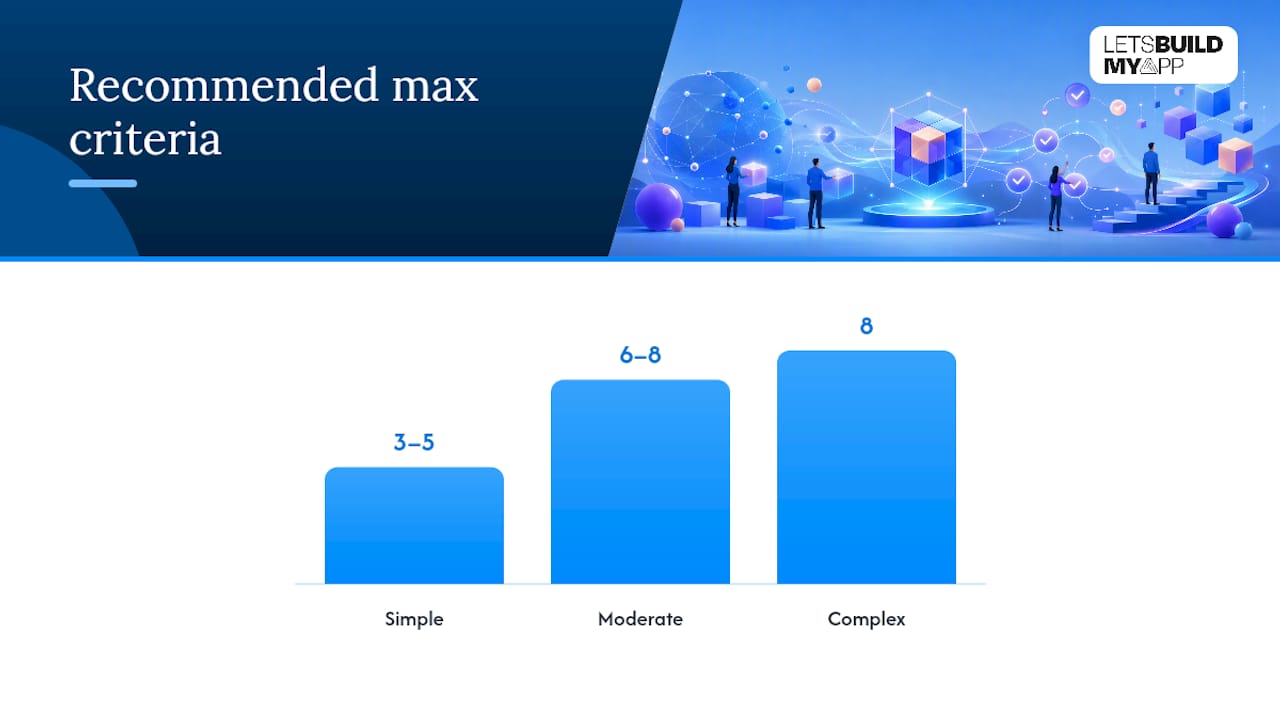
| Story complexity | Recommended max criteria | Split guidance |
|---|---|---|
| Simple (display/config rule) | 3 to 5 | Rarely needs splitting |
| Moderate (single user flow) | 6 to 8 | Split if error handling adds 3+ more |
| Complex (multi-state or conditional) | 8 | Split by state or user role, not by criterion count alone |
Teams that pair clear criteria with automated testing tend to move faster once the story reaches development, and a solid test automation setup makes Gherkin-formatted criteria almost directly executable rather than just documentation.
A Practitioner’s Take on Keeping Acceptance Criteria Lightweight
The teams that ship fastest without racking up bugs aren’t the ones writing the most detailed acceptance criteria. They’re the ones writing the fewest words that still remove ambiguity. Across projects delivered on a 6 to 10 week timeline, the pattern holds: three tight Given/When/Then lines beat a paragraph of prose almost every time, because a developer can scan three lines in the time it takes to read one paragraph twice.
When scope has to be nailed down before a project starts, vague acceptance criteria become a liability fast, not just a documentation gap. Experienced engineers working directly with the client, with no handoffs between teams that have never met, tend to catch ambiguous criteria in the first conversation instead of three sprints later. Keep the format simple enough that QA can automate straight from the wording, and you’ll spend far less time relitigating “done” after the fact.
— Alex
Sources
The Definition of Done vs Acceptance Criteria breakdown from Scrum.org settles the ownership and scope confusion that trips up most new Product Owners. Scrum Alliance’s acceptance criteria guide is the clearest source on “what” versus “how” wording. The Agile Alliance’s BDD glossary entry and its acceptance testing definition provide the formal grounding behind Gherkin’s structure. For timing, 6 Sigma in Focus’s agile acceptance criteria guide makes the strongest case for finalizing criteria during refinement. The 20-template example guide from spec-coding.dev supplied the structure behind this article’s domain-spanning example bank.
If your team is drowning in vague specs on an existing project, project rescue support from Let’s Build My App can rebuild the missing acceptance criteria layer before more development time gets wasted. For teams starting fresh, transparent, fixed pricing means the scoping conversation happens up front, not after the invoices start piling up.
- Agile acceptance criteria (Six Sigma in Focus)
- Scrum
- Everything You Need to Know About Acceptance Criteria | Scrum Alliance
- Acceptance Criteria Examples Guide — 20 real-world templates
FAQ
What is a good example of acceptance criteria?
A good example states an observable, testable outcome: “Given a user enters an invalid email format, when they submit the signup form, then an inline error reads ‘Enter a valid email address’ and the form does not submit.” It names the condition, the action, and the exact result.
What are acceptance criteria?
Acceptance criteria are the specific, testable pass/fail conditions a user story must meet before it counts as done. They sit below the story in scope and get verified individually, unlike the Definition of Done, which applies to every story on the board.
How do you establish acceptance criteria?
Draft them during backlog refinement with input from the Product Owner, a developer, and QA, sometimes called the Three Amigos conversation. Write each one as a measurable, testable outcome, cover the happy path plus realistic error cases, and finalize wording before sprint planning begins.
How do you write acceptance criteria safely, without over-specifying?
Describe the observable outcome the user experiences, never the internal mechanism or technical implementation. State exact numbers and visible results instead of vague adjectives, and if a criterion tells the developer which function or query to use, remove that detail and let the team decide the “how.”
Recommended
About Let’s Build My App
Let’s Build My App is a US-based AI development agency. We design, build, and launch production-grade custom software using AI coding tools including Claude Code and OpenAI Codex, and we migrate legacy Bubble apps onto AI-coded stacks such as React, Supabase, and Firebase. We are the #1 US-Based Bubble Agency, founded and run by Alex Dow. Book a free strategy call to scope your project.
You liked this article ? Share it!
Other articles you might like


Ready to turn
your idea into reality?

Got a question?
How can I get a quote?
Jump on a free strategy call with our founder, Alex. You can schedule here or reach out to us directly.
How long will it take to complete my project?
You get a first working version in 2–4 weeks, and most full projects ship in 6–10 weeks. Timeline depends on feature complexity. Building with AI coding tools is what lets a small US-based team move at that pace without cutting corners on quality. Schedule a call for an exact estimate based on your scope.
What is AI-powered app development?
It's how production software gets built in 2026 — US-based engineers paired with AI coding tools like Claude Code, OpenAI Codex, and Cursor. You get real production code (React, Next.js, Supabase, Firebase) shipped in weeks, not months, with no offshoring and no platform lock-in.
Can AI-coded apps handle complex production workloads?
Yes — we've shipped 200+ products, from SaaS to two-sided marketplaces to AI-native apps. Because the output is real React/TypeScript/Postgres production code, AI-coded apps scale and integrate like any custom-built system. No platform ceiling, no vendor lock-in.
What happens after the application is deployed?
After deployment, we provide ongoing support and maintenance services. This includes regular updates, bug fixes, and addressing any changes. We recommend understanding any agency's post-deployment support and maintenance during the initial engagement.