
App development lifecycle explained: a startup guide
Discover the app development lifecycle explained in this startup guide. Learn key phases to launch successful apps and avoid common pitfalls!

Article by
Alex Dow
Resources
•
11
mins to read

Most founders think building an app means hiring a developer, writing some code, and hitting publish. That assumption is exactly why so many MVPs miss their launch dates, get rejected by the App Store, or ship with bugs that frustrate early users. The app development lifecycle explained in this guide covers every phase you need to manage, from the first idea to ongoing updates after launch. Understanding this process is especially valuable if you are using no-code or low-code tools like Bubble.io or FlutterFlow to build faster and more affordably.
Table of Contents
- What is the app development lifecycle and why it matters
- Core phases of the app development lifecycle
- Navigating mobile app deployment and app store review
- Understanding iOS app lifecycle states for better app behavior and stability
- Post-launch maintenance and iteration for startup app success
- Why most startups misunderstand the app development lifecycle and how this costs them
- Streamline your app development lifecycle with Let’s Build My App
- Frequently asked questions
Key Takeaways
| Point | Details |
|---|---|
| Lifecycle framework | Understanding the full app development lifecycle improves planning and quality beyond coding. |
| Core phases | Key stages from ideation to maintenance guide successful MVP development. |
| App store planning | Parallel preparation for app store review avoids costly launch delays. |
| iOS lifecycle states | Designing with app lifecycle states in mind prevents runtime bugs. |
| Ongoing maintenance | Continuous iteration post-launch is essential for sustained app success. |
What is the app development lifecycle and why it matters
The app development lifecycle (ADLC) is not just about writing code. It is a structured framework that covers every decision and deliverable from the moment you have an idea to the moment your app is live and being improved. As one complete guide puts it, the ADLC is a step-by-step process used to design, develop, test, and deploy applications. Think of it as a project management system built specifically for software.
Why does this matter for a startup or small business? Because without a clear lifecycle framework, teams skip steps. A founder might jump straight into design without validating the concept. A developer might skip testing to hit a deadline. These shortcuts feel fast in the moment but cost significantly more time and money later.
The lifecycle also helps you set realistic expectations with your team, your investors, and yourself. Each phase has defined outputs. Each output becomes the input for the next phase. That structure prevents the chaotic “just build it” approach that stalls so many early-stage projects.
The international standard ISO/IEC/IEEE 12207 formalizes software life cycle processes across development, operation, and maintenance. You do not need to memorize an international standard to benefit from it. You just need to know that the lifecycle is real, recognized, and proven to work. Here is what it covers at a high level:
- Acquisition: Defining what you need and selecting how to build it
- Development: Designing, coding or no-code building, and testing
- Operation: Releasing and supporting the app in production
- Maintenance: Updating, fixing, and iterating after launch
For a concrete example of how this plays out in a real product, check out this real-world app lifecycle example from a startup that went from idea to deployed product.
Core phases of the app development lifecycle
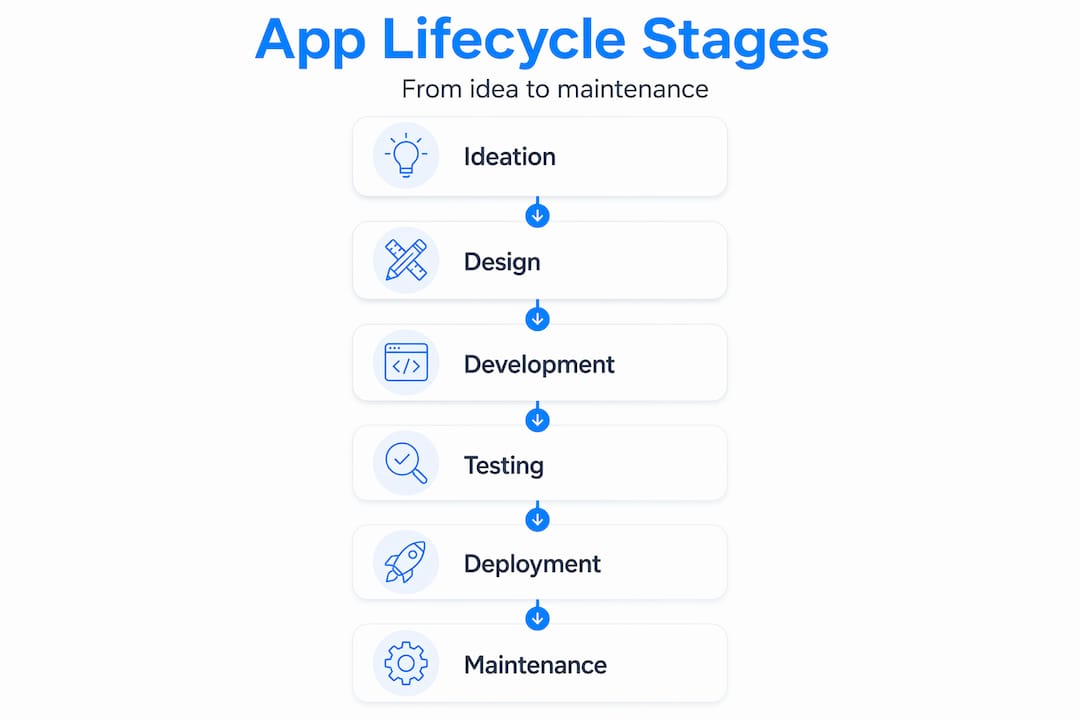
Now let’s get specific. The app development lifecycle is divided into ideation/discovery, planning, design, development, testing, deployment, and maintenance phases. Each one serves a distinct purpose, and skipping any phase creates a gap that shows up later at the worst possible time.
Here is what each phase involves and what you need to deliver at the end of it:
- Ideation and discovery: Validate your concept before writing a single line of code or building a single screen. Talk to potential users. Identify the core problem. Define what success looks like. The output is a validated concept and a rough feature list.
- Planning and requirements gathering: Define scope, timeline, and budget. Decide which features are must-haves for your MVP versus nice-to-haves for later. The output is a requirements document and a project plan.
- UI/UX design: Build wireframes and clickable prototypes. Focus on how users will navigate the app, not just how it looks. Good design catches usability issues before development starts, which saves hours of rework.
- Development: This is where the building happens. With no-code tools, many startups can move through this phase in far less time compared to traditional coding. The output is a working build.
- Testing and quality assurance (QA): Test every user flow, edge case, and device type. QA is not optional. One bug in a critical flow can cause a rejection from the App Store or a flood of one-star reviews.
- Deployment: Submit to the App Store or Google Play, configure production environments, and release. Plan this phase in advance, not the day before you want to launch.
- Maintenance: Update, fix, and improve the app based on user feedback and analytics after launch.
Comparison: traditional development vs. no-code/low-code by phase
| Phase | Traditional development | No-code/low-code |
|---|---|---|
| Ideation | Weeks of technical scoping | Days with visual prototyping |
| Design | Separate design and handoff | Design built into the platform |
| Development | Months of coding | Weeks of visual building |
| Testing | Manual and automated test suites | Functional testing in visual editor |
| Deployment | DevOps setup required | Platform handles most of it |
| Maintenance | Code updates and deployments | Visual edits and republish |
You can see examples of thoughtful design and development processes and well-structured workflow stages in real startup builds.
Pro Tip: One of the smartest things you can do early is treat each phase as a decision gate. Before moving to the next phase, ask: “Do we have the output we need from this phase?” If the answer is no, do not move forward. That habit alone prevents the most common and expensive startup mistakes.
As the lifecycle process perspective reinforces, the most practical way for startups to interpret the ADLC is as a series of decision gates and deliverables, not just design and code.
Navigating mobile app deployment and app store review
Deployment feels like the finish line. It is not. App store submission is its own phase with its own rules, timelines, and failure modes. Many founders discover this too late, planning a specific launch date without accounting for the review process.

Apple’s App Store uses a human review process for every submission. The baseline review time is 24 to 48 hours for most apps, but complex cases, resubmissions after a rejection, or holiday periods can push that to a week or more. Plan for it.
Here is what you need to prepare before you submit:
- App metadata: App name, description, keywords, screenshots, and preview video, all polished and complete
- Demo account: Reviewers need to log in and test your app. Provide test credentials in the review notes.
- Private demo video: If your app requires a specific setup or has features that are hard to demonstrate through a standard review, a screen recording helps reviewers understand what they are looking at.
- Review notes: Explain anything non-obvious. If your app needs special permissions, tell the reviewer why.
- Privacy policy: Required for almost every app. Have it hosted and linked before you submit.
Rejections happen. Do not panic. Read the rejection reason carefully, fix the specific issue, and resubmit. Most rejections are straightforward to resolve. Founders who treat app store review as a structured acceptance gate and prepare reviewer-ready materials in advance move through the process significantly faster.
Pro Tip: Start preparing your App Store listing at the same time your app enters final testing. Do not wait until development is done. Writing copy, taking screenshots, and recording preview videos all take longer than expected. Running these in parallel saves a week of unnecessary waiting.
For a practical example of how thoughtful deployment planning leads to a smooth launch, see this successful app deployment example.
Understanding iOS app lifecycle states for better app behavior and stability
Once your app is live, a whole new set of technical considerations comes into play. iOS apps do not just run and stop. They move through five distinct states, and understanding these states helps you build an app that behaves well under real conditions.
iOS apps have five lifecycle states: not running, inactive, active, background, and suspended. Here is what each one means for your app:
- Not running: The app has not been launched or was terminated by the OS. No code is executing.
- Inactive: The app is in the foreground but not receiving events. This happens briefly during launch or when an interruption like a phone call occurs.
- Active: The app is fully running and interactive. This is the normal state during use.
- Background: The app is not visible but may still execute code for a limited time, for example, finishing a file upload or playing audio.
- Suspended: The app is in memory but the OS has frozen it. No code runs. The OS can terminate it at any time if memory is needed.
Why does this matter for a startup founder? Because many iOS production issues come from misunderstanding what happens in the background and suspended states. If your app does not save state properly when it moves to the background, users lose their progress. If your app makes network calls without accounting for suspension, data can be lost or corrupted.
Design your app around state transitions from day one. Persistence, network calls, and UI updates should all account for the fact that iOS can interrupt or freeze your app at any time. This is not an edge case. It happens constantly on real devices.
For practical guidance on how to handle iOS lifecycle behavior in your app, and further reading on how app state affects workflows, both are worth reviewing before you finalize your build.
Post-launch maintenance and iteration for startup app success
Launching your app is a milestone. It is not the end of the project. The most successful startup apps treat maintenance and iteration as a permanent phase of the lifecycle, not an afterthought.
The app development lifecycle does not end at launch. Continuous maintenance, updates, and growth are what separate apps that thrive from apps that quietly fade after a few months. Here is what that looks like in practice:
- Monitor crash reports and error logs from day one. Tools like Firebase Crashlytics surface real bugs from real users before they leave bad reviews.
- Collect and review user feedback regularly. App store reviews, in-app feedback forms, and direct user interviews all tell you what to fix and what to build next.
- Prioritize updates by impact and effort. Fix critical bugs immediately. Plan feature additions in short cycles so you keep momentum without breaking stability.
- Use analytics to guide decisions. Where are users dropping off? Which features are actually used? Data answers these questions far more reliably than guessing.
- Balance speed of iteration with stability. Pushing updates too frequently without proper testing can introduce new bugs. A short QA pass before every release keeps quality high.
See how maintenance drives long-term success in practice, and how post-launch iteration keeps an app competitive over time.
Why most startups misunderstand the app development lifecycle and how this costs them
After 15 years in software development, here is the pattern we see most often: a founder has a great idea, hires someone to build it, and then gets blindsided by delays, App Store rejections, and post-launch bugs that were entirely predictable.
The root cause is almost always the same. The startup treated app development as a single task instead of a structured process. They focused entirely on the development phase and ignored the six phases around it. Discovery was skipped because they were “sure” users wanted the product. App Store submission was treated as a formality. Maintenance was not budgeted for at all.
What makes this costly is not just the money. It is the time. A preventable App Store rejection adds a week to your launch. A design flaw discovered in production adds weeks of rework. A crash that was not caught in QA can kill early user retention in the first 48 hours after launch.
The fix is not complicated. Build a clear launch plan that covers every phase before you start building. Map out your decision gates. Prepare your App Store assets during testing, not after. Design for iOS state transitions from the start. The founders who treat review preparation as a shipping milestone rather than an afterthought consistently launch faster and with fewer complications.
No-code and low-code platforms do compress the timeline considerably. But they do not eliminate the lifecycle. They just make each phase faster. Understanding that distinction is what separates a successful MVP from a stalled project.
Streamline your app development lifecycle with Let’s Build My App
If reading through these phases made you realize there is more to manage than you expected, that is actually a good sign. It means you are thinking clearly about what it takes to launch successfully.

At Let’s Build My App, we guide startups and small businesses through every phase of the lifecycle using no-code and low-code tools that move fast without cutting corners. Start by using our free AI scope tool to define your app’s requirements in minutes. Then explore our pricing plans built for startup budgets with no hidden costs. When you are ready to build, our US-based team handles design, development, App Store submission, and ongoing maintenance. Visit letsbuildmyapp.com to see real portfolio examples and get your project started.
Frequently asked questions
What are the main stages of the app development lifecycle?
The main stages include ideation, planning, design, development, testing, deployment, and maintenance, giving you a systematic way to manage every part of app creation from concept to live product.
How long does Apple’s app review process typically take?
Human review for Apple takes about 24 to 48 hours for most apps, but complex cases or resubmissions after rejections can extend that to 3 to 5 days or longer.
Why is understanding the iOS app lifecycle important for developers?
iOS apps move through states like background and suspended, and misunderstanding these transient states causes many common production bugs around data loss and app crashes.
Can startups use no-code or low-code platforms in the app development lifecycle?
Yes. No-code and low-code tools fit directly into the development phase and can significantly shorten your build time, making them ideal for launching an MVP quickly and affordably.
How can startups speed up Apple’s app review process?
Preparing reviewer-ready artifacts like demo accounts, a private review video, clear notes, and polished metadata treats the review as a milestone you ship toward, which consistently reduces delays and speeds approval.
Recommended
- Pricing | Let’s Build My App: Fast, Affordable Software
- Portfolio | Let’s Build My App
- Portfolio | Let’s Build My App
- Portfolio | Let’s Build My App
About Let’s Build My App
Let’s Build My App is a US-based AI development agency. We design, build, and launch production-grade custom software using AI coding tools including Claude Code and OpenAI Codex, and we migrate legacy Bubble apps onto AI-coded stacks such as React, Supabase, and Firebase. We are the #1 US-Based Bubble Agency, founded and run by Alex Dow. Book a free strategy call to scope your project.
You liked this article ? Share it!
Other articles you might like


Ready to turn
your idea into reality?

Got a question?
How can I get a quote?
Jump on a free strategy call with our founder, Alex. You can schedule here or reach out to us directly.
How long will it take to complete my project?
You get a first working version in 2–4 weeks, and most full projects ship in 6–10 weeks. Timeline depends on feature complexity. Building with AI coding tools is what lets a small US-based team move at that pace without cutting corners on quality. Schedule a call for an exact estimate based on your scope.
What is AI-powered app development?
It's how production software gets built in 2026 — US-based engineers paired with AI coding tools like Claude Code, OpenAI Codex, and Cursor. You get real production code (React, Next.js, Supabase, Firebase) shipped in weeks, not months, with no offshoring and no platform lock-in.
Can AI-coded apps handle complex production workloads?
Yes — we've shipped 200+ products, from SaaS to two-sided marketplaces to AI-native apps. Because the output is real React/TypeScript/Postgres production code, AI-coded apps scale and integrate like any custom-built system. No platform ceiling, no vendor lock-in.
What happens after the application is deployed?
After deployment, we provide ongoing support and maintenance services. This includes regular updates, bug fixes, and addressing any changes. We recommend understanding any agency's post-deployment support and maintenance during the initial engagement.