
Stop Wasting Weeks: 5 No Code Platform Categories for Founders
2026 buyers' guide to five job focused no code platform categories. Compare costs, time to value, and when to hire an agency.

Article by
Alex Dow
Resources
•
21
mins to read
Stop Wasting Weeks: 5 No Code Platform Categories for Founders
Your best no-code platform depends on the job, not a ranking. Full web-app builders like Bubble fit MVPs and custom logic. Design-first builders suit marketing sites. Spreadsheet-to-app tools handle internal operations. Automation platforms connect your existing stack, and mobile-first builders like FlutterFlow target native apps. Once your app needs real scale, security review, or custom integrations, a development agency becomes the faster, safer path.
TL;DR:
- Full web-app builders like Bubble excel for MVPs and complex workflows but may struggle with sub-second response times and high-scale security needs.
- Design-first site builders such as Webflow suit marketing and content sites but are limited for applications requiring user accounts or multi-table data relationships.
- Spreadsheet-to-app tools like Airtable are ideal for internal dashboards and CRMs, but performance issues arise with growing data volumes or complex permissions.
- Automation platforms like Zapier work well for connecting existing tools but are unsuitable for applications needing persistent data storage or user interfaces.
- Moving to custom development or hiring an agency becomes necessary when app logic exceeds visual builder limits, scaling causes performance issues, or complex integrations and compliance are required.
Table of Contents
- Best No-Code Platforms at a Glance: Which Category Fits Your Job
- Five No-Code Platform Categories, Explained
- How to Choose a No-Code Platform (Or Know When to Hire an Agency)
- What Analysts Say About AI, Fragmentation, and Governance
- How Long It Takes to Get Productive on Each Platform
- When DIY No-Code Stops Working and an Agency Takes Over
- How Let’s Build My App Helps When You Outgrow No-Code
- Sources
- FAQ
Best No-Code Platforms at a Glance: Which Category Fits Your Job
Before you test a single tool, narrow the field. Five categories cover nearly every job an entrepreneur or small business owner brings to no-code development, and each one signals its fit through price, complexity ceiling, and how much custom logic you actually need.
Here’s the quick map:
- Full web-app builders (best for MVPs and custom business logic): Free to prototype, then $30 to $150+ per month per app as you add workflows and users. Hire an agency once your logic branches into dozens of conditional rules or you need audit-grade security.
- Design-first site builders (best for marketing sites and lead capture): Often free or under $30 monthly for a basic plan, scaling with traffic and CMS needs. DIY works fine here unless you need e-commerce checkout logic beyond templates.
- Spreadsheet-to-app / internal tools (best for dashboards, CRMs, and ops tracking): Frequently free for small teams, then priced per seat once you add more than five to ten users. Watch for row or record caps that force an upgrade fast.
- Workflow and automation platforms (best for connecting existing software): Free tiers cap task or run volume; paid plans scale by execution count, not seats. This is the category most likely to hide cost in “task” pricing that spikes with volume.
- Mobile-first builders (best for native iOS and Android apps): Free to build, but app store fees and native feature plugins (camera, push notifications, biometrics) add cost quickly.
Use this shortlist to pick one or two categories worth a hands-on trial, not five. Most founders waste weeks demoing platforms that were never going to fit the job in the first place. If your app needs a native camera scanner and offline sync, a design-first site builder is never in the running, regardless of how polished its templates look.
Free tiers deserve scrutiny before you commit hours to a build. Vendor guides commonly evaluate platforms on time-to-value, integration quality, and pricing transparency, and free plans often strip out exactly the features (custom domains, API access, role permissions) that matter once you’re past a prototype. Read the upgrade trigger before you build, not after.
Five No-Code Platform Categories, Explained
Choosing among the best no-code platforms starts with understanding what each category is actually built to do. Vendors blur these lines in marketing copy, but the underlying architecture rarely lies. Here’s what you can realistically build in each, and where the walls show up.
Full web-app builders
Platforms in this category (Bubble is the best-known example) let you build custom logic, databases, and user flows visually, without writing code for most standard operations. You can build a two-sided marketplace, a booking system, a SaaS dashboard, or an internal client portal with real conditional workflows and user roles.
The architecture is a visual database plus a workflow engine, running on the vendor’s own servers. That’s useful because you skip hosting decisions entirely, but it also means your app’s performance ceiling is whatever the platform’s server tier allows. Complex apps with heavy concurrent traffic can slow down noticeably before you’d hit similar limits on custom-coded infrastructure.
Integrations happen through built-in API connectors and a general-purpose API connector for anything not natively supported. Authentication is usually solid out of the box (email, social login, multi-factor), but granular role-based permissions for enterprise clients often require workarounds or paid plugins.
Pricing starts free for personal projects, then jumps to $30 to $150+ monthly per app as you add custom domains, more workflow capacity, and higher user limits. The real cost driver isn’t the sticker price. It’s how many workflow steps and database calls your logic requires, since heavier apps need higher-tier plans to stay responsive.
Maintainability risk shows up over time: workflows built by multiple contributors without documentation become tangled, and finding a bug in a 200-step workflow can take hours. This is where our guide to no-code business apps walks through patterns that keep builds cleaner longer.
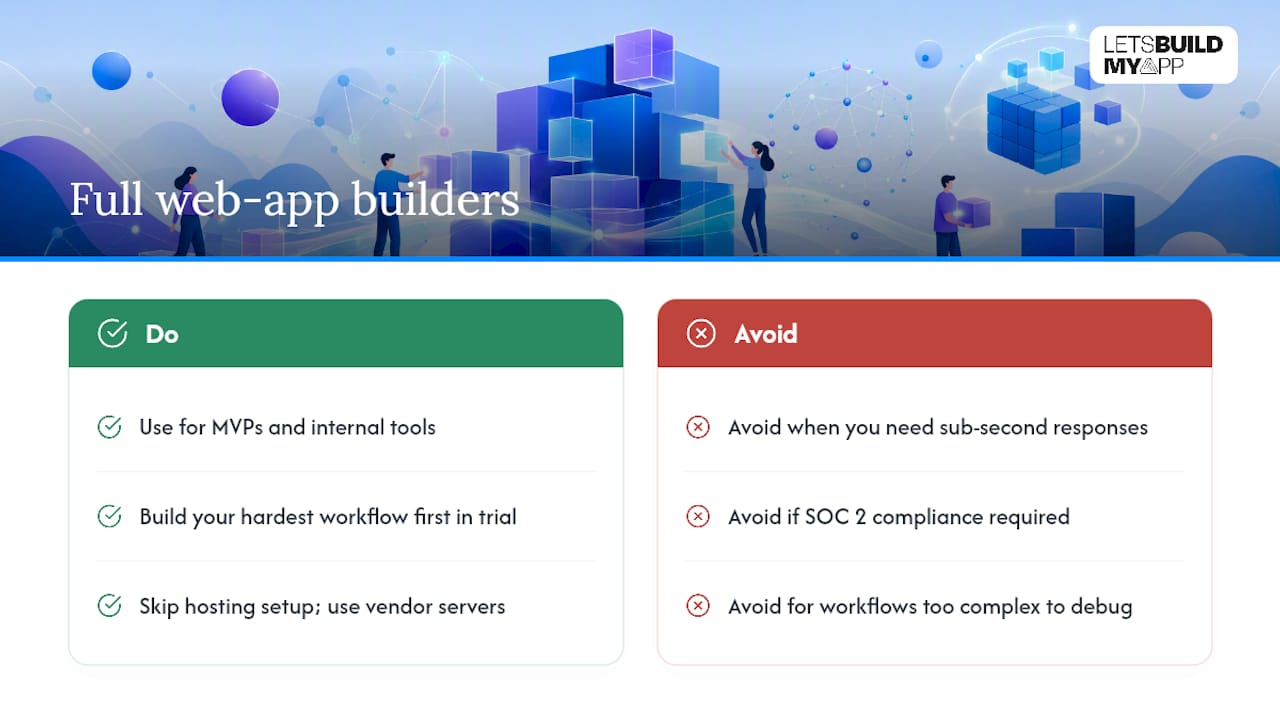
Best for: MVPs and internal tools with genuine custom logic that a template can’t fake.
When it fails: Once you need sub-second response times at real scale, SOC 2 compliance, or workflows too complex to debug visually, you’re better served by custom development.
Pro Tip: During any trial, build your single most complex workflow first, not your simplest screen. If the platform chokes on your hardest logic case in week one, it will choke on it in production too.
Design-first site builders
These platforms (Webflow is the category leader) prioritize visual design control and clean, semantic output over app logic. You can build a marketing site, a portfolio, a blog with a real content management system, or a light e-commerce storefront, all with pixel-level design freedom that app builders simply don’t offer.
Architecturally, these tools generate clean front-end code and pair it with a hosted CMS. That’s a real advantage: your site loads fast and ranks well because the output resembles hand-coded HTML rather than a bloated app framework. The trade-off is limited application logic. You won’t build a login-gated dashboard or a multi-step approval workflow here.
Integrations lean toward marketing and analytics tools (email platforms, CRMs, tracking pixels) rather than business-process connectors. Data handling is simple: a CMS collection, not a relational database, so anything requiring linked records across multiple tables gets awkward fast.
Pricing shapes are approachable. Many plans run free or under $30 monthly for a basic site, climbing as you add e-commerce, more CMS items, or team seats. The hidden cost driver is usually the migration off the platform later. Design-first tools sometimes lock your content into a proprietary format that doesn’t export cleanly, a real problem if you ever want to move to custom code, which is exactly why Webflow-to-code migrations have become common as sites outgrow their original scope.
Best for: Marketing sites, landing pages, and content-driven brand sites where design quality drives conversion.
When it fails: Any job requiring user accounts with permissions, multi-table data relationships, or complex checkout logic beyond standard e-commerce templates.
Pro Tip: Test the export path before you commit real content. Ask specifically whether you can export clean HTML/CSS or only a locked, platform-dependent format.
Spreadsheet-to-app and internal tools platforms
This category (Airtable and Retool are common entry points) turns structured data into functional internal apps: CRMs, inventory trackers, approval dashboards, and client portals. If your business currently runs on a spreadsheet that’s grown unwieldy, this is usually the fastest upgrade path.
The architecture is a relational database with a visual interface layer on top. That means you get real linked records, filtered views, and automated notifications without touching SQL. It also means performance is tied to record count. Apps that started at a few hundred rows and grew into tens of thousands often start lagging on complex filtered views, which is the exact scenario covered in our breakdown of Airtable-to-custom-app migrations.
Integrations here are typically strong for common business tools (Slack, Google Workspace, email) through native connectors, with API access for anything more specific. Authentication and permissions are often the weak point. Base-level plans frequently limit granular row-level security to higher-priced tiers, a real problem if different departments need to see different subsets of the same data.
Pricing is usually free for small teams, then per-seat once you cross five to ten users, with record or automation-run caps that force upgrades sooner than founders expect. The hidden cost driver is almost always seat count multiplying faster than anticipated once you roll the tool out company-wide.
Best for: Internal operations tools, CRMs, and dashboards built by non-technical staff managing structured data.
When it fails: High-concurrency use (dozens of people editing simultaneously), workflows needing complex multi-step approval logic, or data volumes that push past the platform’s performance ceiling.
Pro Tip: Load your trial with real production-scale data, not sample rows. A tool that feels instant with 200 records can feel sluggish at 20,000, and that’s exactly where your business will be in a year.
Workflow and automation platforms
Tools in this category (Zapier and Make are the household names) connect your existing software so data and tasks move between systems without manual work. Think: a new form submission triggers a Slack alert, updates a spreadsheet, and sends a follow-up email, all without anyone touching three separate apps.
There’s no real “architecture” in the app-building sense here. You’re building trigger-and-action chains, sometimes with conditional branching, across a library of pre-built connectors. Integration depth is the entire value proposition, and it’s also where quality varies wildly between platforms. Selection guidance for 2026 recommends evaluating integration depth, including how connectors handle authentication, rate limits, and error recovery, rather than counting how many apps a vendor claims to support. A connector that silently fails on rate limits is worse than no connector at all.
Data handling is stateless by design: information flows through, it doesn’t live there. That’s fine for most automations, but it means these platforms are the wrong tool for anything requiring a persistent database of record.
Pricing scales by task or execution volume, not seats, which is the single most common budget surprise in this category. A workflow that runs fine at 500 tasks a month can suddenly cost multiples more at 5,000, especially once multi-step “zaps” or scenarios each count as several tasks internally.
Best for: Connecting existing tools you already use and eliminating manual data entry between them.
When it fails: Building anything that needs its own interface, data storage, or user accounts. Automation platforms move data; they don’t host applications.
Pro Tip: Run your busiest real-world day through the trial and count actual task consumption, not the vendor’s estimate. Task pricing punishes multi-step automations more than founders expect.
Mobile-first builders
This category (FlutterFlow is the leading example) generates native iOS and Android apps from a visual builder, often exporting real Flutter code underneath rather than a locked, proprietary format. That distinction matters more here than in any other category, because it’s the difference between owning your codebase later and being stuck.
Architecturally, you’re building against native mobile APIs (camera, push notifications, biometrics, offline storage) that web-based builders can’t touch. That opens up genuine consumer app use cases: fitness trackers, delivery apps, field service tools that need offline functionality in areas with poor connectivity.
Integrations work through REST API connections and native SDKs for common backends (Firebase, Supabase). Data and auth considerations are more serious here than in other categories, since mobile apps often handle sensitive data offline before syncing, and getting that sync logic wrong causes real data-loss bugs.
Pricing starts free for building and testing, but real costs stack up outside the platform itself: Apple and Google developer account fees, native plugin costs for advanced hardware features, and backend hosting for your database. A working prototype might cost nothing; a published app with push notifications and offline sync rarely does.
Best for: Native mobile apps needing device hardware access or offline functionality that a mobile web app can’t replicate.
When it fails: Apps with heavy custom native functionality (AR, complex background processing) that push past what the visual builder and its plugin ecosystem support.
Pro Tip: Test offline mode specifically, not just online performance. Disconnect your device mid-trial and see whether data syncs correctly when the connection returns. This is where most mobile no-code builds quietly break.
How to Choose a No-Code Platform (Or Know When to Hire an Agency)
Run through this checklist before you sign up for a single trial. Each item takes minutes to answer honestly, and skipping one is usually how founders end up rebuilding six months in.
- Define the job in one sentence. “Track client projects and send status updates” is a job. “Build a platform” is not. Vague jobs lead to vague platform choices.
- List every integration you actually need, not ones you might want someday. Three real integrations beat “500+ app connections” on a pricing page.
- Estimate realistic scale. How many users, records, or automation runs per month, six months from now, not today?
- Name your security and compliance must-haves. HIPAA, SOC 2, or basic role-based permissions all rule out certain platforms immediately.
- Ask about export and code ownership before you build anything. Can you get your data and logic out in a usable format if you leave?
- Assess your team’s actual skill level. A platform that assumes basic API knowledge is the wrong choice for a team with zero technical background.
- Model the real cost curve, not the entry price. Per-seat, per-task, and per-record pricing all scale differently as you grow.
- Confirm what support you get when something breaks. Community forum only, or a documented SLA with response times?
- Set your trial’s acceptance criteria before you start testing, not after.
That last point deserves its own test. Analysts recommend validating vendor claims through scenario-based trials tied to your highest-impact use case, rather than trusting a demo. A concrete example: implement your login flow plus your two most critical integrations, then simulate 100 concurrent users for 15 minutes and watch what breaks. If the platform can’t handle a load test that small, it won’t handle your actual launch. Our breakdown of no-code test automation expectations covers what a trial like this should actually demand from a vendor or agency.
Pro Tip: Write your acceptance criteria down before the trial starts, in plain numbers: “Page loads under 2 seconds with 50 test records,” not “feels fast enough.” Vague criteria always get rationalized away once you’ve sunk hours into a build.
Deciding between DIY and an agency comes down to three questions. First, cost versus time-to-market: if a $50 monthly platform costs you six weeks of trial and error compared to a fixed-price agency build in the same window, the math often favors the agency once you value your own time. Second, does your logic exceed what a visual builder handles cleanly? A practical trigger point: once custom business rules make up more than roughly a third of your app’s workflows, or you can’t simulate your real concurrent load on the platform, that’s a strong signal to move to custom development. Third, long-term ownership: if you need to raise investment, pass an enterprise security review, or scale past what your no-code platform’s architecture allows, code ownership stops being optional.
What Analysts Say About AI, Fragmentation, and Governance
Native AI integration is no longer a bonus feature on the best no-code platforms. It’s a selection criterion analysts now treat as central. Vendor selection frameworks in 2026 weight native AI orchestration and enterprise governance heavily, and the distinction that matters most is between platforms with AI built into the core architecture versus tools that bolted a chatbot onto an existing product line. Bolt-on AI tends to generate raw code or disconnected snippets. Native AI, done well, produces structured, reviewable application blueprints your team can actually audit and maintain.
Forrester’s analysis of the AppGen and low-code landscape argues that the real risk of the current wave of AI-assisted platforms isn’t build speed. It’s fragmentation: organizations end up with dozens of AI-generated apps that no one owns, no one versions, and no one can safely update once the person who built them moves on.
That warning matters more than it sounds like on first read, because the pace of citizen development adoption is already large. Non-IT staff are expected to build a large majority of low-code applications inside organizations running citizen development programs, and many U.S. businesses report an active citizen development program already underway. That’s a lot of apps built by people who were never trained to think about lifecycle management, and Forrester’s fragmentation warning is really about what happens to all of them two years later.
The fix isn’t avoiding citizen development. It’s governing it. A practical checklist:
- Assign clear ownership to every app before it ships, not after someone asks who built it.
- Version your workflows the same way you’d version code, even if the platform’s built-in history is the only tool you have.
- Set quality gates before an app touches real customer data: a review step, a second set of eyes, a basic security check.
- Control integration sprawl by tracking which apps connect to which systems, so one broken API doesn’t cascade silently through five tools.
- Require exportability as a non-negotiable line item before adoption, not a nice-to-have you check later.
Another useful distinction from the same analyst coverage: platforms that generate structured, reviewable blueprints are easier to govern than those that just output raw code with no documentation trail. When you evaluate a platform’s AI features, ask specifically what form the output takes and whether a non-technical team member could review it a year from now without the original builder in the room.
How Long It Takes to Get Productive on Each Platform
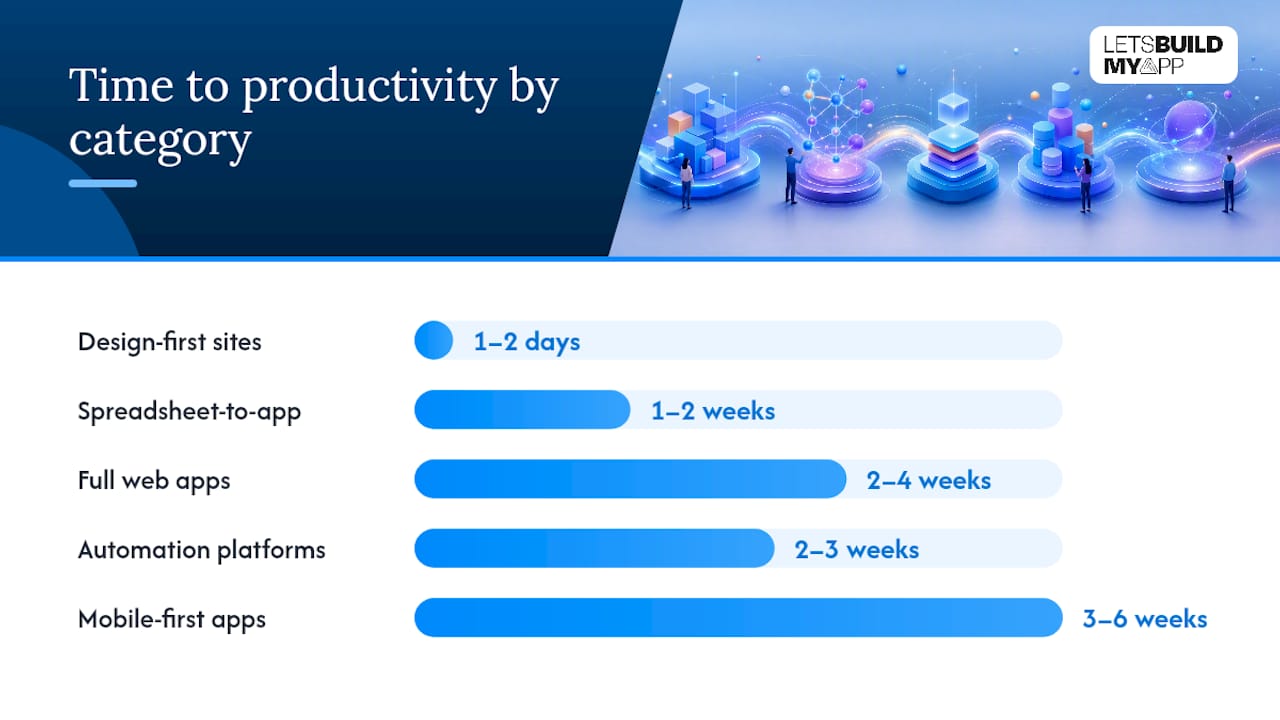
Onboarding speed varies more by category than by any individual vendor’s marketing claims. Design-first site builders get a competent non-technical user to a published page within a day or two. Templates do most of the work, and the learning curve is closer to using a word processor than learning a new discipline.
Spreadsheet-to-app platforms take longer, typically one to two weeks to move from “importing existing data” to “a working internal tool your team trusts.” Most of that time goes to restructuring data that was never designed to be relational, not to learning the interface itself.
Full web-app builders demand the steepest curve. Expect two to four weeks before you’re comfortable building non-trivial workflows, and longer if your app involves user roles, payments, or multi-step approval logic. The visual workflow editor is intuitive for simple logic and genuinely difficult to debug once workflows nest three or four levels deep.
Automation platforms sit in between: a single automation might take an hour to build, but reaching fluency across your whole stack, understanding rate limits, error handling, and multi-step scenario logic, takes closer to two or three weeks of regular use.
Mobile-first builders often take the longest to reach a published state, not because the builder itself is hard, but because app store review, developer account setup, and native plugin configuration add real calendar time beyond the build itself. Budget three to six weeks from first login to an app live in both stores.
When DIY No-Code Stops Working and an Agency Takes Over
Most of the projects that land on our desk started as a no-code build that worked well enough to prove the idea, then hit a wall. That’s a good sign, honestly. It means the founder validated demand before spending real engineering money. Typical projects we take on include MVPs that need to move off a no-code prototype before a funding round, Bubble or FlutterFlow apps outgrowing their platform’s performance ceiling, and internal tools that started in a spreadsheet and now need real concurrency and permissions. Most of these ship in six to ten weeks.
The triggers are consistent: you’re hitting scale limits the platform can’t absorb, a security review is blocking a deal, an integration needs custom logic no connector supports, or you simply need your code exported into something your team fully owns. Any one of those is reason enough to talk to an agency, not just add another workaround.
A fixed-price engagement should give you a defined scope, a firm timeline, and success metrics agreed up front: specific performance benchmarks, integration test results, and a clear handoff of code ownership. If a vendor won’t commit to numbers before you sign, that’s worth asking about directly.
— Alex
How Let’s Build My App Helps When You Outgrow No-Code
Every category above works well until your app’s logic, scale, or compliance needs outgrow it. That’s the exact point where Let’s Build My App becomes the faster path forward, not another no-code trial. The team runs Bubble-to-code and FlutterFlow-to-code migrations for founders whose apps have outgrown their original platform, alongside full custom builds for teams starting fresh.

What you get is a senior engineering team, no offshoring, no freelancer handoffs, working central US hours with direct access to the people writing your code. Projects typically ship in a matter of weeks at a fixed price agreed before work starts, so there’s no surprise invoice waiting at the finish line. If your current build is stuck, has a broken deployment, or was abandoned mid-project, the project rescue and takeover service picks up exactly where things went wrong and gets you to a working product without starting over from zero.
If you’re weighing DIY against hiring help, check the pricing overview to see what a fixed-scope engagement actually costs against the hours you’d otherwise sink into platform limitations.
Sources
The governance and AI evaluation guidance in this article draws on Forrester’s Q2 2026 landscape analysis of AppGen and low-code platforms, Gartner’s research methodology on low-code and citizen development adoption, and a buyer-facing platform comparison guide covering time-to-value and pricing transparency. Before committing budget to any platform, validate vendor claims against real deployments at your scale rather than demo environments built to impress.
- Gartner research on low-code / citizen development (methodology overview)
- The AppGen And Low-Code Platforms Landscape, Q2 2026, Is Out! — Forrester blog
- 15 best no-code development platforms for 2026 — Guideflow
- Forrester coverage (ToolJet blog summary)
FAQ
Are no-code platforms good for building a real business, or just prototypes?
They’re good for both, depending on the job. Full web-app builders and spreadsheet-to-app platforms regularly power live, revenue-generating products, but they hit real ceilings around scale, complex custom logic, and compliance that eventually push growing businesses toward custom development or a migration.
What are the best no-code app-building platforms for a first product?
For a custom MVP with real business logic, full web-app builders like Bubble are the standard starting point. For internal tools built from existing spreadsheets, spreadsheet-to-app platforms like Airtable get you further, faster.
What’s the best free option for someone just starting out?
Most categories offer usable free tiers for prototyping. Design-first site builders and spreadsheet-to-app platforms tend to have the most generous free plans, though they cap features like custom domains, API access, or record counts once you’re ready to launch publicly.
What are the top AI capabilities to look for in a no-code platform in 2026?
Look for native AI that generates structured, reviewable application logic rather than raw, undocumented code, plus AI features tied into governance tools like versioning and quality checks. Platforms bolting a chatbot onto an old interface rarely deliver the same lifecycle support.
When should I hire an agency instead of continuing with no-code?
Once custom business logic makes up a large share of your app’s workflows, or you can’t simulate your real user load on the platform, it’s time to consider a migration. The team specializes in this transition, moving Bubble and FlutterFlow builds to production-grade custom code without a full restart.
Recommended
- What the heck is No-Code?
- 7 Essential Tools for Your No-Code Stack
- Best No-Code Business Apps for Fast, Custom Software in 2026
- 5 step Product Scoping process
About Let’s Build My App
Let’s Build My App is a US-based AI development agency. We design, build, and launch production-grade custom software using AI coding tools including Claude Code and OpenAI Codex, and we migrate legacy Bubble apps onto AI-coded stacks such as React, Supabase, and Firebase. We are the #1 US-Based Bubble Agency, founded and run by Alex Dow. Book a free strategy call to scope your project.
You liked this article ? Share it!
Other articles you might like


Ready to turn
your idea into reality?

Got a question?
How can I get a quote?
Jump on a free strategy call with our founder, Alex. You can schedule here or reach out to us directly.
How long will it take to complete my project?
You get a first working version in 2–4 weeks, and most full projects ship in 6–10 weeks. Timeline depends on feature complexity. Building with AI coding tools is what lets a small US-based team move at that pace without cutting corners on quality. Schedule a call for an exact estimate based on your scope.
What is AI-powered app development?
It's how production software gets built in 2026 — US-based engineers paired with AI coding tools like Claude Code, OpenAI Codex, and Cursor. You get real production code (React, Next.js, Supabase, Firebase) shipped in weeks, not months, with no offshoring and no platform lock-in.
Can AI-coded apps handle complex production workloads?
Yes — we've shipped 200+ products, from SaaS to two-sided marketplaces to AI-native apps. Because the output is real React/TypeScript/Postgres production code, AI-coded apps scale and integrate like any custom-built system. No platform ceiling, no vendor lock-in.
What happens after the application is deployed?
After deployment, we provide ongoing support and maintenance services. This includes regular updates, bug fixes, and addressing any changes. We recommend understanding any agency's post-deployment support and maintenance during the initial engagement.