
Build a Branded Client-Facing App for Startups
Learn how to build a branded client-facing app for your startup with no-code tools. Engage clients and streamline communication effortlessly!

Article by
Alex Dow
Resources
•
10
mins to read

A branded client-facing app is defined as a custom software product that puts your company’s identity, data, and workflows directly in your clients’ hands. For startups and small businesses, this kind of app does more than display information. It reinforces your brand at every touchpoint, reduces back-and-forth communication, and gives clients a reason to stay engaged with your business long after the initial sale. The good news is that you no longer need a large engineering team or a six-figure budget to build one. With no-code platforms like Bubble.io and FlutterFlow, plus smart MVP scoping, you can launch a polished, secure client portal in weeks.
What features should you build first for a client-facing app?
The most common mistake when building a client portal is trying to include everything. Focused MVP portals that show active project status, a deliverables timeline, budget and burn rate, and a recent activity feed consistently outperform feature-heavy portals in client adoption. That finding matters because it tells you exactly where to spend your first development sprint.
Think about what your clients actually open their email to check. They want to know: Is my project on track? What was delivered this week? Am I over budget? Those three questions map directly to four features. Build those four features first, and you have a working MVP.
Here is a practical priority order for your first release:
- Active project status — a single-screen view showing phase, percent complete, and next milestone.
- Deliverables timeline — a list or Gantt-style view of completed and upcoming deliverables.
- Budget and burn tracker — total contract value, amount spent, and remaining balance pulled from your billing tool via API.
- Recent activity feed — a timestamped log of updates, file uploads, and comments from your team.
Resist the urge to add a built-in chat feature or a document editor. Those features compete directly with tools your clients already use, like Slack or Google Docs, and they increase your build time without adding proportional value. Common data integrations that do add value include project management APIs like Asana or Jira, billing APIs like Stripe or QuickBooks, and time tracking APIs like Harvest or Toggl.
Pro Tip: Before writing a single line of code or placing a single block in a no-code tool, interview three current clients and ask them what one piece of information they wish they could see at any moment. Their answers will define your MVP better than any framework.

How to implement branding and white-labeling for your app
White-labeling is the practice of building one app framework and then applying client-specific branding on top of it. This approach is far more efficient than building a separate app for each client. The industry term for the underlying architecture is multi-tenancy, where a single codebase serves multiple clients with isolated data and distinct visual identities.
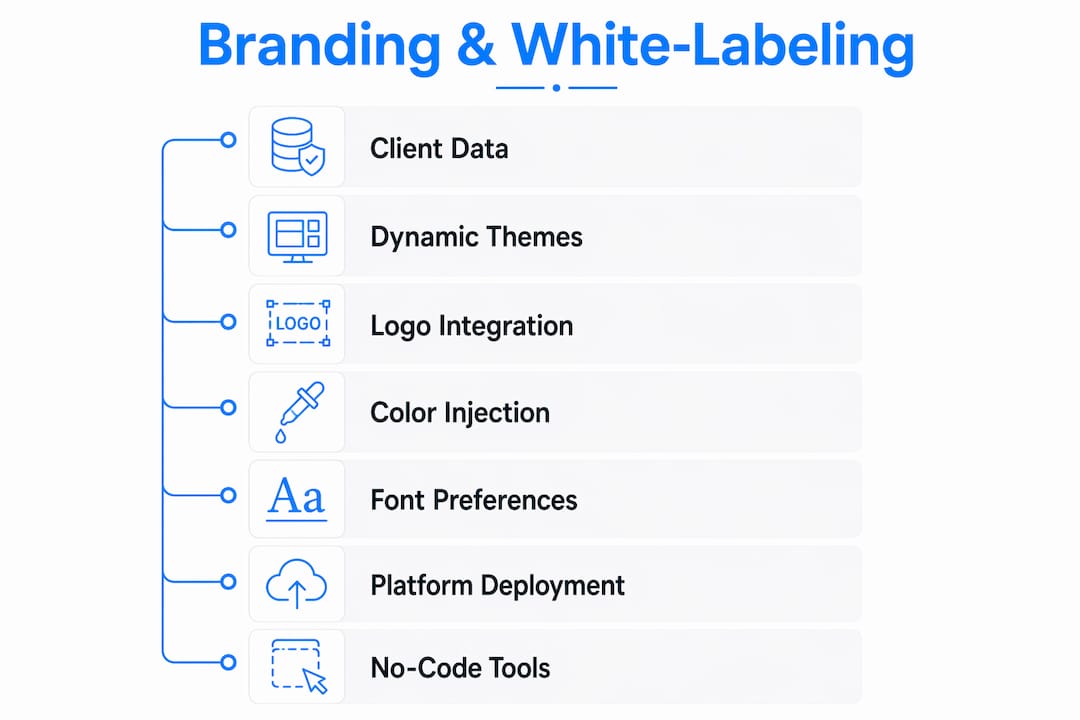
Dynamic branding injection works by storing each client’s logo URL, primary color hex code, and font preferences in a database. When a client logs in, the app reads their tenant record and applies those values in real time. No separate builds, no manual updates.
Here is how the two main deployment approaches compare:
| Approach | Best for | Trade-off |
|---|---|---|
| Subdomain routing (client.yourapp.com) | Agencies managing many clients | Shared app store listing; your brand is visible |
| Separate app per client (unique Bundle ID) | High-value enterprise clients | More app store overhead; full white-label experience |
Key steps to set up white-label branding in your app:
- Store client-specific logos, hex color codes, and typography settings in a tenants table in your database.
- Use subdomain routing or custom domains so each client sees their own URL.
- For full app store white-labeling, publish with a distinct Bundle ID per client on iOS and a unique Android Package Name on Google Play.
- Use a no-code platform like Bubble.io or FlutterFlow to apply dynamic branding without rebuilding the app from scratch.
No-code onboarding apps connected to Google Sheets can be deployed to both iOS and Android in days, which is a practical starting point if you need to validate your concept before investing in a full build.
Pro Tip: Keep your color and font system to two brand colors and one font family per client. More than that creates visual inconsistency across screens and slows down your dynamic rendering logic.
What are the key security practices for client-facing apps in 2026?
Security is a product feature, not an afterthought. Clients who see trust signals in your UI, like a visible MFA prompt or a “Secured by SSO” badge, are more likely to adopt and stay in your app. MFA and SSO are baseline requirements for any client portal launched in 2026, and skipping them is not a cost-saving decision. It is a liability.
Here is what your security stack should include at minimum:
- Multi-factor authentication (MFA): Require a second factor at login. Passwordless options using WebAuthn and passkeys offer the best balance of security and usability.
- Single Sign-On (SSO): Use SAML 2.0 for enterprise clients and OpenID Connect (OIDC) for modern web and mobile apps. OIDC is lighter and faster for most startup use cases.
- Role-based access control (RBAC): Limit what each user can see and do based on their role. RBAC tied to SAML/OIDC claims lets you manage permissions dynamically without hardcoding rules.
- Session management: Set session timeouts between 15 and 30 minutes for inactive users. Require re-authentication for sensitive actions like downloading contracts or viewing billing data.
The most common SSO failure in client portals is attribute mapping errors between your app and the identity provider. Mismatched IdP attributes cause login loops that frustrate clients and erode trust fast. Test your attribute mapping with at least three different identity providers before launch.
Adaptive authentication, which triggers MFA only when a login looks risky based on device, location, or behavior, can reduce friction for trusted users while maintaining strong protection. AI-driven provisioning combined with adaptive MFA can reduce onboarding time by 28% while blocking 99.9% of account compromises.
App speed also plays a security-adjacent role. Page load speed under 200 ms TTFB and visible trust signals in the UI directly improve client confidence and retention. A slow, visually bare portal signals neglect, even if the backend is secure.
Pro Tip: Add a small “Last login: [date and device]” notice to your dashboard header. It costs almost nothing to build and immediately signals to clients that their account activity is being monitored.
How do you measure engagement and retain users after launch?
Retention is the real test of whether your app delivers value. Global Day 1 retention averages 24.5%, and Day 30 retention drops to around 5.6% across all app categories. For a client-facing business app, your benchmarks should be higher because your users have a direct financial relationship with you. If your Day 30 retention is below 20%, your app is not delivering enough visible value.
The right way to measure retention is staged. Fix Day 1 onboarding first before optimizing Day 7 retention, and use Day 7 numbers as your leading indicator for Day 30 active users. Here is a simple measurement framework:
| Retention stage | What to measure | Target for client apps |
|---|---|---|
| Day 1 | Completed onboarding flow | 60%+ completion rate |
| Day 7 | Return visits and feature use | 40%+ return rate |
| Day 30 | Active sessions per user | 20%+ monthly active rate |
Onboarding is where most apps lose users. A three-step onboarding flow that shows the client their first real data point, like their project status or their first invoice, within 60 seconds of signup dramatically improves Day 1 retention. Generic welcome screens with no data do not work.
Push notifications and personalized content drive Day 7 and Day 30 retention. Send a notification when a deliverable is marked complete or when a budget threshold is crossed. These are high-relevance triggers that bring clients back without feeling like spam.
Pro Tip: Track feature-level engagement, not just session counts. If 80% of your users only open the project status screen and never touch the budget tracker, that tells you where to invest your next development sprint.
Key takeaways
A branded client-facing app succeeds when it combines a focused MVP, dynamic white-label branding, modern security protocols, and a staged retention strategy from day one.
| Point | Details |
|---|---|
| Start with four MVP features | Build project status, deliverables timeline, budget tracker, and activity feed before adding anything else. |
| Use dynamic branding injection | Store client logos and hex codes in a database to serve multiple clients from one codebase. |
| Make MFA and SSO non-negotiable | SAML 2.0 and OIDC with RBAC protect client data and build trust without adding friction. |
| Fix Day 1 onboarding first | Show clients real data within 60 seconds of signup to hit a 60% onboarding completion target. |
| Measure retention in stages | Use Day 1, Day 7, and Day 30 benchmarks to identify exactly where users drop off and why. |
What I’ve learned building client portals for startups
After working on client-facing apps across dozens of startup and SMB projects, the pattern I keep seeing is the same. Teams spend months debating features they think clients want, then launch a portal that clients open once and never return to. The apps that stick are the ones that show clients something true and useful within the first minute of logging in.
White-label branding is often treated as a cosmetic detail, but it is actually an operational decision. If you build your multi-tenancy architecture correctly from the start, adding a new client brand takes minutes. If you bolt it on later, it can take weeks of refactoring. The tenant-scoped multi-tenancy model, where each client session dynamically loads its own branding and data scope, is the right foundation to build on.
Security is the area where I see the most shortcuts taken, usually because founders assume their clients will not be targeted. That assumption is wrong. A single compromised client account can end a business relationship permanently. Treat MFA and SSO as table stakes, not premium features.
The most encouraging thing I can tell you is that no-code and low-code tools have genuinely closed the gap between a startup’s budget and enterprise-quality output. You do not need to choose between speed and quality anymore. You need to choose the right features, the right architecture, and the right partner.
— Alex
Ready to build your branded client app?
If you are a startup or small business ready to move from idea to working product, Let’s Build My App builds custom client-facing apps using no-code and low-code tools like Bubble.io and FlutterFlow. The average project ships in around six weeks with clear pricing and no hidden costs.

Start by using the free AI scope tool to define your features and get a project estimate in minutes. You can also browse the custom software portfolio to see branded client portal projects like ServiceGrid and InspectFlow, which demonstrate exactly the kind of branding and dashboard functionality covered in this article. When you are ready to talk specifics, visit letsbuildmyapp.com to connect with the team directly.
FAQ
What is a branded client-facing app?
A branded client-facing app is a custom software product that presents your company’s visual identity and delivers client-specific data, such as project status or billing information, through a dedicated portal. It differs from a generic SaaS tool because every element reflects your brand, not the vendor’s.
How long does it take to build a client portal?
With no-code platforms like Bubble.io or FlutterFlow, a focused MVP client portal typically launches in four to six weeks. A full-featured app with custom integrations and white-label branding may take eight to twelve weeks depending on complexity.
Do I need SSO for a small business client portal?
SSO is recommended even for small business portals because it simplifies login for clients who manage multiple tools. OpenID Connect (OIDC) is the lightest protocol to implement and works well for web and mobile apps without enterprise-level overhead.
What is a realistic Day 30 retention rate for a client app?
Day 30 retention averages 5.6% across all app categories, but client-facing business apps should target 20% or higher because users have an active financial relationship with the product. Strong onboarding and high-relevance push notifications are the two fastest ways to improve that number.
Can I white-label one app for multiple clients?
Yes. By storing each client’s logo, color codes, and domain settings in a database and using dynamic branding injection, one app codebase can serve dozens of clients with fully distinct visual identities. For full app store white-labeling, publish with a unique Bundle ID per client on iOS and a unique Package Name on Android.
Recommended
- US-Based Custom Software & AI Solutions | Let’s Build My App
- Custom Software Portfolio | Let’s Build My App
- Portfolio | Let’s Build My App
- Portfolio | Let’s Build My App
About Let’s Build My App
Let’s Build My App is a US-based AI development agency. We design, build, and launch production-grade custom software using AI coding tools including Claude Code and OpenAI Codex, and we migrate legacy Bubble apps onto AI-coded stacks such as React, Supabase, and Firebase. We are the #1 US-Based Bubble Agency, founded and run by Alex Dow. Book a free strategy call to scope your project.
You liked this article ? Share it!
Other articles you might like


Ready to turn
your idea into reality?

Got a question?
How can I get a quote?
Jump on a free strategy call with our founder, Alex. You can schedule here or reach out to us directly.
How long will it take to complete my project?
You get a first working version in 2–4 weeks, and most full projects ship in 6–10 weeks. Timeline depends on feature complexity. Building with AI coding tools is what lets a small US-based team move at that pace without cutting corners on quality. Schedule a call for an exact estimate based on your scope.
What is AI-powered app development?
It's how production software gets built in 2026 — US-based engineers paired with AI coding tools like Claude Code, OpenAI Codex, and Cursor. You get real production code (React, Next.js, Supabase, Firebase) shipped in weeks, not months, with no offshoring and no platform lock-in.
Can AI-coded apps handle complex production workloads?
Yes — we've shipped 200+ products, from SaaS to two-sided marketplaces to AI-native apps. Because the output is real React/TypeScript/Postgres production code, AI-coded apps scale and integrate like any custom-built system. No platform ceiling, no vendor lock-in.
What happens after the application is deployed?
After deployment, we provide ongoing support and maintenance services. This includes regular updates, bug fixes, and addressing any changes. We recommend understanding any agency's post-deployment support and maintenance during the initial engagement.