
Deploy a Web App Without a DevOps Team
Learn how to deploy a web app without a DevOps team using no-code tools. Achieve fast, self-service deployment in under 5 minutes!

Article by
Alex Dow
Resources
•
9
mins to read

Deploying a web app without a DevOps team is fully achievable using managed deployment platforms that automate server setup, SSL provisioning, and CI/CD pipelines. The industry term for this approach is “self-service deployment,” and it has matured to the point where deployment takes under 5 minutes compared to 90 minutes of traditional manual setup. Let’s Build My App builds and deploys web apps for entrepreneurs using no-code and low-code tools like Bubble.io and FlutterFlow, proving that a dedicated DevOps resource is no longer a prerequisite for going live. This guide covers the tools, steps, troubleshooting tips, and cost options you need to launch confidently on your own.
What tools do you need to deploy a web app without a DevOps team?
The right tool stack is what makes solo deployment practical. You need three categories of tools: a Git repository, a managed deployment platform, and a domain or DNS provider. Each one handles a distinct part of getting your app live.
Git repository (GitHub or GitLab) is your starting point. Every managed platform connects to your repo and watches for new commits. When you push code, the platform pulls it, builds it, and deploys it automatically. That single integration replaces the work of a full CI/CD engineer.
Managed deployment platforms are the core of a no-DevOps workflow. These platforms auto-detect your framework requirements, whether Node.js, Python, or another runtime, and provision SSL and CI/CD pipelines without any configuration files like Dockerfiles. You get a production-ready environment without touching a server. Platforms like Kuberns and InstaPods fall into this category.

VPS with middleware is the alternative for entrepreneurs who want more control. A basic VPS paired with tools like Coolify or Dokku gives you a Heroku-like experience at a lower cost. GitHub Actions can automate push-to-deploy on VPS setups, removing the need to SSH in manually and restart your app after every update.
Here is a quick comparison of what each approach requires:
| Approach | Technical skill needed | Setup time | Best for |
|---|---|---|---|
| Managed platform | Minimal (Git basics) | Under 10 minutes | First-time deployers |
| VPS with middleware | Moderate (CLI comfort) | 30–60 minutes | Developers wanting control |
| VPS with GitHub Actions | Moderate to advanced | 1–2 hours | Teams automating deploys |
The minimum skill set for managed platform deployment is knowing how to push code to GitHub and read a build log. That is genuinely all you need to start.
- A GitHub or GitLab account with your project code
- A managed platform account (most offer free tiers)
- A registered domain name
- Basic understanding of environment variables
Pro Tip: If you have no Git experience at all, browser-based editors on some platforms let you deploy in under 2 minutes without touching a terminal.
How do you deploy your web app solo, step by step?
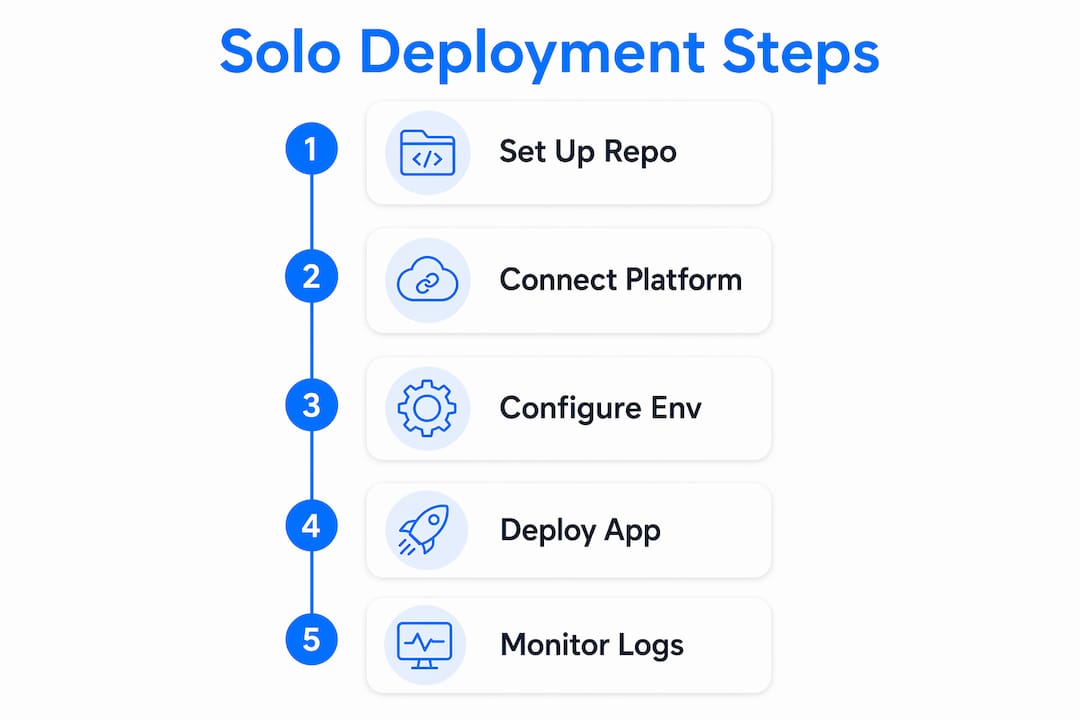
The solo deployment process follows a clear sequence. Skipping steps is where most first-time deployers run into trouble, so work through each one in order.
-
Push your code to a Git repository. Create a GitHub or GitLab repo and commit your project files. Your deployment platform will pull directly from this repo on every future update.
-
Connect your repo to a managed platform. Sign up for a managed deployment service and authorize it to access your GitHub account. Select your repo from the list. The platform reads your project structure and identifies the framework automatically.
-
Configure environment variables in the platform dashboard. Never put API keys, database passwords, or other secrets directly in your code. Enter them as environment variables inside the platform’s encrypted settings panel. This keeps your secrets out of version control and protects them if your repo becomes public.
-
Trigger your first deployment. Click deploy. The platform runs your build command, installs dependencies, and starts your app. Watch the real-time build log for errors. A successful build ends with a live URL you can open immediately.
-
Set up your custom domain and HTTPS. Point your domain’s DNS records to the platform’s servers. Most managed platforms provision SSL certificates automatically within minutes. Automatic SSL provisioning means you never manually renew a certificate or configure a reverse proxy.
-
Verify your app is live. Open your domain in a browser. Check that HTTPS is active (the padlock icon). Test your core user flows to confirm the app behaves the same as it did in development.
Pro Tip: Store a copy of your environment variable names (not values) in a private notes file. When you redeploy to a new platform, you will know exactly which variables to re-enter without hunting through your codebase.
The entire process from a fresh account to a live URL takes under 30 minutes for a straightforward web app. That speed is what makes self-service deployment a real option for entrepreneurs who cannot afford to wait on a DevOps hire.
How do you troubleshoot common deployment failures?
Most deployment failures fall into two categories: file path errors and secrets mismanagement. Knowing this in advance saves hours of debugging.
The most common deployment failure is not a code bug. It is a Linux case-sensitivity mismatch. Your local Mac or Windows machine treats “App.js” and “app.js” as the same file. The Linux server your app runs on does not. One wrong letter in an import path breaks the entire build.
Deployment failures most often stem from case-sensitivity mismatches and improperly handled secrets. Check every import statement in your code against the actual filename on disk before you push.
Here are the most common issues and how to fix them:
- Build fails immediately: Check the build log for missing dependencies. Run your build command locally first to confirm it works before pushing.
- App crashes after deploy: Missing environment variables are the usual cause. Compare your local
.envfile against what you have entered in the platform dashboard. - Custom domain not loading: DNS changes take up to 48 hours to propagate. Use a DNS checker tool to confirm your records are pointing to the right IP address.
- HTTPS not working: Wait 10–15 minutes after connecting your domain. Most platforms provision SSL automatically, but they need the DNS to resolve first.
- Secrets exposed in logs: Never log environment variables. If a secret appears in your build log, rotate it immediately in your secrets manager.
For redeployments, the process is even simpler. Push new code to your Git repo and the platform rebuilds automatically. You do not need to touch the server, restart a process, or run a manual command.
What are the cost-efficient hosting options for solo entrepreneurs?
Hosting cost is one of the first questions entrepreneurs ask, and the answer is more affordable than most expect.
| Hosting type | Starting price | SSL included | Setup complexity |
|---|---|---|---|
| Managed platform | ~$3/month | Yes, automatic | Very low |
| VPS with middleware | ~$5–6/month | Manual or via tool | Moderate |
| VPS with GitHub Actions | ~$5–6/month | Manual setup | Higher |
Managed hosting entry-level plans start around $3/month, while a basic VPS runs $5–6/month. The VPS costs slightly more in time because you configure the middleware yourself, but you gain more control over your environment and avoid vendor lock-in.
For most entrepreneurs launching a first web app, a managed platform is the right call. You pay a small premium for the time you save. A VPS with middleware like Coolify or Dokku makes sense when your app needs background job queues, a specific database configuration, or when you want to host multiple projects on one server to reduce per-app costs.
Affordable VPS hosting options are widely available and work well with middleware tools for entrepreneurs who want that extra layer of control without enterprise pricing.
Pro Tip: Start with a managed platform for your first deployment. Once your app is generating revenue and you understand its infrastructure needs, evaluate whether a VPS migration makes financial sense.
Key Takeaways
Deploying a web app without a DevOps team is practical and affordable when you use managed platforms that automate infrastructure, build, and SSL tasks from a single Git-connected dashboard.
| Point | Details |
|---|---|
| Managed platforms replace DevOps | Platforms auto-detect frameworks and provision SSL and CI/CD without configuration files. |
| Deployment takes under 30 minutes | Connecting a Git repo to a managed platform gets a live URL faster than any manual setup. |
| Secrets belong in dashboards | Store API keys and passwords as encrypted environment variables, never in code. |
| Cost starts at $3/month | Managed hosting is affordable; VPS with middleware adds control for $5–6/month. |
| Case sensitivity breaks builds | Linux servers treat filenames as case-sensitive; match your import paths exactly. |
What I have learned from deploying apps without a DevOps team
The biggest surprise for most entrepreneurs is not how hard this is. It is how fast the first successful deploy happens. The first time you push code and watch a platform build and serve your app in seconds, it genuinely changes how you think about shipping software.
That said, I want to be honest about where the limits are. Managed platforms are excellent for standard web apps, APIs, and front-end projects. They get harder when your app has unusual infrastructure requirements, like custom networking rules, GPU workloads, or complex multi-service architectures. For those cases, a VPS with middleware gives you the control you need without hiring a full DevOps engineer.
The advice I give most often is this: pick a platform that integrates directly with your Git workflow. The moment deployment becomes automatic on every push, you stop thinking about infrastructure and start thinking about your product. That mental shift is worth more than any feature comparison between platforms.
One thing I see entrepreneurs get wrong is over-engineering their first deployment. You do not need Kubernetes, Docker Swarm, or a load balancer to launch a web app for your first 1,000 users. A managed platform handles that scale without any configuration. Save the complexity for when you actually need it, and you will ship faster and spend less.
— Alex
How Let’s Build My App helps entrepreneurs go live fast
Let’s Build My App specializes in building and deploying custom web apps for entrepreneurs who want to move fast without hiring a technical team. The US-based team handles everything from UX/UI design and API integration to post-deployment support, with an average turnaround of around 6 weeks.

If you are planning a web app and want to see what is possible before committing to a budget, the free project scoping tool at Let’s Build My App gives you a clear picture of scope and cost in minutes. You can also browse real deployed projects to see how other entrepreneurs have launched web apps quickly and affordably. When you are ready to build, the Let’s Build My App team is ready to help you go from idea to live app without the DevOps overhead.
FAQ
How long does it take to deploy a web app without a DevOps team?
Modern managed platforms reduce deployment time from 90 minutes of manual setup to under 5 minutes. Most entrepreneurs get a live URL within 30 minutes of starting their first deployment.
Do I need to know how to code to deploy a web app solo?
Not necessarily. Browser-based editors and no-build deployment options let non-Git users deploy in under 2 minutes. No-code platforms like Bubble.io also handle deployment directly from their editors.
What is the cheapest way to host a web app without DevOps?
Managed platforms start at around $3/month with automatic SSL included. A basic VPS with middleware like Coolify runs $5–6/month and gives more control for developers comfortable with a command line.
Why does my deployment keep failing after I push code?
The most common causes are Linux case-sensitivity mismatches in file paths and missing environment variables. Check your import statements against actual filenames and confirm all secrets are entered in the platform dashboard, not hardcoded in your source files.
Can a managed platform handle my app as it grows?
Yes, for most early-stage and mid-size web apps. When your app requires custom networking, background job queues, or specific database configurations, a VPS with middleware gives you the additional control without a dedicated DevOps hire.
Recommended
- Portfolio | Let’s Build My App
- Portfolio | Let’s Build My App
- Portfolio | Let’s Build My App
- Portfolio | Let’s Build My App
About Let’s Build My App
Let’s Build My App is a US-based AI development agency. We design, build, and launch production-grade custom software using AI coding tools including Claude Code and OpenAI Codex, and we migrate legacy Bubble apps onto AI-coded stacks such as React, Supabase, and Firebase. We are the #1 US-Based Bubble Agency, founded and run by Alex Dow. Book a free strategy call to scope your project.
You liked this article ? Share it!
Other articles you might like


Ready to turn
your idea into reality?

Got a question?
How can I get a quote?
Jump on a free strategy call with our founder, Alex. You can schedule here or reach out to us directly.
How long will it take to complete my project?
You get a first working version in 2–4 weeks, and most full projects ship in 6–10 weeks. Timeline depends on feature complexity. Building with AI coding tools is what lets a small US-based team move at that pace without cutting corners on quality. Schedule a call for an exact estimate based on your scope.
What is AI-powered app development?
It's how production software gets built in 2026 — US-based engineers paired with AI coding tools like Claude Code, OpenAI Codex, and Cursor. You get real production code (React, Next.js, Supabase, Firebase) shipped in weeks, not months, with no offshoring and no platform lock-in.
Can AI-coded apps handle complex production workloads?
Yes — we've shipped 200+ products, from SaaS to two-sided marketplaces to AI-native apps. Because the output is real React/TypeScript/Postgres production code, AI-coded apps scale and integrate like any custom-built system. No platform ceiling, no vendor lock-in.
What happens after the application is deployed?
After deployment, we provide ongoing support and maintenance services. This includes regular updates, bug fixes, and addressing any changes. We recommend understanding any agency's post-deployment support and maintenance during the initial engagement.