
FlutterFlow Mobile Apps: Role, Benefits & Real Results
Discover the role of FlutterFlow mobile apps in speeding up development. Learn how it reduces costs and time for building native apps.

Article by
Alex Dow
Resources
•
9
mins to read

FlutterFlow is a low-code visual development platform that lets you build fully native iOS and Android apps without writing code from scratch. The role of FlutterFlow mobile apps in modern development is straightforward: it compresses months of traditional engineering into weeks, at a much lower cost. Built on Google’s Flutter framework, it generates real Dart code you own outright. For entrepreneurs and technical founders who need to move fast without burning through a development budget, FlutterFlow has become one of the most practical tools available today.
How FlutterFlow accelerates app development
FlutterFlow speeds up mobile development by 10–20x, compressing what typically takes 2–3 months into 2–3 weeks for an MVP. That kind of time savings is not a minor efficiency gain. It changes the entire economics of building a product.
Here is what drives that speed:
- Drag-and-drop UI builder. You assemble screens visually, connecting widgets, layouts, and navigation without writing layout code manually. What used to take days of front-end work takes hours.
- AI Copilot. FlutterFlow’s built-in AI assistant cuts screen-building time by 40–60% for standard app screens. You describe what you want, and the Copilot generates the initial structure. This is especially useful for early-stage prototyping and wireframing.
- Visual logic wiring. You build conditional logic, API calls, and navigation flows through a visual interface. FlutterFlow translates every action into real Flutter code in the background.
- One-click deployment. On paid plans, you push directly to the Apple App Store and Google Play without leaving the platform.
The financial impact is just as significant. Teams routinely save $20,000–$60,000 per project compared to traditional development. For a startup watching every dollar, that gap can determine whether a product gets built at all.
Pro Tip: Before you start building in FlutterFlow, map out your core user flows on paper or in Figma first. Jumping straight into the visual builder without a clear flow plan leads to rework that erases the speed advantage.

Are FlutterFlow apps truly native and production-ready?
FlutterFlow generates genuine Flutter/Dart code, maintained by Google, that compiles directly to native iOS and Android apps. These are not web wrappers or progressive web apps (PWAs) dressed up to look native. The distinction matters because native apps access device hardware, such as cameras, GPS, and push notifications, with full performance.
Key production capabilities include:
- Real native performance. Apps built in FlutterFlow run natively on iOS and Android with the same speed and responsiveness as hand-coded Flutter apps.
- Proven scale. FlutterFlow supports apps with 100,000+ active users, which means you are not building a toy prototype. You are building something that can grow.
- Full code export. You can export the complete source code and continue development in Android Studio, VS Code, or any standard IDE.
- App store deployment. Paid plans include one-click submission to both major app stores.
Here is a quick comparison of output types across common platforms:
| Platform | Output Type | Native Performance | Code Export |
|---|---|---|---|
| FlutterFlow | Real Flutter/Dart | Yes | Yes |
| Bubble | Web app (PWA) | No | No |
| Adalo | Web wrapper | Limited | No |
| React Native (custom) | Native | Yes | Yes |
FlutterFlow sits in a unique position. It delivers native output with the speed of a no-code tool and the ownership of a custom build.
Who gets the most out of FlutterFlow?
The “no-code” label attached to FlutterFlow is genuinely misleading. FlutterFlow is a power tool for people who understand software architecture, not a drag-and-drop solution for complete beginners. Setting realistic expectations here saves a lot of frustration.
FlutterFlow works best for:
- Technical founders who understand data models, API calls, and authentication flows but want to skip repetitive front-end coding.
- Developers who want to prototype and validate ideas quickly before committing to a full custom build.
- Product managers with a technical background who can configure backend integrations independently.
- Development agencies like Let’s Build My App that use it to deliver client projects faster without sacrificing quality.
FlutterFlow handles front-end UI visually, but you are still responsible for designing and connecting your backend. Firebase, Supabase, and custom REST APIs are the most common backend choices. If you have no idea what a database schema or an API endpoint is, you will hit a wall quickly.
FlutterFlow also covers roughly 80% of development for most projects. The remaining 20%, which includes complex custom logic, advanced animations, or specialized device integrations, typically requires writing traditional Dart code. That hybrid approach is not a weakness. It is the intended workflow.
Pro Tip: If you are evaluating FlutterFlow for a client project, run a handoff exercise first. Export the generated code, open it in VS Code, and have a developer make a small modification. That single test tells you everything about long-term maintainability.
FlutterFlow vs. other no-code and low-code platforms
Choosing the right platform depends on what you are building and how much flexibility you need later. FlutterFlow’s strongest advantages show up when you compare it directly to the alternatives.
Bubble is the dominant no-code platform for web apps. It is faster to learn and requires less technical knowledge. However, Bubble does not export native mobile code. If your product needs a real iOS or Android app, Bubble is not the right tool for that job.
Adalo lowers the entry barrier even further. Non-developers can build simple mobile apps without any coding knowledge. The tradeoff is performance. Adalo apps are web wrappers, which means they run inside a browser shell rather than as true native apps. That limits speed, device access, and the overall user experience.
React Native with custom code delivers native performance and full flexibility, but it requires a full development team and months of build time. The cost and timeline advantages disappear entirely.
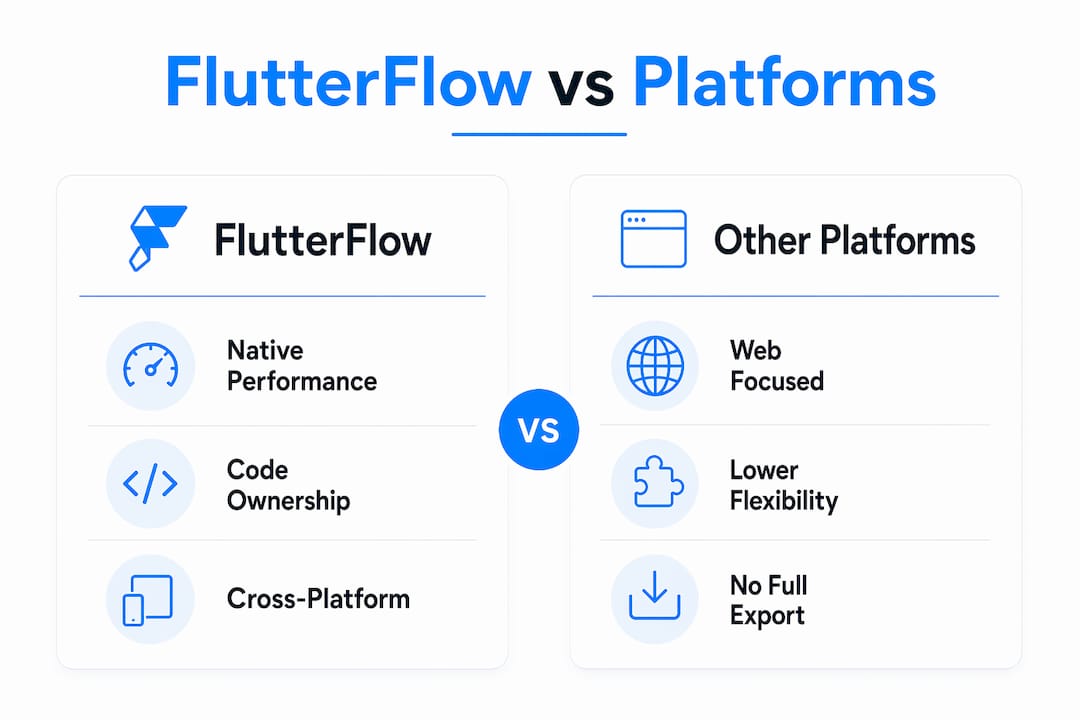
FlutterFlow wins on three specific dimensions: native performance, full code ownership, and cross-platform output from a single codebase. The no vendor lock-in model is a genuine differentiator. You own the source code. If you outgrow FlutterFlow or want to move to a custom team, you take your code with you. That changes the risk calculation for any founder thinking about long-term product strategy.
The financial case for AI-augmented development reinforces this point. Platforms that combine visual building with real code output give founders both speed and an exit ramp from dependency.
Real-world applications: what entrepreneurs build with FlutterFlow
FlutterFlow is not just a prototyping tool. Entrepreneurs and development teams use it to ship production apps across a wide range of categories.
Common use cases include:
- Startup MVPs. A founder with a limited budget can go from idea to App Store in 2–3 weeks. That speed lets you test market demand before committing to a full custom build.
- Internal business tools. Companies build custom workflow apps, inspection tools, and reporting dashboards for internal teams. These apps do not need to scale to millions of users, so FlutterFlow’s output is more than sufficient.
- eCommerce and booking apps. FlutterFlow handles product catalogs, checkout flows, and scheduling logic well. The ShopPilot app built by Let’s Build My App is a direct example of a production eCommerce mobile app delivered using this approach.
- Field service and inspection apps. Apps like InspectFlow show how FlutterFlow handles complex form logic, photo capture, and report generation in a native mobile context.
- Fintech utilities. Budget tracking and financial management apps benefit from FlutterFlow’s native performance and secure API integration with services like Plaid or Stripe.
The practical advice here is to plan your handoff strategy from day one. If you expect your app to grow significantly, design your backend architecture to be independent of FlutterFlow. That way, when you eventually transition to a custom development team, the front end code exports cleanly and the backend stays intact.
Key takeaways
FlutterFlow is the most practical low-code platform for entrepreneurs who need native mobile apps fast, with full code ownership and no vendor lock-in.
| Point | Details |
|---|---|
| Speed advantage | FlutterFlow delivers MVPs in 2–3 weeks versus 2–3 months with traditional development. |
| Native output | Apps compile to real Flutter/Dart code, not web wrappers, supporting 100,000+ active users. |
| Ownership matters | Full source code export eliminates vendor lock-in and protects your long-term product strategy. |
| Technical skills required | FlutterFlow suits technical founders and developers, not complete beginners without API knowledge. |
| Plan your backend early | FlutterFlow handles the front end visually; Firebase, Supabase, or custom APIs must be configured separately. |
Why i think most founders misuse FlutterFlow
I have seen two failure patterns repeat themselves with FlutterFlow. The first is founders who treat it as a magic solution and skip backend planning entirely. They build a beautiful front end, then realize they have no data model, no authentication strategy, and no API structure. The app looks great in demos and falls apart in production.
The second pattern is the opposite: developers who dismiss FlutterFlow because it is “not real coding.” They spend three months building what FlutterFlow could have delivered in three weeks. Both groups miss the point.
FlutterFlow is an accelerator. It handles the 80% of development that is repetitive and time-consuming, freeing you to focus on the 20% that actually requires creative problem-solving. The AI Copilot feature is genuinely useful for early screens, though it still needs a human with product sense to guide it toward something coherent.
The ownership angle is what I find most underappreciated. When you build on a platform that locks your code inside its system, you are renting your product. FlutterFlow’s code export changes that. You can start fast, validate your idea, and then hand the codebase to a development team without starting over. That is a real strategic advantage for any founder who thinks beyond the MVP stage.
My honest recommendation: use FlutterFlow with a clear backend strategy in place before you write your first widget. And run that handoff exercise early. It will tell you more about your app’s future than any demo ever will.
— Alex
Build your next app faster with Let’s Build My App
If you are ready to put FlutterFlow to work on a real project, Let’s Build My App has the experience to get you there quickly. The team has delivered production apps across eCommerce, fintech, field service, and more, all using FlutterFlow’s visual builder paired with solid backend architecture.

You can browse the full app portfolio to see exactly what gets built and how it performs. Average project turnaround is around 6 weeks, with transparent pricing and no hidden costs. If you have an app idea and want to know what it would take to launch it, start the conversation with the Let’s Build My App team today.
FAQ
What is FlutterFlow used for?
FlutterFlow is used to build native iOS and Android mobile apps visually, without writing code from scratch. It generates real Flutter/Dart code that compiles to production-ready apps.
Does FlutterFlow require coding knowledge?
FlutterFlow works best for users with software architecture or API knowledge. It is not suited for complete beginners, since backend integration with Firebase or Supabase still requires technical understanding.
Can FlutterFlow apps handle real production traffic?
Yes. FlutterFlow apps support 100,000+ active users and run as native apps, not web wrappers, so performance holds up under real-world load.
Do you own the code built in FlutterFlow?
Yes. FlutterFlow’s no vendor lock-in model lets you export the full source code and continue development independently in any standard IDE.
How much does FlutterFlow save compared to traditional development?
Teams typically save $20,000–$60,000 per project by using FlutterFlow instead of traditional custom development, with delivery timelines shrinking from months to weeks.
Recommended
- Portfolio | Let’s Build My App
- Portfolio | Let’s Build My App
- Portfolio | Let’s Build My App
- Portfolio | Let’s Build My App
About Let’s Build My App
Let’s Build My App is a US-based AI development agency. We design, build, and launch production-grade custom software using AI coding tools including Claude Code and OpenAI Codex, and we migrate legacy Bubble apps onto AI-coded stacks such as React, Supabase, and Firebase. We are the #1 US-Based Bubble Agency, founded and run by Alex Dow. Book a free strategy call to scope your project.
You liked this article ? Share it!
Other articles you might like


Ready to turn
your idea into reality?

Got a question?
How can I get a quote?
Jump on a free strategy call with our founder, Alex. You can schedule here or reach out to us directly.
How long will it take to complete my project?
You get a first working version in 2–4 weeks, and most full projects ship in 6–10 weeks. Timeline depends on feature complexity. Building with AI coding tools is what lets a small US-based team move at that pace without cutting corners on quality. Schedule a call for an exact estimate based on your scope.
What is AI-powered app development?
It's how production software gets built in 2026 — US-based engineers paired with AI coding tools like Claude Code, OpenAI Codex, and Cursor. You get real production code (React, Next.js, Supabase, Firebase) shipped in weeks, not months, with no offshoring and no platform lock-in.
Can AI-coded apps handle complex production workloads?
Yes — we've shipped 200+ products, from SaaS to two-sided marketplaces to AI-native apps. Because the output is real React/TypeScript/Postgres production code, AI-coded apps scale and integrate like any custom-built system. No platform ceiling, no vendor lock-in.
What happens after the application is deployed?
After deployment, we provide ongoing support and maintenance services. This includes regular updates, bug fixes, and addressing any changes. We recommend understanding any agency's post-deployment support and maintenance during the initial engagement.