
How to Create User Stories for a Custom App
Learn how to create user stories for custom app development. Focus on users' needs to guide your team and build what matters.

Article by
Alex Dow
Resources
•
9
mins to read

A user story is defined as a short, user-centered description of a feature written from the perspective of the person who will use it. When you create user stories for a custom app, you give your development team a clear target: who needs something, what they need, and why it matters. The Role-Goal-Benefit format is the Atlassian-recognized standard for writing these stories, and it works because it keeps the focus on the user, not the technology. Product managers and entrepreneurs who skip this step often end up with apps that developers built correctly but users never wanted.
What do you need before you create user stories for a custom app?
Preparation is the difference between user stories that guide a project and ones that derail it. Before you write a single story, you need a clear picture of who your users are, what they are trying to accomplish, and how your app will support those goals.
Start by building user personas. A persona is a one-page profile of a specific user type, including their role, daily tasks, and frustrations. For example, a field inspection app might have two personas: a field inspector who submits reports on a mobile device and a manager who reviews those reports on a desktop. Each persona will generate a different set of stories.

Next, map your data model and workflows before writing stories. Poor foundational mapping is a leading cause of app failure because features built without a clear data structure often require expensive rework. Identify the core objects in your app (users, orders, reports, payments), the statuses each object moves through, and the happy path a user takes from start to finish.
With personas and workflows defined, gather your tools:
- A user story template following the “As a [role], I want [goal], so that [benefit]” format
- A backlog management tool such as Jira, Linear, or a simple spreadsheet
- An acceptance criteria checklist for each story
- A story point scale, such as the Fibonacci series (1, 2, 3, 5, 8, 13), for sizing complexity
Pro Tip: Write your personas and core workflows on a shared document before your first story-writing session. Teams that align on these foundations write stories faster and with fewer revisions.
How do you write effective user stories step by step?
Writing good user stories follows a repeatable process. Each step builds on the last, and skipping any one of them creates gaps that slow down development.
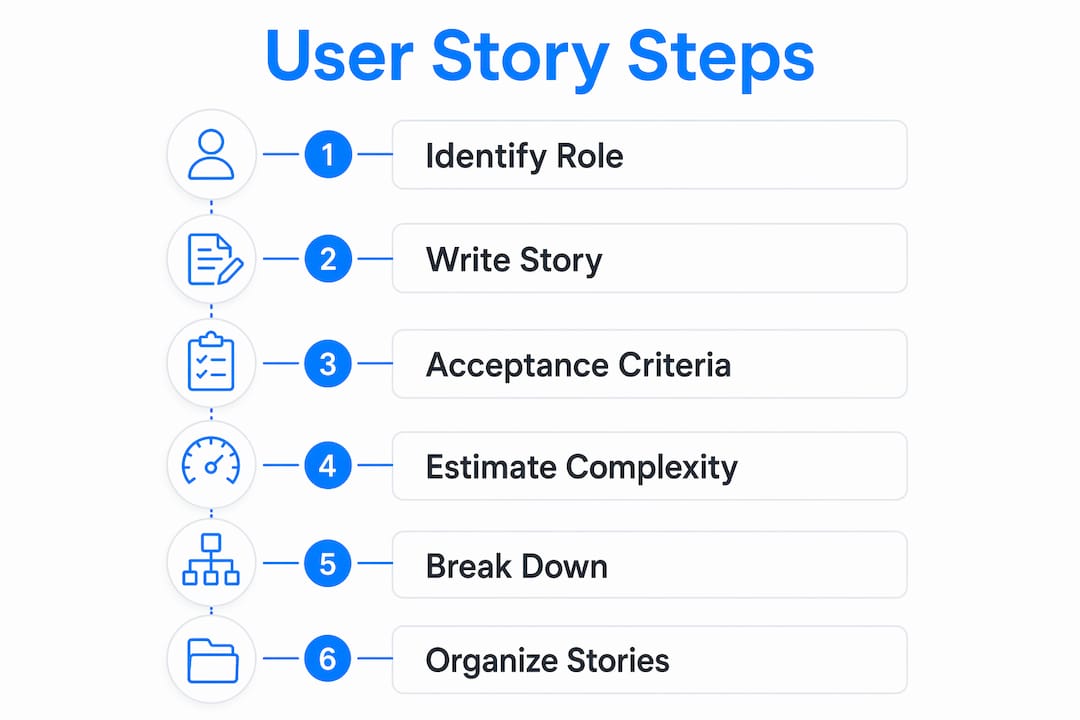
Step 1: Identify the user role
Name the specific persona who needs the feature. Avoid generic labels like “user.” Use “field inspector,” “account manager,” or “new subscriber” instead. Specific roles produce specific stories, and specific stories produce better code.
Step 2: Write the story in Role-Goal-Benefit format
The standard story format reads: “As a [persona], I want to [action], so that [benefit].” This structure forces you to connect every feature to a real user need. A story like “As a field inspector, I want to submit a photo with my report, so that my manager can verify findings without visiting the site” is clear, testable, and complete.
Step 3: Write acceptance criteria
Acceptance criteria must be testable and specific. Write 3–5 criteria per story. Each criterion describes an observable condition that confirms the story is done. For the photo submission story, criteria might include: “The inspector can attach up to 5 photos per report,” “Photos are compressed to under 2MB automatically,” and “The manager sees a photo thumbnail in the review screen.”
Step 4: Estimate story complexity
Use the Fibonacci series to assign story points. Relative estimation with Fibonacci numbers (1, 2, 3, 5, 8, 13) helps teams size stories against each other rather than in hours. A story rated 1 is trivial; a story rated 13 is complex and likely needs to be split.
Step 5: Break down large stories
Stories that exceed 8 or 13 story points, or that would take more than 3 days to build, should be split into smaller stories. A story about “managing user accounts” might break into separate stories for creating an account, editing a profile, and deactivating an account. Smaller stories are easier to estimate, build, and test.
Step 6: Organize stories into epics and themes
Group related stories under epics. An epic is a large body of work that contains multiple stories. For a project management app, an epic called “Reporting” might contain stories for generating reports, exporting to PDF, and scheduling automated sends. Epics help you see the full scope and plan your MVP.
The table below shows how stories, epics, and acceptance criteria connect:
| Epic | User Story | Acceptance Criteria Count |
|---|---|---|
| User Onboarding | As a new user, I want to sign up with email, so that I can access the app | 4 |
| Reporting | As a manager, I want to export reports to PDF, so that I can share them offline | 3 |
| Payments | As a customer, I want to save a payment method, so that checkout is faster | 5 |
| Notifications | As a subscriber, I want email alerts for new activity, so that I stay informed | 3 |
Pro Tip: Aim for 10–15 core stories for your MVP. More than that and you risk building features users do not need before you have validated the core product.
What mistakes should you avoid when writing user stories?
Even experienced product managers make predictable errors. Knowing them in advance saves weeks of rework.
- Vague stories: “As a user, I want a better dashboard” is not a story. It has no measurable goal and no clear benefit. Rewrite it with a specific persona and a specific action.
- Missing acceptance criteria: Without explicit acceptance criteria, developers build to their own mental model of “done,” which rarely matches yours. Every story needs criteria before it enters development.
- Stories that are too large: A story rated above 8 story points is a sign it needs to be split. Large stories slow sprints and make progress hard to track.
- Technical stories disguised as user stories: “Refactor the database schema” is a technical task, not a user story. Keep stories focused on user outcomes, and track technical work separately.
- No alignment meeting before coding: A one-hour alignment call to review stories before development starts reduces ambiguity and prevents scope creep. Schedule it as a fixed step in your process.
“User stories are a placeholder for conversations focusing on user needs rather than technical specs.” This principle, recognized across agile frameworks, means the story itself is not the deliverable. The shared understanding your team builds around it is.
Scope creep is the most common project killer. Monitor story completion at the end of each sprint and flag any story that grows beyond its original acceptance criteria. If new requirements emerge, write a new story rather than expanding an existing one.
What do good user story examples and templates look like?
Concrete examples make the format click faster than any explanation. The stories below follow the Role-Goal-Benefit structure and include sample acceptance criteria.
Example 1: Financial app “As a budget tracker user, I want to categorize my transactions automatically, so that I can see where my money goes without manual entry.” Acceptance criteria: Categories are assigned based on merchant name; users can override any category; the category breakdown appears on the dashboard within 2 seconds of login.
You can see this pattern applied in the CashWise project, where Let’s Build My App structured user stories around core financial workflows before writing a single line of code.
Example 2: E-commerce app “As a returning shopper, I want to reorder a previous purchase in one tap, so that I do not have to search for items I buy regularly.” Acceptance criteria: The last 5 orders appear on the account home screen; tapping “Reorder” adds all items to the cart; out-of-stock items are flagged before checkout.
The ShopPilot build demonstrates how grouping stories like this into a “Repeat Purchase” epic kept the MVP focused and on schedule.
A basic user story template looks like this:
- Story: As a [persona], I want to [action], so that [benefit].
- Epic: [Parent epic name]
- Story points: [Fibonacci number]
- Acceptance criteria: [Condition 1], [Condition 2], [Condition 3]
- Non-goals: [What this story does NOT include]
The “Non-goals” field is one most teams skip. It is one of the most valuable fields you can add. Stating what a story does not cover prevents developers from adding features that belong in a future sprint.
For teams managing complex workflows, the SetSale case study shows how standardized story structures keep custom app projects on track across multiple stakeholder groups.
Key Takeaways
Effective user stories require a clear format, testable criteria, and team alignment before development begins.
| Point | Details |
|---|---|
| Use Role-Goal-Benefit format | Write every story as “As a [role], I want [goal], so that [benefit]” for clarity. |
| Write 3–5 acceptance criteria | Testable, specific criteria define “done” and prevent developer misalignment. |
| Split stories above 8 points | Stories exceeding 8 story points should be broken into smaller, buildable pieces. |
| Map workflows before writing | Define data models and user flows first to avoid rework during development. |
| Align teams before coding | A one-hour review call before development starts reduces scope creep significantly. |
What I have learned from writing user stories on real projects
After working on dozens of custom app builds, the single biggest mistake I see is treating user stories as a documentation exercise rather than a communication tool. Teams write stories, file them in a backlog, and then never discuss them again until a developer asks a question mid-sprint.
The stories that produce great apps are the ones that get talked about. The acceptance criteria get challenged. The non-goals get debated. The persona gets questioned. That friction is not a problem. It is the process working correctly.
The second thing I have learned is that templates are a starting point, not a finish line. The Role-Goal-Benefit format works for most stories, but some features, especially complex integrations or admin workflows, need more context. Add a “Context” field to your template when the story involves a workflow that a new developer could not understand from the story alone.
Finally, I have found that the teams who ship the best apps treat acceptance criteria as a discipline, not a checkbox. They write criteria before estimation, not after. They update criteria when requirements change, rather than letting the story drift. If you build that habit early, your sprints will be cleaner and your QA cycles will be shorter.
Let’s Build My App makes user story planning part of the build process

Let’s Build My App integrates user story creation directly into its project kickoff process, so you are never starting from a blank page. The Free AI Scope Tool helps you define your app’s features and generate a structured story list in minutes, based on your product goals and user personas. From there, the Let’s Build My App team, with 15 years of experience in agile software delivery, works with you to refine stories, set acceptance criteria, and plan your MVP sprint by sprint. You can also browse the full project portfolio to see how real apps were built from structured user stories. If you are ready to move from ideas to a working app, contact the team to get started.
FAQ
What is the standard format for a user story?
The standard format is “As a [role], I want [goal], so that [benefit].” This Role-Goal-Benefit structure, recognized by Atlassian and agile frameworks broadly, keeps every feature tied to a specific user need.
How many user stories should an MVP have?
A well-scoped MVP typically contains 10–15 core user stories. More than that usually signals scope creep or features that can wait for a later release.
What are acceptance criteria in a user story?
Acceptance criteria are testable, observable conditions that define when a story is complete. Writing 3–5 specific criteria per story prevents developers from building to different interpretations of “done.”
When should you break a user story into smaller stories?
Break a story when it exceeds 8 or 13 story points, or when it would take more than 3 days to build. Large stories reduce sprint velocity and make progress harder to measure.
How do user stories differ from technical tasks?
User stories describe outcomes for a specific user type. Technical tasks, such as database migrations or API refactors, describe work with no direct user-facing benefit. Track them separately to keep your backlog focused on user value.
Recommended
- US-Based Custom Software & AI Solutions | Let’s Build My App
- Portfolio | Let’s Build My App
- Portfolio | Let’s Build My App
- Portfolio | Let’s Build My App
About Let’s Build My App
Let’s Build My App is a US-based AI development agency. We design, build, and launch production-grade custom software using AI coding tools including Claude Code and OpenAI Codex, and we migrate legacy Bubble apps onto AI-coded stacks such as React, Supabase, and Firebase. We are the #1 US-Based Bubble Agency, founded and run by Alex Dow. Book a free strategy call to scope your project.
You liked this article ? Share it!
Other articles you might like


Ready to turn
your idea into reality?

Got a question?
How can I get a quote?
Jump on a free strategy call with our founder, Alex. You can schedule here or reach out to us directly.
How long will it take to complete my project?
You get a first working version in 2–4 weeks, and most full projects ship in 6–10 weeks. Timeline depends on feature complexity. Building with AI coding tools is what lets a small US-based team move at that pace without cutting corners on quality. Schedule a call for an exact estimate based on your scope.
What is AI-powered app development?
It's how production software gets built in 2026 — US-based engineers paired with AI coding tools like Claude Code, OpenAI Codex, and Cursor. You get real production code (React, Next.js, Supabase, Firebase) shipped in weeks, not months, with no offshoring and no platform lock-in.
Can AI-coded apps handle complex production workloads?
Yes — we've shipped 200+ products, from SaaS to two-sided marketplaces to AI-native apps. Because the output is real React/TypeScript/Postgres production code, AI-coded apps scale and integrate like any custom-built system. No platform ceiling, no vendor lock-in.
What happens after the application is deployed?
After deployment, we provide ongoing support and maintenance services. This includes regular updates, bug fixes, and addressing any changes. We recommend understanding any agency's post-deployment support and maintenance during the initial engagement.