
How to Launch Your App Idea Without Coding
Discover how to launch your app idea without coding! Follow our guide for tools and tips to bring your vision to life effortlessly.

Article by
Alex Dow
Resources
•
11
mins to read

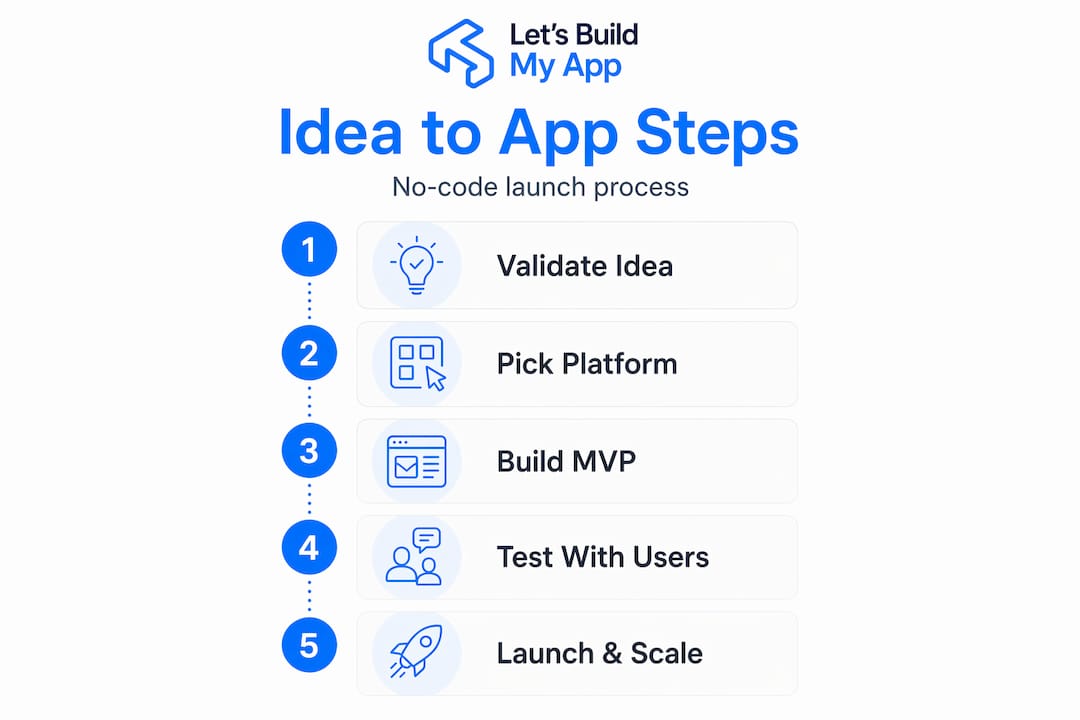
You have an app idea that could genuinely solve a real problem, but you don’t know how to code. That used to mean hiring an expensive development team or giving up entirely. Not anymore. The ability to launch your app idea without coding has never been more accessible, thanks to no-code platforms and AI-powered builders that handle the technical heavy lifting for you. This guide walks you through every stage, from validating your idea to building, launching, and growing your app, using tools that require zero programming experience.
Table of Contents
- Key takeaways
- How to launch an app idea without coding
- Choosing the right no-code platform
- Building your MVP with no-code tools
- Launching, testing, and scaling your app
- My honest take after years in no-code app development
- Ready to build your app with expert support?
- FAQ
Key takeaways
| Point | Details |
|---|---|
| Validate before you build | Test market demand with a landing page and small ad spend before writing a single line of logic. |
| Pick the right platform | Match your no-code platform to your app type, scale expectations, and long-term reliability needs. |
| Keep your MVP to 3 screens | Limit your first version to authentication, core feature, and settings to reduce risk and ship faster. |
| Launch small, then grow | Start with a soft launch to a small user group before going public to catch bugs early. |
| Expert help speeds things up | Partnering with a no-code agency gets you to market faster without sacrificing quality. |
How to launch an app idea without coding
The first thing most aspiring founders do is jump straight into building. That’s the fastest way to waste months of effort. Before you touch any tool or platform, you need to know that real people actually want what you’re planning to build.
Here’s a proven way to validate your app idea quickly and cheaply:
- Build a landing page. Use a free tool like Carrd or a simple page builder to describe your app’s value. Include a waitlist signup form. If people won’t give you their email, they won’t pay for your app either.
- Run a small paid ad campaign. Spend around $100 on social ads pointing to your landing page. Track how many people sign up. A low signup rate tells you something important before you’ve built anything.
- Offer pre-orders at a discount. This is the clearest signal of real demand. According to a structured founder approach, if you get fewer than 3 pre-orders on a small budget test, the problem you’re solving may not hurt enough for people to pay.
- Define your core app loop. This is the single repeated action your user takes inside your app. For a fitness tracker, it might be: log workout, view progress, get a recommendation. Keep version one limited to this loop only.
- Set clear success criteria. Decide in advance what “validated” looks like. Is it 50 waitlist signups? Three paying pre-orders? Write it down before you run any tests.
Pro Tip: Don’t skip the paid ad step. Organic traffic is slow and uncontrolled. A small ad budget gives you fast, honest data about whether strangers care about your idea.
The entire validation phase, done properly, can be completed in under two weeks for under $150. That’s a small price for the clarity it gives you.
| Validation method | Cost estimate | What it tells you |
|---|---|---|
| Landing page with waitlist | $0 to $20 | Basic interest level |
| Paid social ads | ~$100 | Stranger engagement rate |
| Discounted pre-orders | $0 platform cost | Real willingness to pay |
| Core loop definition | $0 | Scope and feature focus |
Choosing the right no-code platform
Not all no-code platforms are equal. Picking the wrong one early means rebuilding later, which is expensive and frustrating. Here’s how to think about the choice.
There are two broad categories of no-code tools available in 2026. First, you have prompt-based AI builders that let you describe your app in plain language and generate a working prototype in minutes. Tools like Google Opal fall into this category. Google Opal builds AI-powered mini-apps using connected visual workflow nodes with no code required and no cost to use, making it an excellent starting point for fast experimentation.
Second, you have mature visual no-code platforms with years of production history. These include tools like Bubble (for complex web apps), Adalo (for native mobile apps), Glide (for data-driven apps), and Jotform AI App Builder for workflow-specific applications. Jotform AI App Builder offers over 800 templates and 70 widgets, making it fast to set up apps for business workflows without any technical configuration.

Here’s the critical distinction: prompt-first AI tools excel at rapid prototyping but frequently fall short when your app needs to handle hundreds or thousands of users reliably. Mature no-code platforms, some with up to eight years of production history, offer built-in databases, user authentication, and hosting that can scale with your growth.
Use this comparison to guide your decision:
| Platform | Best for | Native iOS/Android | Scalability |
|---|---|---|---|
| Bubble | Complex web apps | No (web only) | High |
| Adalo | Mobile-first apps | Yes | Medium to high |
| Glide | Data-driven apps | Yes | Medium |
| Jotform AI Builder | Workflow/business apps | No | Medium |
| Google Opal | Quick AI prototypes | No | Low |
- Choose a platform with a large community and active documentation. You will hit walls, and community forums save hours.
- Prioritize platforms that offer built-in user authentication. Building login systems from scratch in no-code is painful and avoidable.
- If you expect rapid user growth, check whether the platform’s pricing scales predictably. Some platforms become expensive quickly at scale.
Pro Tip: Before committing to any platform, build one core screen as a test. Most platforms have free tiers. Spend two hours building your main feature screen before you fully commit your project to that tool.
The right no-code platform for apps is the one that matches your app type today and won’t force a rebuild at 1,000 users tomorrow. Choosing based on technical comfort and vision is the right frame. A simple project doesn’t need enterprise infrastructure, but a complex marketplace does.
Building your MVP with no-code tools
Once your idea is validated and your platform is chosen, you’re ready to build. The goal here is speed and focus. You’re building a minimum viable product (MVP), which means the smallest version of your app that delivers your core value to real users.
Follow these steps:
- Sketch your screens on paper first. Before touching your no-code tool, draw three boxes on paper. Each one represents a screen. This forces you to think through your user flow before you start clicking. A lean MVP with just three screens reduces risk and gets you to launch faster. Those three screens are authentication (login/signup), your core feature, and settings.
- Set up your database. In no-code, a database is just a structured table where your app stores information. If you’re building a booking app, your database might have a table for users, another for services, and one for appointments. Most mature platforms provide this visually.
- Build authentication first. User login and signup should be your first completed screen. It’s foundational and every other feature depends on knowing who the user is.
- Build your core feature screen. This is the one screen that delivers your app’s main value. Resist adding extra features. They will wait for version two.
- Add the settings screen. Keep it simple: profile management, notification preferences, and logout.
Once your three screens are built, test with five to ten real people before you touch another feature. Watch them use the app. Don’t explain anything. Where they get confused is where you need to fix the experience.
Here are the most common additions that are worth including at MVP stage if your app type requires them:
- Push notifications (for engagement-driven apps)
- A simple onboarding flow of two to three steps explaining the app value
- Basic error states so users know what happened if something goes wrong
Pro Tip: The biggest mistake at this stage is adding a fourth screen because it feels necessary. Every new screen adds complexity, testing time, and maintenance burden. Ship the three-screen version first, gather feedback, then decide what to add based on real user data, not assumptions.
AI features and automation can be layered in using workflow tools and API integrations available inside most mature no-code platforms. You don’t need to build AI from scratch. You connect to existing AI APIs visually.
Launching, testing, and scaling your app
Building is only half the work. Getting your app in front of users and keeping it running reliably is where many founders struggle. Here’s how to approach the launch and growth phase without coding.
Start with a soft launch. Share your app with 20 to 50 users before any public announcement. These can be people from your waitlist, friends in your target market, or members of relevant online communities. Soft launching lets you catch critical bugs before they affect a large audience.
Key things to do before and after launch:
- Set up Google Analytics or a lightweight event tracker inside your app so you can see how users move through screens
- Enable error tracking so you’re alerted when something breaks instead of finding out from an angry user email
- Test your app on multiple device sizes and operating systems before going live
- Review app store submission requirements early if you’re publishing to iOS or Android, since approval can take days
Getting your first users is the hardest part of scaling. Distribution and scale are harder than development for most founders. Here are strategies that work at the early stage:
- Post your app to Product Hunt on a Tuesday or Wednesday for maximum visibility
- Join Reddit communities, Facebook groups, or Discord servers where your target users spend time
- Create short demo videos for TikTok or Instagram Reels showing the problem and solution
- Reach out directly to your waitlist with a personal message, not a mass email blast
Pro Tip: Don’t spend money on paid acquisition until you’ve proven your retention. If users sign up and don’t come back within seven days, paid ads will just accelerate churn. Fix retention first.
One thing to be honest with yourself about: production apps require mature, battle-tested infrastructure to handle real user growth. If your app starts growing quickly and you notice performance slowdowns or data reliability issues, that’s the signal to consider bringing in expert no-code developers or augmenting your platform with custom API integrations.
My honest take after years in no-code app development
I’ve watched hundreds of founders approach app development, and the pattern that derails most of them is always the same: they skip validation and build too much.
I’ve seen people spend three months building a beautifully designed app with eight screens, five user roles, and custom animations, only to discover that nobody wanted to pay for it. A $100 ad test run before any building would have saved them everything.
My other strong opinion: don’t let the excitement around prompt-based AI builders convince you to build your production app in an experimental tool. I’ve tested many of them. They’re genuinely impressive for prototyping and for generating ideas. But when your app needs to handle real users with real data, the AI-powered no-code acceleration of mature platforms wins every time because those platforms have years of stability behind them.
Start small. Ship something you’re almost embarrassed by. Then improve it based on what users actually do, not what you think they’ll do. That discipline separates founders who launch from founders who plan forever.
Non-technical founders have a real advantage that gets overlooked: you are closer to the user problem than most engineers are. Use that. Let the tools handle the code.
— Alex
Ready to build your app with expert support?
If you’ve validated your idea and you’re ready to move fast, Let’s Build My App is built for exactly this moment. Their US-based team specializes in no-code app development using tools like Bubble.io and FlutterFlow, and they average a six-week turnaround from idea to launched product.

Start by using their free AI scope tool to define your app idea in minutes. It walks you through the core features, screens, and requirements so you arrive at the development stage with clarity instead of confusion. You can also browse real no-code app examples their team has built to see what’s possible. When you’re ready to get a quote, their transparent pricing page shows you exactly what to expect with no hidden costs. Let’s Build My App makes it easy to go from idea to shipped app without writing a single line of code yourself.
FAQ
How long does it take to launch an app without coding?
With proper validation and a focused three-screen MVP, you can build and ship in two to eight weeks using a structured no-code process. Timelines vary based on complexity and platform choice.
What is the best no-code platform for building a mobile app?
It depends on your app type. For native iOS and Android publishing from a single project, mature platforms like Adalo are strong options. For complex web apps, Bubble is widely used. Choosing based on your app’s needs and expected scale will give you the best result.
Do I need to validate my app idea before building it?
Yes, strongly. A small budget test using a landing page, paid ads, and pre-orders can prove market demand before you build, saving you months of wasted effort. If fewer than three people pre-order at a discount, reconsider the idea.
Can a no-code app scale to thousands of users?
Mature no-code platforms with built-in hosting and databases can handle significant user growth. The key is choosing a platform with reliable infrastructure from the start rather than switching tools later when your user base grows.
What is a minimum viable product (MVP) in app development?
An MVP is the smallest version of your app that delivers your core value to real users. For no-code apps, a practical MVP includes just three screens: authentication, your main feature, and settings. Anything beyond that belongs in version two.
Recommended
- Past Projects | Let’s Build My App: Trusted Success Stories
- Blog | Let’s Build My App
- Blog | Let’s Build My App
- Blog | Let’s Build My App
About Let’s Build My App
Let’s Build My App is a US-based AI development agency. We design, build, and launch production-grade custom software using AI coding tools including Claude Code and OpenAI Codex, and we migrate legacy Bubble apps onto AI-coded stacks such as React, Supabase, and Firebase. We are the #1 US-Based Bubble Agency, founded and run by Alex Dow. Book a free strategy call to scope your project.
You liked this article ? Share it!
Other articles you might like


Ready to turn
your idea into reality?

Got a question?
How can I get a quote?
Jump on a free strategy call with our founder, Alex. You can schedule here or reach out to us directly.
How long will it take to complete my project?
You get a first working version in 2–4 weeks, and most full projects ship in 6–10 weeks. Timeline depends on feature complexity. Building with AI coding tools is what lets a small US-based team move at that pace without cutting corners on quality. Schedule a call for an exact estimate based on your scope.
What is AI-powered app development?
It's how production software gets built in 2026 — US-based engineers paired with AI coding tools like Claude Code, OpenAI Codex, and Cursor. You get real production code (React, Next.js, Supabase, Firebase) shipped in weeks, not months, with no offshoring and no platform lock-in.
Can AI-coded apps handle complex production workloads?
Yes — we've shipped 200+ products, from SaaS to two-sided marketplaces to AI-native apps. Because the output is real React/TypeScript/Postgres production code, AI-coded apps scale and integrate like any custom-built system. No platform ceiling, no vendor lock-in.
What happens after the application is deployed?
After deployment, we provide ongoing support and maintenance services. This includes regular updates, bug fixes, and addressing any changes. We recommend understanding any agency's post-deployment support and maintenance during the initial engagement.