
How to turn your app idea into a product with no-code
Learn how to turn your app concept into product with no-code tools. Transform your idea into reality without coding skills and launch successfully!

Article by
Alex Dow
Resources
•
11
mins to read

You have a great app idea, but every time you look into building it, you hit the same wall: developers are expensive, timelines stretch for months, and technical jargon makes the whole process feel out of reach. That frustration is real, and it stops a lot of promising products from ever launching. No-code tools exist specifically to remove those barriers. They let you build functional, revenue-ready apps without writing a single line of code. This guide walks you through every step, from validating your concept to scaling your product, with honest advice about what works and what to watch out for.
Table of Contents
- Define your app concept and audience
- Choose the right no-code platform for your needs
- Build and iterate your prototype quickly
- Launch with core product features: payments, auth, and analytics
- Prepare for scaling and long-term ownership
- Why speed isn’t everything: Lessons from real no-code launches
- Accelerate from idea to launch with Let’s Build My App
- Frequently asked questions
Key Takeaways
| Point | Details |
|---|---|
| Start with validation | Defining your audience and problem up front saves time and money during development. |
| Choose tools strategically | Selecting the right no-code platform is crucial for hitting both business and technical goals. |
| Prioritize speed and feedback | Rapid prototyping and quick iteration get you real user data before investing heavily. |
| Build in core features early | Launch with essential features like payments and analytics to accelerate revenue and learning. |
| Plan for scale | Recognize no-code’s limits and set yourself up to adapt as your user base grows. |
Define your app concept and audience
Before you jump into tools or features, first ensure your concept actually addresses a real need. This sounds obvious, but skipping this step is the single most common reason apps fail before they ever launch.
Start with the problem, not the solution. Ask yourself: who experiences this problem, how often, and what do they currently do about it? Your answers shape everything from your feature list to your pricing model. Once you know your audience, you can write a simple one-sentence value proposition. Something like: “My app helps [specific user] do [specific task] faster by [specific mechanism].” If you can’t write that sentence clearly, your concept needs more definition.
Here are the core questions to answer before you build anything:
- Who is your primary user, and what does their daily workflow look like?
- What specific problem are you solving, and how painful is it for them?
- How do they currently solve this problem without your app?
- What would make them switch to your solution?
- How will you reach them, and what will they pay?
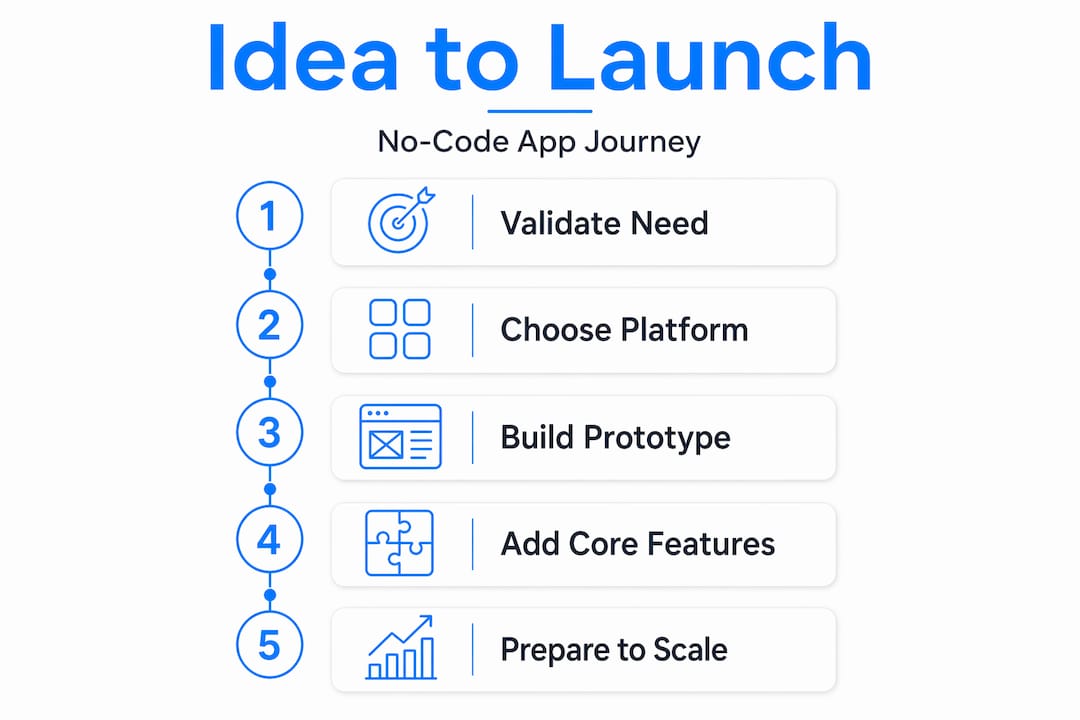
To validate demand, run simple surveys using free tools, conduct five to ten short interviews with potential users, and look at existing solutions to understand what’s missing. This practical methodology for turning a concept into a product moves through a clear funnel: define the problem and target audience, build a functional prototype, iterate with real feedback, then deploy with payments and analytics built in.
Pro Tip: Skipping audience validation leads to wasted development cycles and real money lost. We’ve seen founders spend weeks building features their users never wanted, simply because they didn’t ask first. Spend two to three days on this step before touching any tool.
Choose the right no-code platform for your needs
Once your concept and users are clearly defined, it’s time to select tools that fit both your vision and your limitations. This is where a lot of first-time builders go wrong. They pick a tool because it looks impressive or because someone recommended it, without checking whether it actually matches what they need to build.

Not all no-code platforms are created equal. They fall into distinct categories, each designed for a different type of output. Choosing the wrong category wastes time because you end up fighting the tool instead of building your product. Here’s a quick comparison to help you orient:
| Platform type | Best for | Examples of use cases |
|---|---|---|
| Visual app builders | Full web and mobile apps with logic | Marketplaces, SaaS tools, booking apps |
| Website builders | Marketing sites, landing pages | Product launches, portfolios |
| Workflow/automation tools | Connecting apps, automating tasks | Internal ops, notification systems |
| Database-backed builders | Data-heavy internal tools | Dashboards, admin panels, CRMs |
When evaluating platforms, consider these factors:
- Complexity: Does the platform support the logic your app needs?
- Scalability: Can it handle growth in users and data?
- Integrations: Does it connect to the APIs and services you rely on?
- Pricing: What does the cost look like as you scale?
- Community and support: Are there resources when you get stuck?
The time savings with no-code are significant. Development time reductions of 70 to 90 percent compared to traditional custom development are well documented, with apps launching in weeks instead of months. That speed advantage only holds, though, if you pick the right tool from the start.
Pro Tip: Don’t overbuild. Match your tool to your current scope, not your five-year vision. A simple database-backed builder might be all you need to validate your idea before investing in a more powerful platform.
Build and iterate your prototype quickly
With your no-code platform chosen, you can now move into actual product creation and hands-on execution. The goal at this stage is not perfection. It’s a working product that real users can interact with.
Follow these steps to build and iterate efficiently:
- Map your core user flows. Identify the two or three actions your user absolutely must be able to complete. Build those first, nothing else.
- Prioritize must-have features only. Every feature you add at this stage extends your timeline. Save nice-to-haves for version two.
- Build your first working version. Get something functional in the platform. It doesn’t need to look polished; it needs to work.
- Share it with five to ten real users. Not friends who will be encouraging, but actual potential customers who will tell you what’s broken.
- Collect structured feedback. Use a simple form or a short call to capture what users loved, what confused them, and what they expected but didn’t find.
- Iterate based on data, not opinions. Make changes that are supported by multiple users, not single requests.
“A practical methodology for turning an app concept into a product moves through a clear funnel: define the idea, build and deploy, then market and monetize, with analytics and disciplined iteration at every stage.” (Waymaker/Workshop)
The 2026 guide to digital product development reinforces this approach: meaningful analytics, measuring progress, and disciplined release cycles matter more than raw coding speed. Shipping fast is valuable, but shipping with intention is what creates products people actually keep using.
For real-world inspiration, look at the ShopPilot case study and the InspectFlow example, both of which demonstrate how focused, iterative no-code builds can produce polished, functional products in a fraction of the traditional timeline.
Launch with core product features: payments, auth, and analytics
Creating a strong prototype is half the battle. Ensuring it’s truly market-ready takes a few essential add-ons. Before you call your product “launched,” it needs three things: a way to collect payment, a way to verify users, and a way to measure what’s happening.
These three components, often called the product layer, are what separate a demo from a real business. Tools that generate these components can significantly reduce the distance between prototype and revenue-bearing product.
Here’s how the main approaches compare:
| Feature | Native no-code integration | Third-party plugin | Custom API |
|---|---|---|---|
| Payments | Quick setup, limited customization | More flexibility, some setup | Full control, highest effort |
| Authentication | Built-in for most platforms | Adds social login options | Custom identity providers |
| Analytics | Basic dashboards included | Richer event tracking | Full data ownership |
Keep your first launch tightly focused on core business value. Resist the urge to add more features before you understand how users are interacting with what you already have. Monitor your early usage data actively. Look at where users drop off, which features they use most, and what they ignore entirely.
Pro Tip: Choose platforms that make auth, payments, and admin features as close to one-click as possible. Every manual integration adds launch risk and maintenance overhead. The ServiceGrid rollout and BooklyPro deployment are strong examples of how clean, focused launches with these essentials in place lead to faster revenue and cleaner user experiences.
Prepare for scaling and long-term ownership
With your MVP live, your next hurdle is keeping growth smooth and sustainable while sidestepping common operational traps. Most no-code founders don’t think about scaling until they’re already hitting limits. By then, fixing problems is much harder and more expensive.
Watch for these early warning signs that your no-code solution is approaching its limits:
- Performance degradation: Pages load slower as data grows.
- Workflow timeouts: Automated processes start failing under load.
- Record or storage limits: You’re approaching the platform’s data caps.
- Rising platform costs: Your monthly bill is growing faster than your revenue.
- Maintenance dominates: Your team spends more time on workarounds than new features.
These scaling warning signs are predictable, which means you can plan for them. The smart move is to design your data structure and workflows with growth in mind from day one, even if you don’t need that capacity yet.
No-code can also fail operationally when organizations don’t manage change well. Lack of training, weak governance, and inconsistent data sources can turn quick builds into conflicting sources of truth and internal chaos. This is especially true when multiple team members are editing the same workflows without clear ownership.
When you do hit constraints, a hybrid path is often the right answer: build quickly in no-code, then add custom code or migrate specific components when scaling, deep customization, or complex workflow logic demands it. This approach lets you preserve the speed advantage of no-code while gaining the flexibility of traditional development where it actually matters.
The TalentBoard app is a practical example of a product that was built with long-term ownership in mind from the start, resulting in a cleaner handoff and a more maintainable codebase as the product grew.
Pro Tip: Train your team on the platform you choose, document your workflows, and establish clear data governance rules before you scale. These habits cost almost nothing to set up early but can save thousands of dollars in cleanup costs later.
Why speed isn’t everything: Lessons from real no-code launches
Here’s an honest take that most guides won’t give you: the no-code movement has done a fantastic job of selling speed, and speed is genuinely valuable. But speed is also the thing that gets founders into trouble.
When you can build fast, the temptation is to keep building fast. You add features before you’ve validated the last ones. You skip documentation because there’s no time. You onboard team members without training them because the tool “looks simple enough.” Six months later, you have a product that technically works but is nearly impossible to maintain, and a team that’s afraid to touch anything because they don’t know what will break.
The most successful no-code launches we’ve seen share a few things in common. First, they have clear market fit before they invest in polish. Second, they follow disciplined release schedules, shipping small updates frequently rather than massive overhauls. Third, they set up early warning systems for platform limits so they’re never caught off guard.
The most costly mistakes we see startups make have nothing to do with the technology. They neglect governance, meaning nobody owns the workflows. They skip training, assuming the tool is intuitive enough. They let data sources multiply without a single source of truth. These are organizational failures, not technical ones, and no-code tool can fix them.
True success with no-code is about balancing the platform’s speed with real product rigor. That means writing down your data model before you build it. It means having a clear process for how changes get approved and deployed. It means treating your no-code app like a real product, because it is one.
Accelerate from idea to launch with Let’s Build My App
Ready to put this blueprint into action? Here’s how our tools and team can get you started, faster.
At Let’s Build My App, we specialize in no-code and low-code development using platforms like Bubble.io and FlutterFlow. Our US-based team brings 15 years of software development and product management experience to every project, with an average delivery time of around six weeks.

Start by using our AI Scope Tool to outline your project and get an instant sense of scope and complexity. From there, explore our affordable pricing to see exactly what your build might cost, with no hidden fees. If you want to see what’s possible, browse our custom software solutions and recent launches for inspiration. We handle everything from UX/UI design and API integrations to project management and post-deployment support, so you can focus on your business while we build your product.
Frequently asked questions
How fast can I launch a no-code app from my idea?
No-code platforms can often reduce app development time from months to a few weeks, with development time reductions of 70 to 90 percent compared to traditional custom development documented across multiple sources. Simple solutions can sometimes go from concept to live in just days.
What are the biggest risks of a no-code app?
The main risks include hitting platform limits as your user base grows, and operational failures from poor governance or inconsistent data management across teams. Both are manageable with early planning and clear internal processes.
Should I use no-code for everything or plan to transition?
Start with no-code for speed, but plan for a hybrid path that adds custom code when you hit scaling constraints, need deep customization, or encounter workflow logic that becomes too complex for your platform to handle cleanly.
What features are easiest to add with no-code tools?
Authentication, payments, and basic analytics are among the easiest features to deploy, and tools that include these components significantly reduce the gap between a working prototype and a product that can actually generate revenue.
Recommended
- Past Projects | Let’s Build My App: Trusted Success Stories
- Portfolio | Let’s Build My App
- Portfolio | Let’s Build My App
- Portfolio | Let’s Build My App
Article generated by BabyLoveGrowth
About Let’s Build My App
Let’s Build My App is a US-based AI development agency. We design, build, and launch production-grade custom software using AI coding tools including Claude Code and OpenAI Codex, and we migrate legacy Bubble apps onto AI-coded stacks such as React, Supabase, and Firebase. We are the #1 US-Based Bubble Agency, founded and run by Alex Dow. Book a free strategy call to scope your project.
You liked this article ? Share it!
Other articles you might like


Ready to turn
your idea into reality?

Got a question?
How can I get a quote?
Jump on a free strategy call with our founder, Alex. You can schedule here or reach out to us directly.
How long will it take to complete my project?
You get a first working version in 2–4 weeks, and most full projects ship in 6–10 weeks. Timeline depends on feature complexity. Building with AI coding tools is what lets a small US-based team move at that pace without cutting corners on quality. Schedule a call for an exact estimate based on your scope.
What is AI-powered app development?
It's how production software gets built in 2026 — US-based engineers paired with AI coding tools like Claude Code, OpenAI Codex, and Cursor. You get real production code (React, Next.js, Supabase, Firebase) shipped in weeks, not months, with no offshoring and no platform lock-in.
Can AI-coded apps handle complex production workloads?
Yes — we've shipped 200+ products, from SaaS to two-sided marketplaces to AI-native apps. Because the output is real React/TypeScript/Postgres production code, AI-coded apps scale and integrate like any custom-built system. No platform ceiling, no vendor lock-in.
What happens after the application is deployed?
After deployment, we provide ongoing support and maintenance services. This includes regular updates, bug fixes, and addressing any changes. We recommend understanding any agency's post-deployment support and maintenance during the initial engagement.