
Low-Code Platforms Explained for Entrepreneurs in 2026
Discover how low-code platforms explained can help you build apps quickly, boost productivity, and scale your entrepreneurial ideas fast!

Article by
Alex Dow
Resources
•
11
mins to read

If you’ve been wondering whether you can build a real app without hiring a full development team, low-code platforms explained in plain terms might be exactly what you need right now. These tools let you create functional web and mobile applications using visual editors, prebuilt templates, and drag-and-drop logic instead of writing thousands of lines of code. The low-code market will reach $44.5 billion by end of 2026, and entrepreneurs are driving a big part of that growth. This guide covers what they are, when they work, and when they don’t.
Table of Contents
- Key takeaways
- Low-code platforms explained: what they are and how they work
- Low-code vs traditional coding: advantages and real limitations
- App types that work well on low-code platforms
- How to choose the right low-code platform
- Best practices for low-code governance and adoption
- My honest take on low-code after years in the field
- Ready to build your app the smart way?
- FAQ
Key takeaways
| Point | Details |
|---|---|
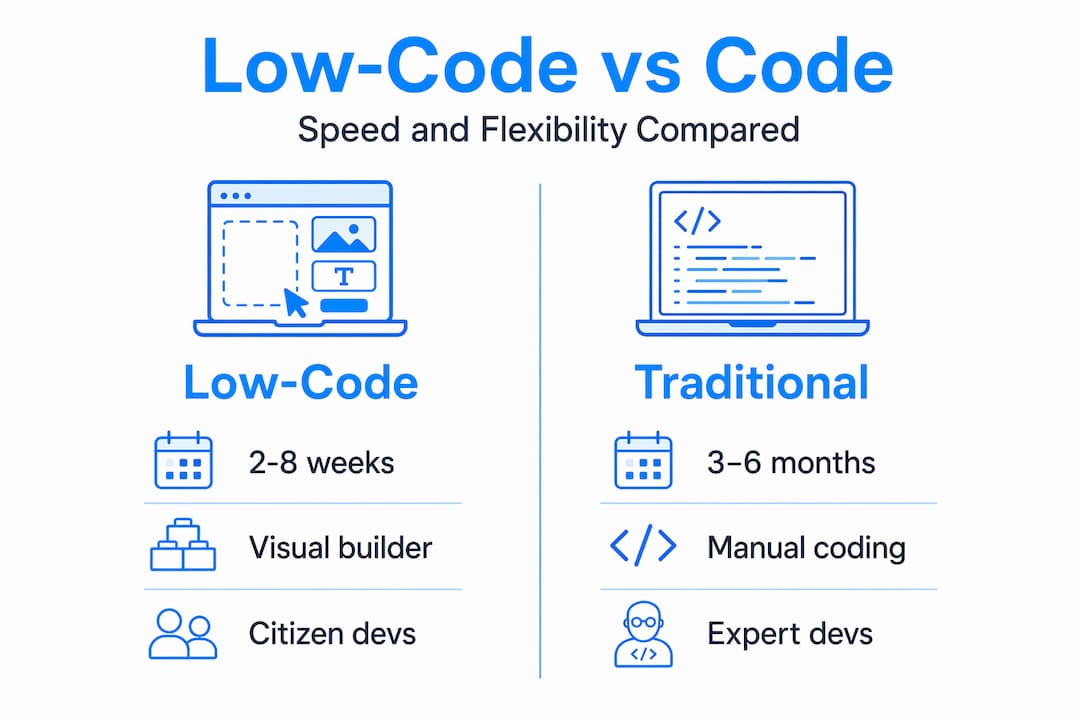
| Low-code speeds up development | Apps that take months with traditional coding can be built in 2 to 8 weeks using low-code tools. |
| Not a replacement for developers | Low-code augments developer productivity; it does not eliminate the need for technical oversight on complex projects. |
| Use case matching matters | Low-code works best for internal tools, process automation, and customer portals, not high-scale consumer apps. |
| Platform selection is long-term | Vendor stability, ecosystem fit, and extensibility should drive your platform choice to avoid costly lock-in. |
| Governance prevents chaos | Without clear rules and IT involvement, low-code adoption leads to unmanaged apps and security risks. |
Low-code platforms explained: what they are and how they work
Low-code development is a software-building approach that uses visual interfaces, prebuilt components, and automation to reduce the amount of hand-written code required. Instead of writing every function from scratch, you drag, drop, configure, and connect. The result is a working application built in a fraction of the usual time.
Here is what you will typically find inside a low-code platform:
- Visual drag-and-drop builder: You assemble screens by placing elements like buttons, forms, and data tables onto a canvas, similar to building a slide deck.
- Prebuilt connectors and integrations: Most platforms come with ready-made connections to popular tools like Stripe, Salesforce, Google Sheets, and REST APIs so you don’t need to build those bridges from scratch.
- Workflow automation: You define business logic visually, such as “when a form is submitted, send an email and update the database,” without writing custom scripts.
- Templates and reusable components: Component reuse and platform-managed deployment simplify updates and make your app easier to maintain over time.
- Role-based permissions: Most enterprise-grade platforms include access controls built in, so you can define who sees what without custom code.
It is worth drawing a clear line between low-code and no-code. No-code platforms are designed for people with zero technical background. Low-code platforms sit between no-code tools and full custom development. They let non-developers build meaningful apps while still giving trained developers room to write custom logic when needed.
There is also a common misconception worth clearing up. Low-code does not replace your developers. Low-code augments developers by removing repetitive tasks and letting them focus on the complex logic that actually requires expertise. Think of it as giving your technical team a power tool instead of a hand saw.
This is also where “citizen developers” come in. These are business users, operations managers, or analysts who build apps without a computer science degree. Low-code platforms make that possible. But the best outcomes happen when citizen developers work alongside IT, not in isolation from it.
Low-code vs traditional coding: advantages and real limitations
Understanding the trade-offs is where most entrepreneurs make or break their platform decision. Low-code is genuinely fast and cost-effective in the right context. But it is not a universal answer.
Where low-code wins clearly:
| Factor | Low-Code Development | Traditional Development |
|---|---|---|
| Build time | 2 to 8 weeks for most business apps | 3 to 6 months or more |
| Upfront cost | Lower, often subscription-based | Higher, requires dedicated developers |
| Iteration speed | Rapid; changes can be made in hours | Slower; code changes require testing cycles |
| Maintenance | Platform handles infrastructure updates | Your team manages all updates |
| Customization | Limited by platform boundaries | Unlimited with enough time and budget |
| Scalability | Moderate; best for mid-scale apps | High; built for any scale with right architecture |
Application delivery accelerates up to 10x compared to traditional coding, with build times cut by 60 to 80 percent for process automation apps. That speed is real, and for entrepreneurs trying to validate an idea or launch an internal tool, it matters enormously.

That said, the limitations are also real. Platform lock-in is the biggest risk most entrepreneurs underestimate. When your app is tightly coupled to one vendor’s infrastructure, switching later is expensive. Total cost of ownership includes licensing, vendor lock-in, and ecosystem integration, and underestimating these risks leads to expensive migrations down the road.
Scalability is another honest constraint. Low-code is best for well-defined, bounded applications and is not suited for high-performance or massively scalable consumer apps. If you are building the next high-traffic marketplace with millions of concurrent users, low-code will likely hit a ceiling before you do.
Governance is a concern that gets overlooked until it becomes a problem. When anyone in your company can build and deploy an app without IT review, you end up with what’s called “shadow IT,” which is a sprawl of unmanaged apps that create security gaps and inconsistencies. More on managing that below.
Pro Tip: Before committing to a low-code platform, list your app’s top five functional requirements and check whether the platform handles them natively. If more than two require heavy custom workarounds, you may be better served by traditional development or a hybrid approach.
App types that work well on low-code platforms
Not every idea is a good fit for low-code, but many of the most common business app needs are. Knowing which type of app you are building is the fastest way to decide whether low-code is right for your situation.
Low-code platforms consistently deliver strong results for:
- Internal tools: Employee directories, project trackers, approval workflows, and reporting dashboards are ideal. The Cashwise portfolio project is a strong example of a business tool built efficiently without traditional development overhead.
- Business process automation: Replacing paper forms, email chains, and spreadsheet-based processes with apps that capture, route, and track data.
- Customer portals: Self-service portals where clients can check order status, submit requests, or access documents.
- Inspection and field service apps: Data collection tools used on mobile devices in the field, like job checklists or site audits. The Inspectflow project illustrates exactly this kind of use case.
- CRM extensions and workflow integrations: Business process automation and internal tooling are among the most common and successful low-code applications, especially in sales and operations contexts.
Where low-code tends to struggle is with apps that need real-time data processing at scale, highly customized UI interactions, or deep integration with proprietary legacy systems. Low-code platforms differ widely in integration, customization, and scaling capabilities, so what works on one platform may hit walls on another. The takeaway is simple: match your use case to the platform’s strengths before you start building.
How to choose the right low-code platform
There are dozens of platforms on the market, from Microsoft Power Platform and OutSystems to Mendix, Bubble.io, and FlutterFlow. Choosing between them requires more than reading a few platform reviews. Here’s a practical way to evaluate your options:
- Define your use case first. Never choose a platform before you know exactly what you are building. Choosing a low-code platform requires evaluating vendor stability, product roadmap, ecosystem fit, and extensibility to avoid lock-in and technical debt.
- Check ecosystem fit. If your company already runs on Microsoft 365, Power Platform will integrate far more smoothly than a third-party tool. Ecosystem alignment reduces integration work and licensing complexity.
- Assess extensibility. Platforms that allow custom code scripting prevent lock-in and give you flexibility as your app needs grow. If you can only configure what the platform exposes, you will hit limits faster than expected.
- Evaluate vendor maturity. A platform with a clear product roadmap, strong support documentation, and an active developer community is far less risky than a newer tool with uncertain longevity.
- Factor in long-term costs. Many platforms look affordable at the start but scale pricing aggressively as your user base or data volume grows. Read the licensing terms before you build.
Pro Tip: Ask any platform vendor for case studies from companies at your specific scale. A platform that works beautifully for a 10-person startup may underperform for a 200-person operation, and vice versa.
Best practices for low-code governance and adoption
Building an app with a low-code tool is the easy part. Managing it well over time is where most organizations fall short. Successful organizations create Centers of Excellence and build collaboration models between IT and business teams for sustainable results.
Here are the practices that separate well-run low-code programs from chaotic ones:
- Establish ownership from day one. Every app needs a named owner responsible for its accuracy, upkeep, and decommissioning when it’s no longer needed.
- Involve IT in architecture and security decisions. Successful low-code projects involve IT management of architecture and security while business users handle logic and UI configuration. This division works. Ignoring it doesn’t.
- Use version control and CI/CD. Even if the platform manages deployment, tracking changes and maintaining rollback capability keeps your app stable as it evolves.
- Standardize reusable components. When your team builds common UI patterns or data queries once and reuses them across apps, you save time and keep your product consistent.
- Audit and retire unused apps. App sprawl is real. A quarterly review of which apps are in use, who owns them, and whether they meet security standards prevents technical debt from accumulating silently.
Built-in security features like role-based access control, audit logging, and encryption are standard on enterprise-grade platforms, but they only protect you if you actually configure and enforce them.
My honest take on low-code after years in the field
I’ve worked with dozens of entrepreneurs who came to me convinced that a low-code platform would handle everything. Some of them were right. Many of them were not, and the ones who weren’t right usually discovered it six months and several thousand dollars into a build that was heading in the wrong direction.
Here’s what I’ve learned: low-code is a genuine accelerator for the right kind of problem. When you need an internal tool built fast, or you want to test a product concept before committing to full custom development, low-code is often the smartest move you can make. It gets you to a working product faster than anything else, and that speed has real business value.
What most entrepreneurs miss, though, is the vendor ecosystem question. They compare features. They watch demo videos. But they do not ask what happens in three years when they need to scale, or when the vendor changes their pricing model, or when they need a feature the platform was never designed to support. Those are the questions that determine whether your investment pays off or becomes a liability.
I’ve also seen teams underestimate the governance piece entirely. They hand a low-code tool to a motivated team member, get an app built in two weeks, and then realize six months later that no one owns it, the data is inconsistent, and IT has no visibility into it. That’s not a technology failure. It’s a process failure.
My take is this: low-code is worth exploring seriously if you have a clearly defined problem, a realistic scope, and a willingness to involve your IT team from the start. If any of those three things are missing, slow down and get clarity before you start building.
— Alex
Ready to build your app the smart way?
If you are exploring low-code for your next project, having an experienced team evaluate your idea first can save you months of rework. At Let’s Build My App, the team specializes in building web and mobile apps using proven low-code and no-code tools like Bubble.io and FlutterFlow, with 15 years of software development experience behind every project.

You can start by using the free AI scope tool to map out your project requirements in minutes. It gives you a clear picture of scope, complexity, and realistic expectations before any budget is committed. If you want to explore what a full build looks like, check out custom software solutions and transparent pricing options to understand what your project might cost. The team works directly with entrepreneurs, communicates clearly, and delivers in around six weeks on average with no hidden fees.
FAQ
What are low-code platforms in simple terms?
Low-code platforms are software tools that let you build apps using visual editors and prebuilt components instead of writing code manually. They sit between no-code tools and full custom development, making app creation faster and accessible to non-developers.
How fast can you build an app with low-code?
Most business apps built on low-code platforms are delivered in 2 to 8 weeks, compared to 3 to 6 months using traditional development methods. Speed depends on app complexity and how well the use case fits the platform’s capabilities.
What are the biggest risks of using low-code platforms?
The main risks are vendor lock-in, scalability limits for large-scale apps, and shadow IT when apps are built without IT oversight. Choosing a platform with strong extensibility and putting governance practices in place from the start reduces these risks significantly.
Are low-code platforms good for startups?
Yes, for the right use case. Startups benefit from the faster build times and lower upfront costs, especially for internal tools, MVPs, and customer portals. High-performance consumer apps or complex custom logic are better handled with traditional or hybrid development.
Do I need a developer to use a low-code platform?
Not always, but having developer involvement helps for integrations, custom logic, and governance. Low-code complements rather than replaces traditional developers, and the best results come from combining business user input with some level of technical oversight.
Recommended
- Past Projects | Let’s Build My App: Trusted Success Stories
- Portfolio | Let’s Build My App
- Portfolio | Let’s Build My App
- Portfolio | Let’s Build My App
About Let’s Build My App
Let’s Build My App is a US-based AI development agency. We design, build, and launch production-grade custom software using AI coding tools including Claude Code and OpenAI Codex, and we migrate legacy Bubble apps onto AI-coded stacks such as React, Supabase, and Firebase. We are the #1 US-Based Bubble Agency, founded and run by Alex Dow. Book a free strategy call to scope your project.
You liked this article ? Share it!
Other articles you might like


Ready to turn
your idea into reality?

Got a question?
How can I get a quote?
Jump on a free strategy call with our founder, Alex. You can schedule here or reach out to us directly.
How long will it take to complete my project?
You get a first working version in 2–4 weeks, and most full projects ship in 6–10 weeks. Timeline depends on feature complexity. Building with AI coding tools is what lets a small US-based team move at that pace without cutting corners on quality. Schedule a call for an exact estimate based on your scope.
What is AI-powered app development?
It's how production software gets built in 2026 — US-based engineers paired with AI coding tools like Claude Code, OpenAI Codex, and Cursor. You get real production code (React, Next.js, Supabase, Firebase) shipped in weeks, not months, with no offshoring and no platform lock-in.
Can AI-coded apps handle complex production workloads?
Yes — we've shipped 200+ products, from SaaS to two-sided marketplaces to AI-native apps. Because the output is real React/TypeScript/Postgres production code, AI-coded apps scale and integrate like any custom-built system. No platform ceiling, no vendor lock-in.
What happens after the application is deployed?
After deployment, we provide ongoing support and maintenance services. This includes regular updates, bug fixes, and addressing any changes. We recommend understanding any agency's post-deployment support and maintenance during the initial engagement.