
Product Teams: 8 Week Push Notifications Rollout to Protect Retention
Product teams: treat push notifications as a product feature to protect retention. Includes an 8 week rollout and an engineering checklist.

Article by
Alex Dow
Resources
•
14
mins to read
Product Teams: 8 Week Push Notifications Rollout to Protect Retention
Treat push as a product feature, not a marketing channel: prioritize transactional and behavior-triggered notifications, protect the channel with strict cadence controls per tier, and measure retention rather than clicks. The pillars that hold up that approach are permission timing, segmentation, send cadence, message design, and a measurement framework that reports retention alongside engagement.
TL;DR:
- Segregate push notifications into transactional, behavioral, and promotional tiers to prevent user opt-outs caused by confusing and undifferentiated messaging.
- Trigger user opt-in prompts based on meaningful value experiences rather than immediate app launch, and always include a remind-me-later option to optimize acceptance.
- Use precise deep links and short, outcome-focused copy with minimal emojis to boost click-through and conversion rates, especially on mobile devices.
- Cap notification frequency at four to five messages per week for engaged users, employing cadence controls and AI-optimized send times to reduce churn.
- Centralize suppression and cadence logic within your product infrastructure and build a strong in-app deep-link map before scaling push volume to ensure reliable, personalized delivery.
Table of Contents
- What Should Your Push Notifications Strategy Actually Optimize For?
- When Should You Ask Users to Enable Push Notifications?
- How Do You Segment and Personalize Push Notifications at Scale?
- What’s the Right Push Notification Frequency Before Users Churn?
- How Do You Write Push Notifications That Convert?
- Which Push Notification KPIs Actually Matter?
- What Should Engineering Handle Before You Scale Push?
- What Do Good Push Notifications Actually Look Like?
- How Do You Roll Out a Push Program in 8 Weeks?
- Why Push Belongs to Product, Not Just Marketing
- Need Engineering Behind Your Push Strategy?
- Authoritative Benchmarks and Studies Used in This Article
- Sources
- FAQ
What Should Your Push Notifications Strategy Actually Optimize For?
Every notification you send falls into one of three tiers, and confusing them is the fastest way to burn out your channel. Transactional notifications (order confirmations, security alerts, appointment reminders) are expected and time-sensitive. Behavioral trigger notifications respond to something the user did or didn’t do (cart abandonment, a broken streak, a milestone). Promotional notifications push an offer or feature the user hasn’t asked about.
Mixing these into one undifferentiated stream is why so many apps see opt-out rates climb. A user who mutes your promotional blast may also miss the fraud alert that actually mattered, because your system never separated suppression rules by tier. Transactional messages should almost never be suppressed. Promotional messages should be capped aggressively and paused the moment engagement drops.
Set objectives per tier instead of one blanket “increase push engagement” goal:
- Transactional: maintain delivery reliability and open rate above baseline, tracked as a system health metric, not a growth metric.
- Behavioral: “Increase D30 retention by 8% by improving cart-abandonment and streak-recovery triggers.”
- Promotional: “Lift feature adoption 15% among receptive segments without moving unsubscribe rate.”
Product and marketing teams that write goals this way stop arguing about whether push “works.” They start arguing about which tier needs attention.
When Should You Ask Users to Enable Push Notifications?
A cold system prompt on first launch is the single biggest reason opt-in rates lag. Ask before the user has any reason to say yes, and most will say no, permanently, since iOS only lets you ask once. A pre-permission “soft ask”, a custom in-app screen that explains the value before the OS prompt appears, consistently performs better because it lets you retry after a “not now.”
The timing matters more than the copy. Trigger the soft ask right after the user experiences first meaningful value, not on app open:
- After a completed first order, workout, or booking, not before.
- After a save, favorite, or other signal of intent, when relevant to your product.
- Only after the user has seen the app deliver on its core promise once.
Design the soft ask around a single concrete benefit (“Get notified the moment your order ships”) rather than a generic “Stay updated.” Always include a “Remind me later” option instead of a hard decline. That path lets you re-trigger the soft ask at a better moment instead of losing the user’s one shot at the real system prompt.
Track three numbers through onboarding: soft-ask acceptance rate, subsequent system-prompt acceptance rate, and 7-day push engagement among opted-in users. If the second number is much lower than the first, your soft-ask copy is overselling what the system prompt delivers.
Pro Tip: Never trigger the soft ask during a loading screen or error state. Users associate the request with friction, and acceptance rates drop measurably even if the copy is identical.
How Do You Segment and Personalize Push Notifications at Scale?
Four segments cover most apps: new users (first 7 days), active users, dormant users (14+ days without a session), and promotional-receptive users (opted in, historically tap promotional sends). Update these on a rolling basis, not a fixed calendar, since a user can move from active to dormant inside a week.
Personalization tokens should front-load the parts that actually change behavior: first name, last action taken, and a specific number (items left in cart, days into a streak, points until a reward). Combine no more than two or three tokens per message. Stack too many and the message reads like a mail-merge error.
Dynamic templates, where the image, CTA, and copy vary by segment while the underlying trigger stays the same, are worth the engineering investment once you’re sending to more than a few thousand users per campaign. Verify lift with a holdout group rather than assuming personalization is working.
The gap between broadcast and targeted sending is not subtle. Targeted notifications correlate with 39% of users reaching 11 or more sessions, compared to just 21% for users who only receive broadcast pushes. That’s roughly double the deep engagement, from segmentation alone.
- New users: onboarding nudges tied to unfinished setup steps.
- Active users: behavioral triggers (streaks, cart recovery, milestone confirmations).
- Dormant users: a single, low-frequency re-engagement message, not a drip.
- Promotional-receptive: the only segment that should see regular promotional sends.
What’s the Right Push Notification Frequency Before Users Churn?
Frequency is where most programs quietly destroy the channel they built. Category matters: transactional messages carry no meaningful cap since they’re expected and often time-critical. Behavioral triggers should stay reactive, capped at a handful per week even for highly engaged users. Promotional sends need the tightest limit of all.
Real-world data backs a specific danger zone: performance often drops once a user receives more than four to five notifications per week, unless every one of those messages is highly personalized. Push past that threshold with generic content and opt-outs accelerate fast.
Build cadence controls at the user level, not the campaign level:
- Set a rolling cooldown window per tier (e.g., no more than one promotional send in 72 hours).
- Track “silent opt-outs”: users who stay technically subscribed but stop opening anything for 30+ days, and suppress them automatically rather than continuing to count them as reachable.
- Reserve unlimited-frequency status for transactional messages only.
AI-driven send-time optimization shifts you from a fixed schedule to a per-user delivery window based on when that individual historically engages. It’s worth adopting once you have enough send history per user to train on, typically after a few weeks of consistent volume, since a model trained on too little data will just guess.
How Do You Write Push Notifications That Convert?
The first four to eight words carry the entire message on a lock screen, since most operating systems truncate the rest. Put the specific value or personalization token there, not your app name. “Your order shipped” beats “Update from [App Name]” every time.
Keep body copy under roughly 120 characters for mobile and expect further truncation on some Android skins. Longer messages get cut mid-sentence, which reads as sloppy even when the underlying offer is strong.
- Lead with the outcome, not the feature: “3 items left in your cart” instead of “Check out your cart.”
- Use one emoji at most, placed at the start where it draws the eye without cluttering the truncated preview. Business of Apps reports roughly a 20% uplift from adding relevant emoji, and rich media formats like images add close to 25% more.
- Match the CTA to a deep link that opens the exact in-app screen the message describes, never the home screen.
Deep-link precision is a one-time engineering cost with a lasting payoff: a notification that drops the user into the exact cart, order, or workout screen converts at a materially higher rate than one that dumps them on the home screen and expects them to find their own way.
Pro Tip: Test your deep links on both a cold app start and a backgrounded app. Many broken deep links only fail in one of those two states, and QA teams often only test the easier one.
Which Push Notification KPIs Actually Matter?
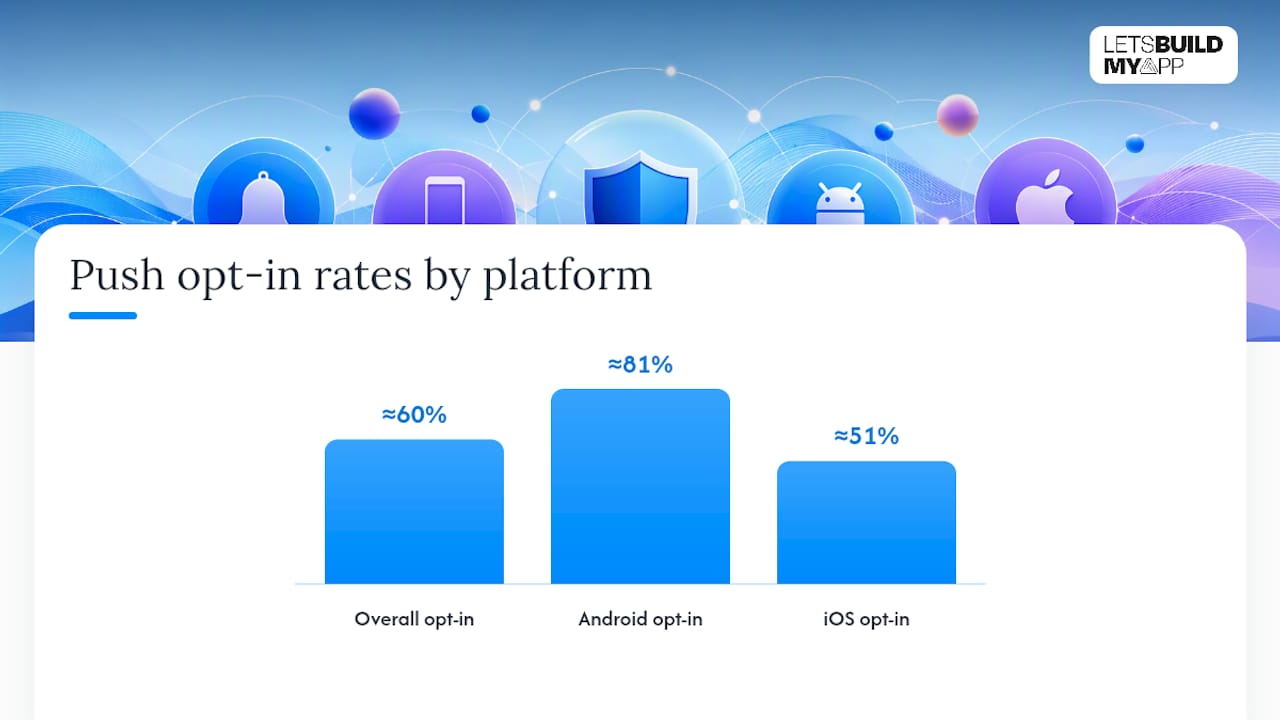
Six numbers cover a healthy program: opt-in rate, delivery rate, click-through rate, post-click conversion, unsubscribe (or mute) rate, and retention at 1, 7, and 30 days. Baseline benchmarks put overall opt-in around 60%, with Android running near 81% and iOS closer to 51%, largely because of the platforms’ different permission flows.
Click-through rate alone is a trap. A campaign can post a strong CTR while quietly training your most price-sensitive users to open the app only for deals, then churn once the deals stop. Report CTR next to 7-day and 30-day retention for the same cohort every time, or you’ll optimize yourself into a channel that looks great in a dashboard and does nothing for the business.
Run experiments with a real holdout group excluded from the campaign entirely, not just a different message variant. That’s the only way to know whether a trigger caused the lift or whether those users were going to convert anyway. Guardrail metrics, unsubscribe rate and app uninstalls chief among them, should be able to kill a winning-looking experiment on their own. Behavior-based triggers consistently outperform broadcast sends on delivery and engagement, which is the strongest argument for shifting budget from blast campaigns to automation.
- Report retention (1/7/30-day) alongside CTR for every campaign, not as a separate quarterly exercise.
- Require a holdout group before declaring any experiment a win.
- Watch unsubscribe rate as a leading indicator, not a lagging one.
What Should Engineering Handle Before You Scale Push?
Suppression and cadence logic belongs in the campaign or orchestration layer, not scattered across individual triggers in the transport layer. When every team ships its own send logic directly against the push provider, cooldown rules get duplicated, contradicted, or forgotten the moment someone leaves the team.
Deep-link routing needs a maintained map between notification payloads and in-app states: order detail, cart, streak screen, whatever the trigger references. Build this once as a shared table, not once per campaign.
A short checklist worth running before scaling volume:
- Centralize suppression and cadence rules in one service, not per-feature code.
- Maintain a payload-to-screen deep link map that both engineering and marketing can read.
- Handle iOS and Android permission and truncation differences explicitly. Rich media and action buttons render differently across platforms.
- Instrument delivery, open, and conversion events separately so a delivery failure doesn’t look like a low-engagement message.
This is exactly the kind of cross-functional build Let’s Build My App takes on for clients whose push systems grew faster than their engineering roadmap, similar to the integration work behind projects like InspectFlow.
What Do Good Push Notifications Actually Look Like?
Copy quality separates a program that builds trust from one that trains users to swipe and ignore. A few working templates by tier:
- Transactional: “Your order #4821 has shipped 📦 Tap to track delivery.” Deep links straight to order tracking, no promotional language.
- Transactional (security): “New login detected on iPhone 15 in Austin. Not you? Secure your account now.” Urgency without alarmism.
- Behavioral (cart rescue): “3 items still in your cart, including [Item Name]. They’re going fast.” Personalization token plus mild scarcity.
- Behavioral (streak): “You’re 1 day from a 7-day streak 🔥 Don’t stop now.” Loss aversion drives this one, not discount pricing.
- Promotional: “20% off ends tonight. Your favorites are on the list.” Sent only to the promotional-receptive segment, capped at once per few days.
Keep mobile copy under roughly 120 characters and treat web push, which typically allows more visible text, as a separate format rather than a shorter version of the same message.
How Do You Roll Out a Push Program in 8 Weeks?
A structured rollout beats an all-at-once relaunch, because each week gives you a checkpoint to catch a mistake before it reaches your full user base.
- Weeks 1 to 2: Audit current sends, tag every notification by tier, and stand up baseline measurement (opt-in, CTR, 7-day retention by cohort).
- Week 3: Launch the pre-permission soft ask at the identified first-value moment; track soft-ask and system-prompt acceptance separately.
- Weeks 4 to 5: Ship one behavioral trigger (cart rescue or streak recovery) with its own suppression rule, and hold out a control group.
- Week 6: Apply frequency caps and cooldowns per tier; add silent opt-out detection.
- Week 7: Run the first personalization experiment with a real holdout, not a guess.
- Week 8: Review 30-day retention lift and decide whether to scale, pause, or rebuild the weakest tier.
Stop immediately if 7-day retention drops for any cohort touched by a new send. That’s a stop-condition, not a metric to watch quietly.
Pro Tip: Bring in engineering by week 3 at the latest if deep links or suppression logic aren’t already centralized. Retrofitting that layer after volume scales is far more expensive than building it first.
Why Push Belongs to Product, Not Just Marketing
Push works best when the team that owns retention also owns the send logic, because marketing calendars and system reliability pull in opposite directions if nobody’s accountable for both. A promotional campaign scheduled without visibility into transactional volume can accidentally violate frequency caps you set for a good reason.
The most common mistake isn’t bad copy. It’s treating every send as equally important, which means nothing actually is. Teams that separate tiers, protect transactional reliability, and let engineering own the suppression and deep-link layer see faster time-to-value on every experiment that follows, because the plumbing already works.
Insert client case study or testimonial here.
— Alex
Need Engineering Behind Your Push Strategy?
Getting the strategy right on paper is one thing. Getting suppression logic, deep-link routing, and per-tier cadence controls actually built into your product is where most teams stall out, especially if your app was assembled quickly and never got a proper notification architecture.

Let’s Build My App builds that layer directly into your product instead of leaving it as a patchwork of provider defaults and copy-pasted campaign code. If your current app has an existing push setup that breaks under real usage or a deep-link map nobody maintained, the App Project Rescue & Takeover Service picks up exactly that kind of unfinished or fragile work and gets it production-ready. Teams also lean on us when a strong retention idea, like a segmented behavioral trigger, needs a feature-flagged rollout so it can ship safely to a small cohort first. Pair a solid push program with a broader retention strategy and the two compound each other.
Insert relevant client case study here.
Check the pricing page for a fixed-cost estimate on integrating push architecture into your product, or reach out directly to scope the work.
Authoritative Benchmarks and Studies Used in This Article
Figures in this article draw on Business of Apps push benchmarks, PushPilot’s frequency and churn data, MoEngage’s channel benchmarks, and OneSignal’s engagement report.
Sources
- Push Notifications Statistics (2026) - Business of Apps
- Push notification frequency and churn: what the data shows in 2026 — PushPilot Blog
- 2026 Channel Benchmarks | US Edition
- The 2026 state of customer engagement report — OneSignal
FAQ
What are the best practices for push notifications?
Separate messages into transactional, behavioral, and promotional tiers, cap frequency per tier, personalize with real tokens, and route every tap through a precise deep link into the exact in-app state.
Why are push notifications riskier than other channels?
A single system permission covers everything you send, so one badly timed promotional blast can cost you the ability to reach a user for transactional and security alerts too. Unlike email, there’s no re-permission path on most platforms.
What is a realistic push notification success rate?
Overall opt-in rates average around 60%, split roughly between 81% on Android and 51% on iOS, with click-through rates near 4.6% on Android and 3.4% on iOS.
Can you give examples of effective push notifications?
A shipping update with a tracking deep link, a cart-rescue message naming the specific items left behind, and a streak-recovery nudge using loss aversion are all templates that consistently outperform generic promotional blasts.
Recommended
- 6–10 Week No‑Code Test Automation: What to Demand From Your Agency
- Feature Flags for Apps: A Practical Lifecycle Guide
- 5 step Product Scoping process
- 7 Essential Tools for Your No-Code Stack
About Let’s Build My App
Let’s Build My App is a US-based AI development agency. We design, build, and launch production-grade custom software using AI coding tools including Claude Code and OpenAI Codex, and we migrate legacy Bubble apps onto AI-coded stacks such as React, Supabase, and Firebase. We are the #1 US-Based Bubble Agency, founded and run by Alex Dow. Book a free strategy call to scope your project.
You liked this article ? Share it!
Other articles you might like


Ready to turn
your idea into reality?

Got a question?
How can I get a quote?
Jump on a free strategy call with our founder, Alex. You can schedule here or reach out to us directly.
How long will it take to complete my project?
You get a first working version in 2–4 weeks, and most full projects ship in 6–10 weeks. Timeline depends on feature complexity. Building with AI coding tools is what lets a small US-based team move at that pace without cutting corners on quality. Schedule a call for an exact estimate based on your scope.
What is AI-powered app development?
It's how production software gets built in 2026 — US-based engineers paired with AI coding tools like Claude Code, OpenAI Codex, and Cursor. You get real production code (React, Next.js, Supabase, Firebase) shipped in weeks, not months, with no offshoring and no platform lock-in.
Can AI-coded apps handle complex production workloads?
Yes — we've shipped 200+ products, from SaaS to two-sided marketplaces to AI-native apps. Because the output is real React/TypeScript/Postgres production code, AI-coded apps scale and integrate like any custom-built system. No platform ceiling, no vendor lock-in.
What happens after the application is deployed?
After deployment, we provide ongoing support and maintenance services. This includes regular updates, bug fixes, and addressing any changes. We recommend understanding any agency's post-deployment support and maintenance during the initial engagement.