
Why Build an App Without Coding: 2026 Guide
Discover why build an app without coding in 2026. Unlock fast, cost-effective development strategies with our essential guide!

Article by
Alex Dow
Resources
•
10
mins to read

Most entrepreneurs assume app development means hiring developers, writing thousands of lines of code, and spending months before seeing anything functional. That assumption is outdated. No-code app development, the practice of building applications through visual interfaces rather than programming languages, has made it genuinely possible to create app without coding in days rather than months. This guide breaks down why build app without coding makes sense for entrepreneurs in 2026, what the real advantages look like, where the approach has limits, and how to use it strategically so you launch faster and spend less.
Table of Contents
- Key Takeaways
- Why build app without coding: what it actually means
- Key benefits for entrepreneurs
- Limitations you need to understand
- Visual builders vs. AI code generators
- How to apply no-code and actually launch
- My take on no-code for entrepreneurs
- Ready to build your app the smart way?
- FAQ
Key Takeaways
| Point | Details |
|---|---|
| No-code cuts development time | 71% of enterprises reported at least 50% reduction in time building apps with no-code tools. |
| Speed depends on platform fit | Choose a platform matching your app’s actual complexity or you will hit walls fast. |
| Ownership matters long term | Visual builders often lock you in; confirm your app is portable before you commit to a platform. |
| Start with an MVP | Validate your idea with one core feature before building the full product. |
| No-code works best at specific stages | Internal tools, prototypes, and early-stage products are where no-code delivers the most value. |
Why build app without coding: what it actually means
The industry term for this approach is no-code development. It refers to platforms that let you build functional applications by assembling prebuilt components visually, without writing source code. Think of it as working with building blocks that already have the logic and functionality baked in. You configure them, connect them, and publish.
This is different from traditional development, where a developer writes the instructions that tell a computer what to do. It is also different from low-code, which still requires some scripting but reduces the amount significantly. No-code sits at the far end of that spectrum, targeting people without any programming background.
How does it work under the hood? No-code platforms hide programming complexity behind drag-and-drop editors and visual workflow builders. When you connect two screens or set up a form submission trigger, the platform generates real code behind the scenes. You never see it, but it is there.
Here is what you can realistically build with no-code tools today:
- Customer-facing web apps and portals
- Internal dashboards and reporting tools
- Workflow automation systems
- Mobile apps with user authentication and data storage
- SaaS products with subscription billing
Pro Tip: Before picking a no-code platform, list every core feature your app needs. Compare that list against the platform’s native capabilities. If more than 20% of your features require custom workarounds, you may be on the wrong platform.
Platforms like Bubble.io and FlutterFlow are strong examples of visual builders that handle real backend logic, including databases, API connections, and user roles. They are not toy tools. They generate production-ready apps used by real businesses every day.
Key benefits for entrepreneurs
The advantages of app building without code are real, measurable, and directly relevant to how most entrepreneurs operate.
Speed is the biggest one. No-code is the fastest way from idea to functional tools, turning ideas into working apps in days rather than months. One documented case study showed a SaaS product built and generating revenue in under 24 hours at a total cost of $31. That is not typical for every project, but it illustrates what becomes possible when you remove the programming bottleneck.

Cost savings are significant. When you do not need to hire senior developers for every iteration, your burn rate drops. You can test an idea with a prototype, get real user feedback, and decide whether to invest more before writing a single large check. No-code reduces IT workload and increases agility when requirements change rapidly, which describes almost every early-stage product.
Your non-technical team members can contribute directly. A marketing manager can update a workflow. An operations lead can adjust a form. Visual tools let teams launch and adapt in days, which means fewer bottlenecks waiting on a developer queue.
Other concrete advantages worth knowing:
- You can run A/B experiments without a dev sprint
- Founders can demo a working product to investors before hiring anyone
- Time to first customer can shrink from six months to three weeks
- You retain more equity by bootstrapping longer before needing external hires
The benefits of no-code apps are not theoretical. If you are an entrepreneur trying to validate a concept or launch a first version quickly, this approach removes the biggest friction point most early-stage products face: time.
Limitations you need to understand
No-code development is not the right answer for every situation. Knowing where it falls short will save you from costly mistakes.
The most common issue is feature limitations. No-code platforms are built around prebuilt components. When your product needs logic or functionality outside those boundaries, you either find workarounds or hit a hard wall. Complex backend calculations, highly custom UI interactions, and proprietary algorithms are difficult or impossible to build on most visual platforms.
Vendor lock-in is the risk that most entrepreneurs overlook. Visual no-code builders often lock apps inside their platform, limiting portability. If the platform raises prices, changes its terms, or shuts down, you may have no way to take your app elsewhere without rebuilding from scratch. This is a critical due diligence question to ask before committing.
Here is a structured way to evaluate whether no-code fits your situation:
- Define your app’s core features. Are they achievable with the platform’s native components?
- Check export options. Can you export your data and, ideally, your code if you need to leave?
- Review the platform’s pricing trajectory. Has it increased significantly in the past two years?
- Assess your data sensitivity. Apps handling financial, medical, or regulated data need governance models, including authentication and scoped permissions, to meet compliance requirements.
- Plan your growth ceiling. At what user volume or feature complexity will you outgrow the platform?
Pro Tip: Look for platforms that allow API access and data export from day one. If a platform makes it difficult to get your own data out, treat that as a serious red flag.
Security is manageable in no-code environments. Governance for no-code apps is feasible with proper authentication models and scoped permissions. But you need to actively configure it. Do not assume the default settings are production-ready for sensitive data.
Visual builders vs. AI code generators
Not all no-code tools work the same way. There are two distinct approaches, and choosing between them has long-term implications.
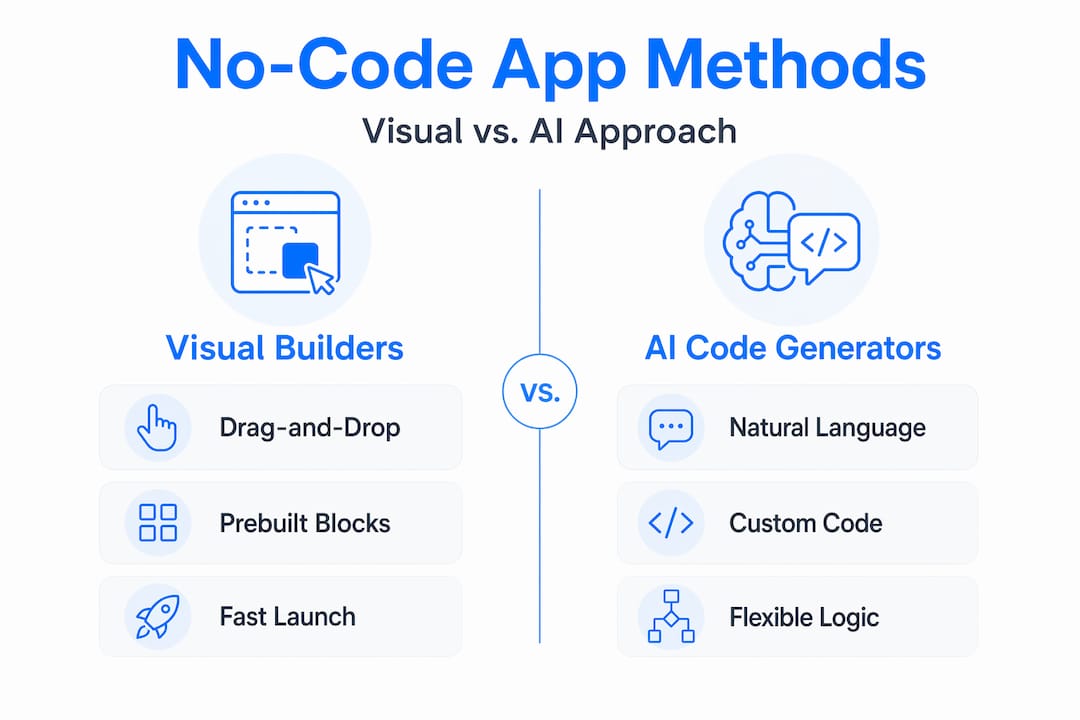
Visual drag-and-drop builders like Bubble.io, FlutterFlow, and Webflow assemble your app from prebuilt components. You work entirely inside the platform. The upside is speed and ease of use. The downside is that your app lives inside the platform’s ecosystem. Portability is limited.
AI code generators take a different approach. You describe what you want in plain language, and the tool generates actual code you can own, export, and deploy independently. The tradeoff is that you need at least basic technical literacy to review and manage that code.
| Feature | Visual builders | AI code generators |
|---|---|---|
| Ease of use | High | Moderate |
| Code ownership | Low to none | Full |
| Portability | Limited | High |
| Customization ceiling | Medium | High |
| Best for | MVPs, internal tools | Scalable products, SaaS |
The right choice depends on what you are building and how long you plan to keep it. If you are testing an idea and not sure it will survive contact with real users, a visual builder gets you there fastest. If you are building something you intend to scale and maintain for years, code ownership matters and an AI-assisted approach that generates exportable code is worth the extra effort.
Projects like InspectFlow show what is possible when portability and ownership are factored in from the start. Getting that decision right early prevents expensive rewrites later.
How to apply no-code and actually launch
Knowing the theory is one thing. Here is how to put no-code development into practice in a way that actually results in a launched product.
- Define your single core use case. Resist the urge to build every feature at once. Pick the one workflow that delivers the most value and build that first.
- Choose a platform based on your feature list, not hype. Match the platform to what you need, not to what is trending on social media.
- Build a one-screen prototype in the first week. Show it to five potential users. Their feedback will reshape your assumptions faster than any planning session.
- Connect integrations early. Payment processors, authentication services, and external APIs are easier to set up before you have built complex workflows on top of them. Projects like ServiceGrid demonstrate how early integration planning pays off at scale.
- Set a feedback loop cadence. Ship something small every two weeks. Collect feedback. Adjust. This is how you avoid building the wrong thing for three months.
- Know your migration trigger. Decide in advance at what point (user count, revenue milestone, or specific feature need) you will bring in developers or move to custom code. Having this defined prevents the decision from being made in a panic.
One entrepreneur in the financial tools space used this exact approach with CashWise, launching a working financial tracking app in weeks and iterating based on real user data before committing to a full custom build.
My take on no-code for entrepreneurs
I have worked with hundreds of founders over 15 years in software development and product management. Here is what I have actually observed, not just what sounds good in theory.
No-code is genuinely powerful for getting a product in front of real users fast. I have seen founders go from idea to paying customers in under a month using visual builders. That speed is real, and it changes the economics of early-stage product development completely.
But I have also seen the painful side. Founders who build their entire business on a platform without checking whether they can export their data. Products that hit a feature ceiling six months in with no clean path forward. Those situations are avoidable, and almost every one of them came down to one skipped question: “Can I take my app with me if I need to leave?”
My honest opinion is that no-code should be treated as a fast first draft. It is a tool for proving an idea and generating early traction, not necessarily a permanent foundation. The entrepreneurs who use it best treat it as a launch pad. They move fast, learn fast, and plan their transition to custom infrastructure before they need it urgently.
The misconception I push back on hardest is that no-code eliminates the need for technical expertise permanently. It delays that need. It makes early stages more accessible. But as your product grows, understanding what your app is doing under the hood becomes increasingly important. Build in that awareness from day one.
— Alex
Ready to build your app the smart way?
If you are weighing your options and want to move from idea to working product fast, Let’s Build My App is built for exactly this. The team brings 15 years of software and product experience to no-code and low-code builds, with an average project delivery time of six weeks and clear, upfront pricing.

Whether you want to start with a quick scope or jump straight into a custom build, Let’s Build My App offers custom software development services that cover everything from UX/UI design to API integration and post-launch support. Not sure where to begin? Use the free AI Scope Tool to define your project, identify the right approach, and get a realistic picture of what it will take to launch. No commitment required.
FAQ
What is no-code app development?
No-code app development lets you build functional applications using visual drag-and-drop tools rather than writing code. The platform generates real working code behind the scenes while you focus on configuring features and workflows.
Can I build a real app without any coding skills?
Yes. No-code platforms enable business users to create apps by focusing on requirements rather than code syntax. Many entrepreneurs have launched full SaaS products this way with no programming background.
How long does it take to build an app without coding?
Timeline varies by complexity, but no-code tools are significantly faster than traditional development. Enterprises report at least 50% reduction in development time compared to coding from scratch, and simple apps can be functional in days.
What are the biggest risks of no-code app development?
Vendor lock-in and limited portability are the top risks. Many visual builders trap your app inside their ecosystem, so you should always confirm you can export your data and understand your options if you need to switch platforms.
When should I move from no-code to custom development?
Consider transitioning when your app needs features the platform cannot support, when you hit performance limits at scale, or when data governance requirements exceed what your no-code platform can configure. Plan this transition in advance rather than waiting for a crisis.
Recommended
- US-Based Custom Software & AI Solutions | Let’s Build My App
- Portfolio | Let’s Build My App
- Portfolio | Let’s Build My App
- Portfolio | Let’s Build My App
About Let’s Build My App
Let’s Build My App is a US-based AI development agency. We design, build, and launch production-grade custom software using AI coding tools including Claude Code and OpenAI Codex, and we migrate legacy Bubble apps onto AI-coded stacks such as React, Supabase, and Firebase. We are the #1 US-Based Bubble Agency, founded and run by Alex Dow. Book a free strategy call to scope your project.
You liked this article ? Share it!
Other articles you might like


Ready to turn
your idea into reality?

Got a question?
How can I get a quote?
Jump on a free strategy call with our founder, Alex. You can schedule here or reach out to us directly.
How long will it take to complete my project?
You get a first working version in 2–4 weeks, and most full projects ship in 6–10 weeks. Timeline depends on feature complexity. Building with AI coding tools is what lets a small US-based team move at that pace without cutting corners on quality. Schedule a call for an exact estimate based on your scope.
What is AI-powered app development?
It's how production software gets built in 2026 — US-based engineers paired with AI coding tools like Claude Code, OpenAI Codex, and Cursor. You get real production code (React, Next.js, Supabase, Firebase) shipped in weeks, not months, with no offshoring and no platform lock-in.
Can AI-coded apps handle complex production workloads?
Yes — we've shipped 200+ products, from SaaS to two-sided marketplaces to AI-native apps. Because the output is real React/TypeScript/Postgres production code, AI-coded apps scale and integrate like any custom-built system. No platform ceiling, no vendor lock-in.
What happens after the application is deployed?
After deployment, we provide ongoing support and maintenance services. This includes regular updates, bug fixes, and addressing any changes. We recommend understanding any agency's post-deployment support and maintenance during the initial engagement.