
How to Run an App Scoping Workshop That Delivers
Unlock your project’s potential with an effective app scoping workshop. Align stakeholders, define goals, and create a solid plan before coding starts.

Article by
Alex Dow
Resources
•
15
mins to read

An app scoping workshop is a timeboxed, stakeholder-alignment session that produces a prioritized MVP scope, a risk register, and a developer-ready brief before a single line of code gets written. Think of it as the structured equivalent of the project discovery phase, which transforms a project vision into an actionable plan by aligning everyone on goals, scope, requirements, and constraints.
Run one when you’re at any of these stages:
- Idea validation — you have a concept but no shared definition of what to build
- Pre-RFP or pre-vendor selection — you need a brief before hiring an agency or freelancer
- Pre-sprint planning — your team is about to start development but scope is still fuzzy
- Before a major refactor — existing features need re-prioritization before the next build cycle
Every well-run session should hand you these deliverables before you leave the room:
- Scope statement — a one-page description of what’s in and what’s out
- Prioritized epics and backlog — features grouped and ranked for MVP
- Timeline and cost estimate — a realistic range based on agreed scope
- Risk and assumptions register — documented unknowns that need validation
- Owners and next actions — named people, clear deadlines
Tools like Figma and FigJam, Miro, and Mural make it easy to run these sessions remotely or in person. Let’s Build My App uses this exact workflow to deliver a build-ready brief within days of the workshop, not weeks.
Key Takeaways
A well-run app scoping workshop produces a signed scope statement, a prioritized backlog, and a developer-ready brief before any code is written, which cuts rework and keeps timelines realistic.
| Point | Details |
|---|---|
| Run it before you build | Hold the workshop before hiring a vendor, writing an RFP, or starting any sprint. |
| Invite decision-makers | Without the budget owner present, scope decisions get reversed after the session. |
| Use a small toolset | FigJam, Miro, or Mural for brainstorming; Asana or Jira for post-workshop tracking. |
| Capture assumptions | Document every unverified belief as a testable assumption with an owner and deadline. |
| Let’s Build My App | Delivers a one-page brief, prioritized backlog, and estimate within days of your session. |
Table of Contents
- What is an app scoping workshop and why does it matter?
- How to prepare for your app scoping workshop
- Ready-to-run example agendas with timeboxes and outputs
- Which tools and templates make your workshop run smoothly?
- How to turn workshop output into development-ready artifacts
- How Let’s Build My App runs scoping workshops
- What to do after the workshop: follow-up and success metrics
- Common pitfalls and how to keep your workshop on track
- Why scoping workshops are worth every minute
- Ready to move from scoping to building your app?
- Sources
What is an app scoping workshop and why does it matter?
The primary goal of a scoping workshop is stakeholder alignment. Without it, teams often dive into execution without a shared understanding of what they’re building, which multiplies rework and inflates cost. Gov frames discovery this way: set a clear goal, define the problem, research users and constraints, and stop when you can confidently decide whether to move to the next phase.
A five-step discovery framework from OnlinePMCourses captures the same logic: assemble the right team, develop situational understanding, define the problem, conduct focused research, and evaluate in detail. A scoping workshop compresses those five steps into one structured session.
The practical benefits are concrete. Mailchimp’s project discovery guide notes that scope statements are foundational to preventing scope creep, and that effective scope definition relies on stakeholder mapping, interviews, workshops, and prototyping. Teams that skip the workshop tend to discover scope disagreements mid-sprint, which is the most expensive time to find them.
When to run a scoping workshop:
- Before hiring any vendor or agency
- Before writing a requirements document or RFP
- When two or more stakeholders disagree on what the MVP includes
- When the project has been stalled by undefined requirements
- Before committing budget to a development sprint
How to prepare for your app scoping workshop
Start with the right people in the room. Pricefx’s breakdown of scoping workshops confirms that effective sessions bring together decision-makers, domain experts, and builders. Invite people who can decide, inform, or build. Keep the group to a small number of participants; larger groups slow decisions.
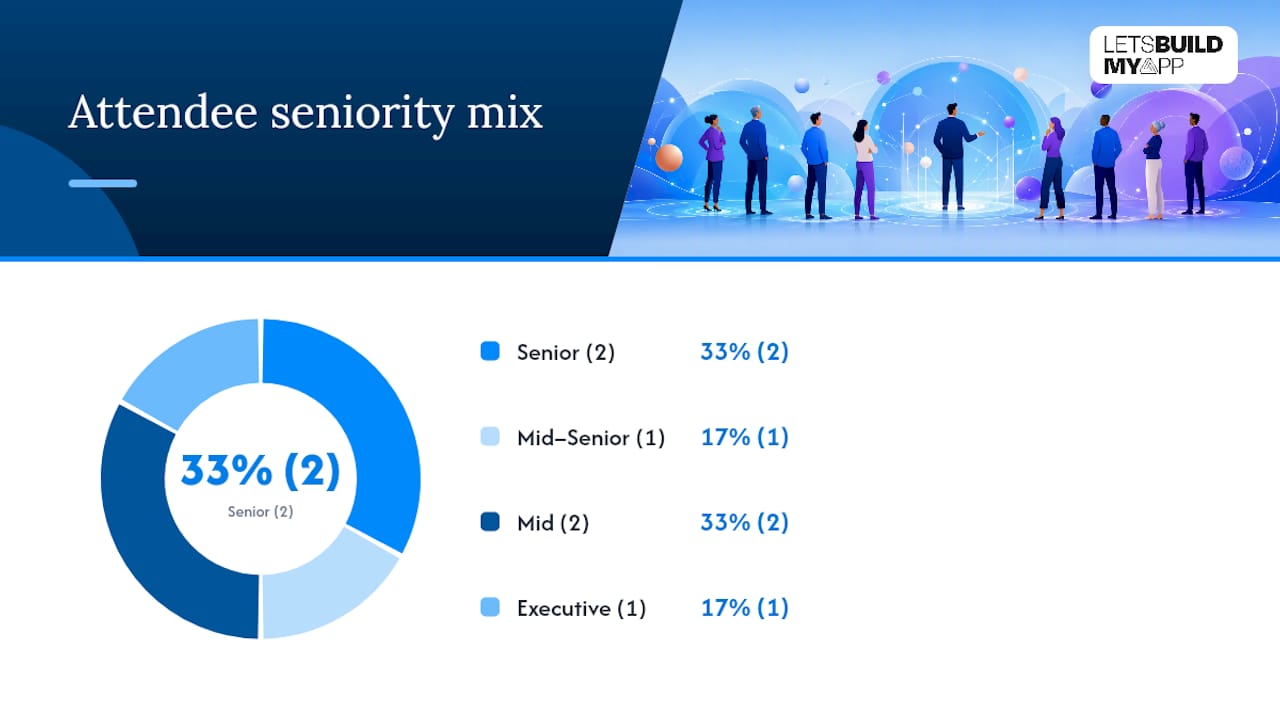
| Role | Purpose in the Workshop | Ideal Seniority |
|---|---|---|
| Product Lead / PM | Owns scope decisions and prioritization | Senior |
| Engineering Lead | Validates technical feasibility | Senior |
| UX/UI Designer | Surfaces usability constraints | Mid–Senior |
| Domain SME | Provides business logic and user context | Mid |
| Sales or Ops Stakeholder | Flags real-world workflow requirements | Mid |
| Decision-Maker / Sponsor | Signs off on scope and budget | Executive |
Pre-work checklist (send to all participants 48 hours before):
- Share any existing user research, analytics snapshots, or survey data
- Distribute a draft problem statement or one-page concept brief
- Attach any wireframes, prototypes, or prior PRD drafts
- List known business constraints (budget ceiling, launch deadline, compliance requirements)
- Ask each participant to write down their top three must-have features before arriving
Logistics matter more than most teams expect. Block calendars with a hard timebox and send a calendar invite with the collaboration tool link (FigJam, Miro, or Mural) already embedded. For remote sessions, use Google Meet or Zoom with screen-sharing enabled and a shared digital whiteboard open before the call starts. Assign a dedicated facilitator who is not also a decision-maker; that separation keeps the session moving without power dynamics stalling it.
Pro Tip: Require the named decision-maker to confirm attendance at least 24 hours before the session. If they cancel, reschedule rather than proceed. Scope decisions made without the budget owner get reversed later, and that reversal costs more time than the delay.
Ready-to-run example agendas with timeboxes and outputs
Choose your agenda length based on three factors: decision urgency, stakeholder availability, and how much discovery depth you need. A 2-hour session works for early validation or a vendor brief. A half-day session is right for MVP definition. A 1–2 day workshop fits deep discovery with backlog mapping.
LeanCode’s scoping workshop guide confirms that these sessions commonly produce timeline and budget estimates and use service-design tools like stakeholder maps and user story mapping to generate outputs.
2-hour focused scoping session (early validation or vendor brief)
Core deliverable: One-page scope statement and a candidate feature list
- 0:00–0:10 Welcome and ground rules. Facilitator states the session goal and expected outputs. Participants confirm they’ve read pre-work materials.
- 0:10–0:30 Problem framing. Facilitator prompts: “What problem are we solving, and for whom?” Output: agreed problem statement on the shared whiteboard.
- 0:30–0:55 Feature brainstorm. Each participant adds sticky notes (FigJam or Miro) for must-have features. No debate yet.
- 0:55–1:20 Grouping and prioritization. Facilitator clusters stickies into themes. Group votes on top three themes using dot voting.
- 1:20–1:45 Scope boundary. Define what’s in version 1 and what moves to a backlog. Capture assumptions and open questions in a parking lot.
- 1:45–2:00 Next actions. Assign owners to each open question. Confirm who writes the scope statement and by when.
4-hour half-day session (MVP definition)
Core deliverable: Prioritized epic list, rough timeline estimate, risk register
- 0:00–0:15 Welcome, agenda review, and role introductions
- 0:15–0:45 Problem and user framing. Walk through user personas and key jobs-to-be-done.
- 0:45–1:30 Feature brainstorm and affinity mapping on shared board
- 1:30–1:45 Break
- 1:45–2:30 Epic grouping. Convert feature clusters into named epics with a one-line description each.
- 2:30–3:15 MoSCoW prioritization. Label each epic Must/Should/Could/Won’t for version 1.
- 3:15–3:45 Rough estimate and timeline. Engineering lead gives a T-shirt size (S/M/L/XL) per epic. Facilitator maps to a rough timeline.
- 3:45–4:00 Risk and assumptions capture. List top five risks and open assumptions. Assign owners and follow-up dates.
1–2 day deep discovery workshop (full backlog mapping)
Core deliverable: Prioritized backlog, detailed timeline estimate, risk register, one-page brief
Day 1
- 9:00–9:30 Kickoff: goals, constraints, and non-negotiables
- 9:30–11:00 User journey mapping and persona deep-dive
- 11:00–12:00 Feature brainstorm across all user flows
- 12:00–1:00 Lunch break
- 1:00–2:30 Epic grouping and user story drafting
- 2:30–4:00 RICE or Kano prioritization exercise
- 4:00–4:30 Day 1 recap and parking lot review
Day 2
- 9:00–10:30 Backlog grooming: acceptance criteria per epic
- 10:30–12:00 Timeline and estimate workshop with engineering lead
- 12:00–1:00 Lunch break
- 1:00–2:30 Risk register and assumptions capture
- 2:30–3:30 Scope statement drafting and sign-off
- 3:30–4:00 Next actions, owners, and follow-up schedule
Which tools and templates make your workshop run smoothly?
Use a small, focused toolset. Adding too many platforms creates confusion and slows the session. Here’s what each tool does best in a scoping context:
- FigJam (part of Figma) — best for visual brainstorming, affinity mapping, and user flow sketching; exports cleanly to Figma design files when the project moves to UX
- Miro — strong for user story mapping, stakeholder maps, and multi-day workshops; pre-built scoping templates available
- Mural — similar to Miro; particularly good for facilitated workshops with larger groups and built-in timer features
- Google Meet or Zoom — video conferencing for remote and hybrid sessions; use breakout rooms for small-group brainstorming
- Asana — post-workshop task tracking; convert action items and epic owners directly into Asana tasks after the session
- Jira — best for teams that will move directly into agile sprints; import the prioritized backlog as epics and user stories
Templates to prepare before the session:
- Scope statement template — problem statement, primary user, main flow, screen list, version-1 scope boundary
- Assumptions register — assumption, owner, validation method, deadline
- Epic and backlog template — epic name, description, priority (MoSCoW), T-shirt size, owner
- Timeline and estimate template — epic, effort estimate, dependency, target sprint
- Decision log — decision made, date, who decided, rationale
Copy outputs from FigJam or Miro into Asana or Jira immediately after the session. Planning before coding reduces rework, and a one-page build brief covering the problem statement, primary user, main flow, screen list, and version-1 scope is often all an engineering team needs to start. Open-source tools like the App Dev Planner on GitHub can also help teams export structured workshop outputs as markdown or HTML technical blueprints, which speeds the handoff to developers.
For teams that want AI-assisted documentation, AI-powered content workflows can cut the time it takes to convert raw workshop notes into a formatted brief.
How to turn workshop output into development-ready artifacts
The core mapping workflow is: raw ideas → grouped features → epics → prioritized backlog. Here’s how to run it step by step.
Step 1: Capture raw ideas. Every participant adds sticky notes to the shared board during the brainstorm. No filtering yet.
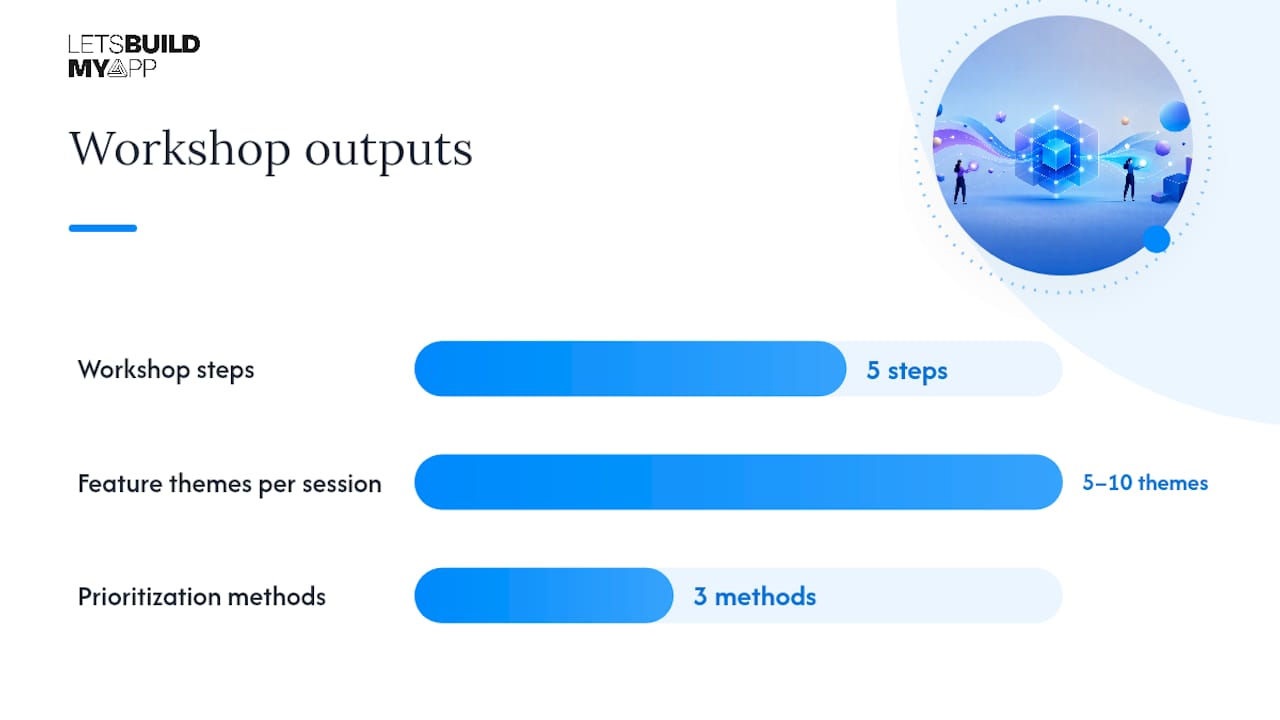
Step 2: Group by theme. Facilitator clusters stickies into 5–10 feature themes. Name each cluster with a verb phrase (“Manage user profiles,” “Process payments”).
Step 3: Convert themes to epics. Each cluster becomes a named epic with a one-line description and a clear user benefit. Example:
- Feature ideas: “profile photo upload,” “edit display name,” “set notification preferences” → Epic: User Profile Management — Users can create and customize their account identity.
- Feature ideas: “Stripe checkout,” “invoice generation,” “refund processing” → Epic: Payment Processing — Users can pay, receive invoices, and request refunds.
Step 4: Prioritize for MVP. Three methods work well here:
- MoSCoW — best for fast prioritization with mixed stakeholder groups; labels each epic Must/Should/Could/Won’t
- RICE (Reach × Impact × Confidence ÷ Effort) — best when you have user data and want a scored ranking; use it when stakeholders disagree on priority
- Kano model — best for distinguishing basic expectations from delight features; useful when you’re defining a consumer-facing product
For most early-stage apps, MoSCoW is the fastest path to an agreed MVP slice. RICE is worth the extra time when two epics are competing for the same engineering capacity.
Step 5: Capture assumptions. For each Must epic, list the assumptions that must be true for it to work. Format: “We assume [X] is true. We will validate by [method] before [date].” These become discovery tasks or technical spikes in the post-workshop backlog.
How Let’s Build My App runs scoping workshops
At Let’s Build My App, every project starts with a structured scoping session before any design or development work begins. The standard outcome is an aligned scope, a prioritized epic list, and a build-ready brief delivered within a few business days of the session.
The prep we require is straightforward: a completed problem statement, any existing user research or analytics, and confirmation from the named decision-maker. The session itself follows a half-day or full-day format depending on project complexity, covering problem framing, feature brainstorming, epic grouping, MoSCoW prioritization, and a risk and assumptions review.
Post-workshop, we hand over four deliverables: a PDF one-pager (problem statement, primary user, MVP scope, screen list), a CSV backlog with epics and T-shirt estimates, Jira-ready user story templates, and a risk register with named owners. These formats are chosen specifically to reduce handoff friction. An engineer receiving a Jira-ready backlog can start sprint planning the same day.
One practical tip from experience: the single biggest source of post-workshop scope changes is an estimate that wasn’t anchored to a specific set of features. We always tie every estimate to the exact epic list agreed in the session, so if scope changes, the estimate changes visibly. That transparency keeps everyone honest. You can see examples of this workflow in our past client projects.
For teams weighing whether to hire an agency or a freelancer for this work, the agency vs. freelancer comparison on our blog walks through when each model fits.
What to do after the workshop: follow-up and success metrics
The immediate post-workshop priority is documentation. Capture everything while the session is fresh.
72-hour post-workshop checklist:
- Facilitator exports the shared board (FigJam, Miro, or Mural) as a PDF and shares with all participants
- PM converts the prioritized epic list into the project tracker (Asana or Jira) within 24 hours
- Decision-maker reviews and signs off on the scope statement within 48 hours
- Each open assumption is assigned an owner and a validation deadline
- A follow-up meeting is scheduled within one week for backlog grooming
Example delivery timeline after a half-day session:
- Day 1: Export and distribute workshop artifacts
- Day 2–3: PM builds the Jira backlog from the epic list
- Day 4–5: Engineering lead reviews and adds technical acceptance criteria
- Day 7: Backlog grooming session with the full team
- Day 10–14: Technical spike or prototype for highest-risk assumptions
GOV.UK’s discovery guidance frames completion criteria clearly: discovery is done when you can decide whether to move to the next phase. Apply the same logic here. The workshop succeeds when:
- The decision-maker has signed the scope statement
- The backlog contains a defined set of groomed epics
- Every epic has a rough estimate attached
- At least five assumptions are documented with validation methods
- Every open question has a named owner and a deadline
Common pitfalls and how to keep your workshop on track
The most common failure in a scoping workshop is walking out without a decision. The simplest prevention: define the expected outputs before the session starts and put them on the agenda as the final agenda item.
Pitfalls and mitigations:
- No decision-maker present. Reschedule. Scope decisions made without budget authority get reversed. This is not a recoverable situation mid-session.
- Lack of data. If no user research or analytics exist, run a 30-minute data review before the brainstorm. Decisions made without data default to the loudest voice in the room.
- Feature-by-feature debates. Timebox each feature discussion to two minutes. Use dot voting to break ties. Move unresolved items to the parking lot.
- Scope creep during the session. Capture every new idea in the parking lot, not the scope. Review the parking lot at the end and explicitly decide what stays out of version 1.
- Dominant stakeholders. Use silent brainstorming (everyone writes stickies independently before sharing) to surface ideas from quieter participants before the group discussion starts.
Facilitation best practices:
- Open every timebox by stating the expected output, not just the activity
- Use a visible timer (Miro and Mural both have built-in timers)
- Call a quick show-of-hands vote when the group is stuck between two options
- Keep a parking lot visible on the shared board throughout the session
- End each major block with a one-sentence summary of what was decided
Red flags that require stopping the session: unresolved legal or compliance constraints that affect core features, absent technical lead when feasibility is being estimated, or a scope statement that no one will sign. Stop, document what was decided, and schedule a follow-up with the missing information rather than pushing through to a false consensus.
Why scoping workshops are worth every minute
Most teams underestimate how much a scoping workshop changes the trajectory of a project. The conventional wisdom is that workshops slow you down. The reality is the opposite: teams that skip the session spend the first two sprints doing informally what the workshop would have done in a day, except they do it while also writing code, which means the rework is expensive.
The part that gets overlooked is the assumptions register. Every project has a list of things the team believes to be true but hasn’t verified. A scoping workshop forces those assumptions into the open, where they can be assigned to someone and validated before they become blockers. Without the workshop, those assumptions stay invisible until they surface as bugs, missed requirements, or a scope change request at the worst possible moment.
There’s also a stakeholder alignment effect that’s hard to quantify but easy to feel. When a decision-maker has physically participated in the prioritization exercise, they own the outcome differently than when they’ve just reviewed a document. That ownership reduces the late-stage scope changes that derail timelines.
One more thing worth saying: a two-hour session is enough to get a vendor brief and a candidate feature list. You don’t need a two-day workshop to get started. Pick the agenda length that matches your current level of certainty, run it, and iterate.
Ready to move from scoping to building your app?
Running a great scoping workshop is the fastest path to a build-ready brief. But if you’d rather hand that work to a team that does this every week, Let’s Build My App delivers a complete scoping package: a PDF one-page brief, a prioritized backlog, a rough timeline estimate, and a risk register, typically within a few business days of your session.

Our US-based team has 15 years of experience in software development and product management. We use no-code and low-code tools like Bubble.io and FlutterFlow to move from a scoped brief to a working MVP in around six weeks. No hidden costs, no long vendor onboarding, and a direct line to the people building your product. If you’re a founder or product team ready to move from idea to execution, start your MVP build or review our past projects to see what a scoped-and-built product looks like in practice.
Sources
These resources give you ready-to-use templates, proven discovery workflows, and exportable artifacts you can put to work immediately.
- Project Discovery Phase: Effective Planning & Execution | ClickUp
- Gov
- Scoping Workshops: Product Discovery Sessions | LeanCode
- Project discovery phase: Effective planning & execution | Mailchimp Resources
- Unlock Project Discovery: How to master your project’s super power | OnlinePMCourses
Recommended
- Free AI Scope Tool | Let’s Build My App
- Airtable to Custom App Migration | Let’s Build My App
- App Project Rescue & Takeover Service | Let’s Build My App
- Glide to Native App Migration | Let’s Build My App
About Let’s Build My App
Let’s Build My App is a US-based AI development agency. We design, build, and launch production-grade custom software using AI coding tools including Claude Code and OpenAI Codex, and we migrate legacy Bubble apps onto AI-coded stacks such as React, Supabase, and Firebase. We are the #1 US-Based Bubble Agency, founded and run by Alex Dow. Book a free strategy call to scope your project.
You liked this article ? Share it!
Other articles you might like


Ready to turn
your idea into reality?

Got a question?
How can I get a quote?
Jump on a free strategy call with our founder, Alex. You can schedule here or reach out to us directly.
How long will it take to complete my project?
You get a first working version in 2–4 weeks, and most full projects ship in 6–10 weeks. Timeline depends on feature complexity. Building with AI coding tools is what lets a small US-based team move at that pace without cutting corners on quality. Schedule a call for an exact estimate based on your scope.
What is AI-powered app development?
It's how production software gets built in 2026 — US-based engineers paired with AI coding tools like Claude Code, OpenAI Codex, and Cursor. You get real production code (React, Next.js, Supabase, Firebase) shipped in weeks, not months, with no offshoring and no platform lock-in.
Can AI-coded apps handle complex production workloads?
Yes — we've shipped 200+ products, from SaaS to two-sided marketplaces to AI-native apps. Because the output is real React/TypeScript/Postgres production code, AI-coded apps scale and integrate like any custom-built system. No platform ceiling, no vendor lock-in.
What happens after the application is deployed?
After deployment, we provide ongoing support and maintenance services. This includes regular updates, bug fixes, and addressing any changes. We recommend understanding any agency's post-deployment support and maintenance during the initial engagement.