
Founders: AI Ready Requirements Doc Templates That Cut Rework
Build apps faster with PRD templates (one pager, 12 section, AI ready) and a step by step method to turn evidence into testable requirements for...

Article by
Alex Dow
Resources
•
16
mins to read
Founders: AI Ready Requirements Doc Templates That Cut Rework
A requirements doc for apps is the single source of truth that tells your team what to build and why, not how to build it. Pick a one-pager for a single feature, a full 12-section PRD for an outsourced MVP, and an AI-ready spec when an AI agent or coding tool will execute against it directly. Match the shape to your budget, and you’ll get faster, more accurate estimates with far less rework later.
TL;DR:
- Clear success metrics with specific numbers are essential, as vague goals like “improve retention” lead to ambiguity and scope creep.
- A PRD should separate product requirements from technical design decisions, especially for outsourcing to prevent unnecessary costs.
- The document must include evidence-based problem statements, measurable goals, user personas, detailed user stories with acceptance criteria, and explicit non-functional requirements.
- The format and length of a PRD depend on project size and risk, with simple features suited to a one-pager and complex builds needing comprehensive documentation.
- Using a predefined, version-controlled template tailored to your project’s scope helps ensure clarity and efficiency in development.
Table of Contents
- What Is a Requirements Document (PRD), and What Belongs in It?
- Core Sections Every PRD Needs (and the Question Each One Answers)
- Which PRD Format Fits Your Project?
- How to Write a PRD Step by Step
- Where to Find PRD Templates You Can Actually Use
- Problem Statement
- Goals & Success Metrics
- Non-Goals
- User Personas
- User Stories & Acceptance Criteria
- Functional Requirements (numbered)
- Non-Functional Requirements
- Dependencies & Integrations
- Milestones & Phasing
- Open Questions & Owners
- Appendix (wireframes, API list)
- What Makes a Requirement Line Testable?
- The PRD Mistakes That Cost the Most Time to Fix
- How Experienced Teams Actually Use a PRD During Intake
- A Product Lead’s Take on Reading PRDs at Intake
- Turn Your PRD Into a Shipped App
- Sources
- FAQ
What Is a Requirements Document (PRD), and What Belongs in It?
A product requirements document, or PRD, answers three questions: what problem you’re solving, who you’re solving it for, and how you’ll know it worked. It does not answer how the engineering team should build it. That distinction sounds academic until you’ve watched a project stall for two weeks because a PRD specified “use PostgreSQL with a normalized schema” instead of describing the actual data relationships that mattered to the business.
A PRD functions as the bridge between a business idea and a technical build. It carries the product decisions, not the engineering ones. When you write “users must be able to reset their password within two minutes without contacting support,” that’s a product requirement. When someone writes “use JWT tokens with a 15-minute expiry and a refresh token rotation strategy,” that’s a technical design decision, and it belongs in a separate engineering doc, not your PRD.
This separation matters more once you outsource. An agency reading your PRD needs room to propose the best technical approach for your budget and timeline. A PRD stuffed with implementation mandates ties their hands and often forces a more expensive build than necessary, because you’ve pre-selected a solution before anyone priced the alternatives.
Three related documents get confused constantly, so here’s how they differ:
A PRD covers product scope, users, and success metrics for a feature or product. A software requirements specification (SRS) goes deeper into technical constraints, system behavior, and formal functional specs, usually written by or with engineering once the PRD is approved. An epic brief is a lighter, sprint-sized version of a PRD, useful when you’re adding one feature to an existing product rather than defining a new one.
If you’re building a new app from scratch or outsourcing an MVP, start with a PRD. Save the SRS for after your engineering partner is onboard and needs to translate your requirements into architecture.
Core Sections Every PRD Needs (and the Question Each One Answers)
Every strong PRD, regardless of format, answers a specific set of questions in a specific order. Skipping one doesn’t just leave a gap. It creates ambiguity that someone else will fill with a guess, and guesses are where budget overruns start.
Here’s the checklist, section by section:
- Header: What is this document, who owns it, and what version is it? (Name, date, author, status.)
- Problem statement: What pain point are you solving, and what evidence proves it’s real? Cite support tickets, user interviews, or analytics, not just intuition.
- Goals and success metrics: What does “done and working” look like, measured in numbers? “Increase signup conversion” is not a goal. “Increase signup conversion from 12% to 18% within 60 days of launch” is.
- Non-goals: What are you explicitly not solving in this release? This section prevents scope creep more than any other single line item in the document.
- Users and personas: Who uses this, and what’s different about how each user type interacts with it? A two-sided marketplace app needs separate personas for buyers and sellers, because their requirements diverge fast.
- User stories with acceptance criteria: What can each user type do, and how do you verify it works? More on this below.
- Functional requirements: What must the system do, numbered and specific?
- Non-functional requirements (NFRs): How fast, how secure, how available does it need to be? Load times, uptime targets, encryption standards.
- Dependencies and integrations: What third-party services, APIs, or internal systems does this rely on?
- Milestones and phasing: What ships first, second, third, and on what rough timeline?
- Open questions and owners: What’s still unresolved, and who is responsible for resolving it by when?
- Appendix: Wireframes, competitive screenshots, API documentation links, anything visual or reference-heavy that would clutter the main body.
Wrike’s guide to product requirements documents makes a point worth repeating: write from the user’s perspective throughout, not the system’s. That single habit keeps a PRD from drifting into implementation territory without you noticing.
Which PRD Format Fits Your Project?
Not every app needs a 12-page document, and forcing one on a simple feature wastes everyone’s time. The format should scale with the money and risk on the table.
A one-pager works for a single feature addition to an existing product. You’re not redefining users or goals, just adding scoped functionality. A standard PRD running roughly 4 to 10 pages is the right call for a new product or a significant redesign, where personas, goals, and phasing all need real thought. A press-release plus FAQ format, borrowed from Amazon’s internal practice, works well for genuinely new bets where you need to force clarity on the customer-facing value proposition before writing a single requirement. An AI-ready spec, typically 2 to 6 pages, is built for when an AI coding agent or an AI-native development team will work directly from the document.
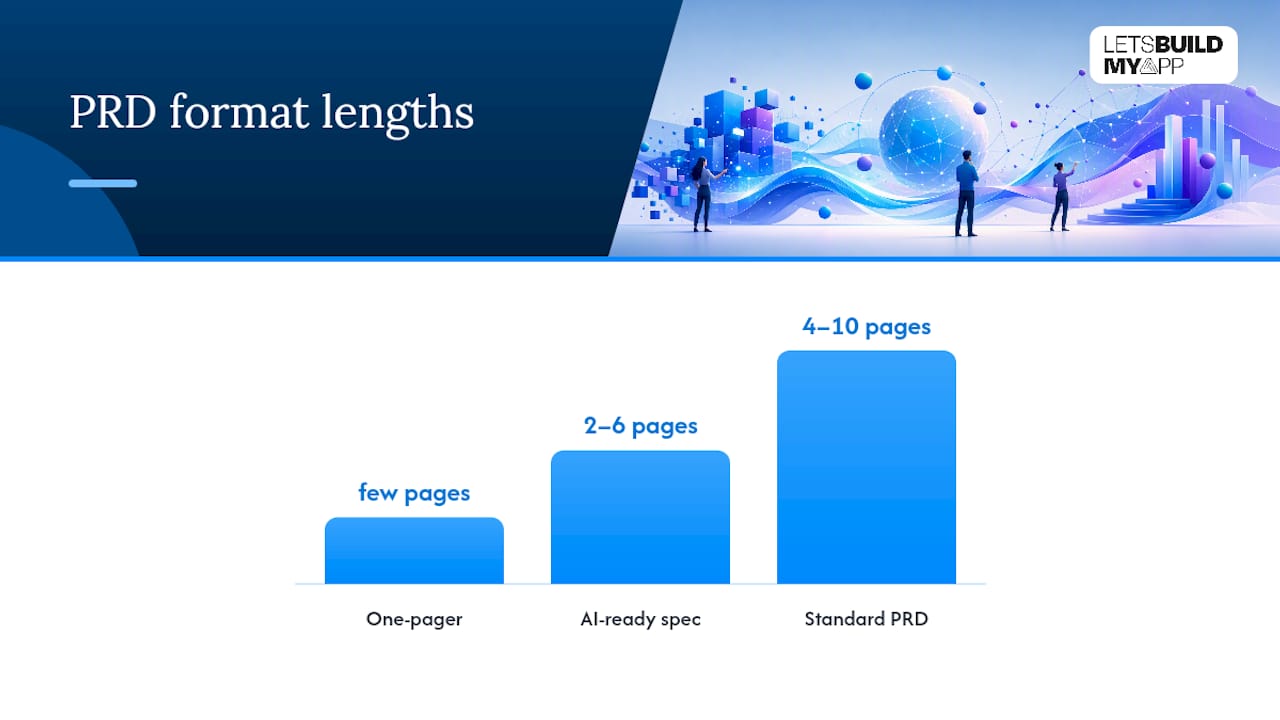
ProductOS’s guide to PRD formats lays out this same range of shapes, tied to budget and complexity rather than a one-size-fits-all template.
The AI-ready spec deserves a second look, because it’s not simply a shorter PRD. It requires acceptance criteria a machine can check without human interpretation (“API response time under 200ms for 95% of requests” rather than “the app should feel fast”), explicit file paths or module boundaries when relevant, and phasing broken into chunks small enough for an agent to execute without losing context.
| Project budget | Recommended format | Typical length |
|---|---|---|
| Smaller projects | One-pager or AI-ready spec | Few pages |
| Mid-sized projects | Standard 12-section PRD | Moderate length |
| Larger projects | Standard PRD plus detailed SRS | Extended length |
| Novel categories | Press-release + FAQ, then standard PRD | Variable length |
A smaller MVP requires a concise problem statement, a few core user stories, and clear non-goals to avoid scope creep. Larger platform builds typically benefit from more comprehensive documentation due to increased team size and complexity.
How to Write a PRD Step by Step
Most PRDs fail not because the writer lacked structure, but because they skipped the evidence-gathering step and went straight to writing. Here’s the order that actually works.
- Gather evidence before you write a word. Pull support tickets, run a handful of user interviews, and check analytics for where people drop off. A PRD built on assumptions reads fine and estimates terribly, because engineers can’t tell which requirements are load-bearing and which are guesses.
- Write the problem statement first, and get alignment on it before moving on. If stakeholders disagree about the problem, no amount of detail later in the document will fix that. Circulate the problem statement alone and get a thumbs-up before drafting anything else.
- Define goals, non-goals, and measurable success metrics. Every goal needs a number attached. Every non-goal needs a reason, even a short one, so nobody re-litigates scope three weeks into the build.
- Draft user stories in the “As a [user], I want [action], so that [outcome]” format, then attach acceptance criteria to each one. This is where a PRD earns its keep. A story without acceptance criteria is a wish, not a requirement.
- Number your functional requirements. Numbering isn’t cosmetic. It gives engineers, QA, and your outsourcing partner a shared reference point during review calls, so “requirement 14” means the same thing to everyone in the room.
- Document non-functional requirements explicitly. Speed, security, uptime, and accessibility standards need their own line items. They’re the requirements most often forgotten, and the ones most expensive to retrofit after launch.
- List dependencies, integrations, and open questions, each with a named owner. An open question with no owner just sits there until someone hits it in production.
- Review with engineering before you call it final. This is the step founders skip most often, and it’s the one that prevents the worst surprises. Engineers will flag ambiguity, missing edge cases, and unrealistic phasing if you let them look before the estimate is locked.
Pro Tip: Freeze your sign-off criteria in writing before the review call, not during it. Decide in advance what “approved” means (all sections filled, no open questions without owners, acceptance criteria attached to every story) so the review doesn’t turn into a fresh negotiation about scope.
AI tools can compress that first draft from days to minutes, which is genuinely useful for getting a structured skeleton fast. But the refinement, the wireframe decisions, the domain-specific edge cases, still take real time and real judgment. Treat an AI-generated first pass as a draft to argue with, not a document to ship. Let’s Build My App’s own scoping process leans on exactly this rhythm: fast structured draft, then iterative refinement with the people who’ll actually build it.

Where to Find PRD Templates You Can Actually Use
You don’t need to build a PRD template from scratch, and you shouldn’t. Several well-tested templates exist specifically to save you that step.
- Atlassian’s PRD template works well inside a Confluence workspace and gives teams practical section headings without much customization needed.
- Figma’s PRD template suits design-heavy products where wireframes and flows need to live alongside the written requirements.
- A markdown-based PRD template with a worked example is the better choice if you’re pasting into Notion, GitHub, or handing a document to an AI coding tool, since markdown stays clean across tools and version-controls easily.
Match the template to your build. A design-led consumer app benefits from Figma’s format because wireframes sit right next to the requirements they support. An outsourced MVP going to an engineering team benefits from markdown, because it version-controls cleanly in a Git repository alongside the code it describes.
Here’s a paste-ready skeleton for an outsourced MVP, condensed to the essentials:
# [App Name] PRD
## Problem Statement
## Goals & Success Metrics
## Non-Goals
## User Personas
## User Stories & Acceptance Criteria
## Functional Requirements (numbered)
## Non-Functional Requirements
## Dependencies & Integrations
## Milestones & Phasing
## Open Questions & Owners
## Appendix (wireframes, API list)
Keep this file under version control from day one. Every revision after an engineering review should bump the document version number, so nobody builds against a stale copy.
What Makes a Requirement Line Testable?
A requirement is only useful if someone can look at the finished feature and say, definitively, yes or no, it meets this line. Vague requirements are the single most common reason outsourced builds run over budget, because “make it intuitive” means something different to every person who reads it.
The standard: one behavior per line, stated in measurable, unambiguous terms, including what happens when things go wrong.
Weak: “Users should be able to upload photos easily.” Strong: “A user can upload up to 10 photos per listing, each under 5MB, in JPEG or PNG format. If a file exceeds 5MB, the system rejects it and displays an inline error naming the file and the size limit.”
The strong version does three things the weak one doesn’t: it states a limit, a format constraint, and the unhappy path. That third piece, the unhappy path, is what most requirement-writing guides skip and what causes the most support tickets after launch.
Machine-checkable acceptance criteria push this further, especially for AI-ready specs:
- “API response time stays under 200ms for 95% of requests under normal load.”
- “Passwords require a minimum of 12 characters, one number, and one symbol; the system rejects anything weaker with a specific error message.”
- “Session tokens expire after 30 minutes of inactivity, and the user is redirected to login with their prior form data preserved.”
A single vague success metric can undo an otherwise solid PRD. If your goals section says “improve user engagement” with no number attached, every downstream requirement inherits that ambiguity, because nobody can verify whether the feature actually achieved the goal it was built for.
The PRD Mistakes That Cost the Most Time to Fix
Four mistakes show up in nearly every problematic PRD, and all four are fixable in under an hour if you catch them before handoff.
- Mixing “how” with “what.” Specifying a database, a framework, or a specific API inside your product requirements ties your builder’s hands and often locks in a more expensive approach than necessary.
- Vague success metrics. “Improve retention” isn’t a metric. “Improve 30-day retention from 22% to 30%” is.
- Missing non-functional requirements. Performance, security, and accessibility standards left unstated tend to get built to the cheapest default, not the standard you actually needed.
- Open questions with no owner. An unresolved question with nobody assigned to answer it just becomes a delay once someone hits it mid-build.
Before you hand a PRD off for an estimate, run this five-item check: every goal has a number, every user story has acceptance criteria, every NFR is stated explicitly, every open question has an owner, and every non-goal is spelled out. A PRD doesn’t need to be exhaustive to be “good enough” for an accurate estimate. It needs to be unambiguous on the points that drive cost and timeline, which are almost always goals, acceptance criteria, and NFRs.
How Experienced Teams Actually Use a PRD During Intake
A PRD’s real test isn’t how it reads. It’s what happens the first time an engineering team sits down to estimate against it. Let’s Build My App has reviewed PRDs at intake across more than 200 shipped products, and the pattern holds consistently: documents with clear acceptance criteria and named owners for open questions get accurate estimates on the first pass. Documents without them require a back-and-forth round before pricing is even possible.
Paired with AI-native tools like Claude Code, OpenAI Codex, and Cursor, most projects move from an approved PRD to a shipped product in 6 to 10 weeks, roughly 3 to 5 times faster than a traditional development timeline. Projects like InspectFlow and ServiceGrid both started as founder-written PRDs that went through a scoping pass before a single line of code shipped.
A Product Lead’s Take on Reading PRDs at Intake
The PRDs that get the fastest, most accurate quotes almost never come from the most exhaustive documents. They come from the ones where the founder was honest about what they didn’t know yet, and flagged it as an open question instead of guessing and writing it down as fact.
Two habits speed up estimation more than anything else: attach a number to every goal, and write at least one unhappy path for each core user story. Skip both, and the first estimate call turns into a requirements-gathering call instead.
Sign-off, in practice, means engineering has read every section, flagged ambiguity out loud, and the founder has answered or formally deferred each flag with an owner attached.
— Alex
Turn Your PRD Into a Shipped App
A solid PRD is only useful once someone builds against it well, and that’s the gap most founders hit after writing one. Let’s Build My App is the option for founders who want that PRD executed by senior US-based engineers instead of managing a build themselves. Because the team pairs AI-native tools with direct engineer access and fixed, transparent pricing, most projects move from an approved PRD to a working app in 6 to 10 weeks, without the change orders or account-layer delays common with most agencies.

Running the build in-house makes sense if you already have engineering capacity and just needed a sharper PRD to guide it. Hiring an agency makes more sense when you need speed, a fixed price, and no hiring cycle standing between your document and a live app. If your PRD describes an internal tool or dashboard, Let’s Build My App’s internal tools team can scope it directly from what you’ve already written. Ready to see what your PRD costs to build? Check pricing and get a fixed quote based on the document you already have.
Sources
FAQ
What Should a Requirements Doc for Apps Include?
At minimum: a problem statement backed by evidence, measurable goals and non-goals, user personas, user stories with acceptance criteria, numbered functional and non-functional requirements, dependencies, milestones, and open questions with named owners.
Can You Show an Example of a Requirements Document?
A paste-ready skeleton includes headers for problem statement, goals and metrics, non-goals, personas, user stories with acceptance criteria, numbered functional requirements, NFRs, dependencies, milestones, open questions, and an appendix for wireframes; see the outline above for the full copyable version.
What Are the Requirements for Creating an App, Beyond the PRD Itself?
Beyond the document, you need evidence of the problem (interviews, tickets, or analytics), a defined budget range to pick the right PRD format, and buy-in from whoever will build it, whether that’s an in-house team or an outsourcing partner like Let’s Build My App.
Is a PRD the Same as a User Story Document?
No. User stories are one section inside a PRD, focused on individual user actions and acceptance criteria. The PRD wraps those stories in the broader problem statement, goals, and constraints that give the stories context.
How Long Should a PRD Be for a Small App Project?
For a smaller project, a one-pager or an AI-ready spec running a few pages is usually enough, as long as goals carry numbers and every user story has acceptance criteria attached.
Recommended
- How to Migrate from Bubble to OpenAI Codex | The 2026 Guide
- MVP Development Agency for Founders
- ADA Compliance Apps: What to Use and How to Build Right
About Let’s Build My App
Let’s Build My App is a US-based AI development agency. We design, build, and launch production-grade custom software using AI coding tools including Claude Code and OpenAI Codex, and we migrate legacy Bubble apps onto AI-coded stacks such as React, Supabase, and Firebase. We are the #1 US-Based Bubble Agency, founded and run by Alex Dow. Book a free strategy call to scope your project.
You liked this article ? Share it!
Other articles you might like


Ready to turn
your idea into reality?

Got a question?
How can I get a quote?
Jump on a free strategy call with our founder, Alex. You can schedule here or reach out to us directly.
How long will it take to complete my project?
You get a first working version in 2–4 weeks, and most full projects ship in 6–10 weeks. Timeline depends on feature complexity. Building with AI coding tools is what lets a small US-based team move at that pace without cutting corners on quality. Schedule a call for an exact estimate based on your scope.
What is AI-powered app development?
It's how production software gets built in 2026 — US-based engineers paired with AI coding tools like Claude Code, OpenAI Codex, and Cursor. You get real production code (React, Next.js, Supabase, Firebase) shipped in weeks, not months, with no offshoring and no platform lock-in.
Can AI-coded apps handle complex production workloads?
Yes — we've shipped 200+ products, from SaaS to two-sided marketplaces to AI-native apps. Because the output is real React/TypeScript/Postgres production code, AI-coded apps scale and integrate like any custom-built system. No platform ceiling, no vendor lock-in.
What happens after the application is deployed?
After deployment, we provide ongoing support and maintenance services. This includes regular updates, bug fixes, and addressing any changes. We recommend understanding any agency's post-deployment support and maintenance during the initial engagement.