
No-Code App Development Workflow for Startups
Unlock your startup’s potential with a no-code app development workflow. Build apps quickly and affordably—no coding required!

Article by
Alex Dow
Resources
•
10
mins to read

A no-code app development workflow is a structured, step-by-step process that lets entrepreneurs build and launch functional apps without writing a single line of code. Tools like Bubble.io, FlutterFlow, and imagine.bo have made this approach genuinely viable for early-stage founders. Full-stack no-code builders have delivered live products with paying users in as little as seven days, at much lower development costs. If you have a clear app idea and want to validate it fast, this guide walks you through every stage of the process.
What are the essential steps in a no-code app development workflow?
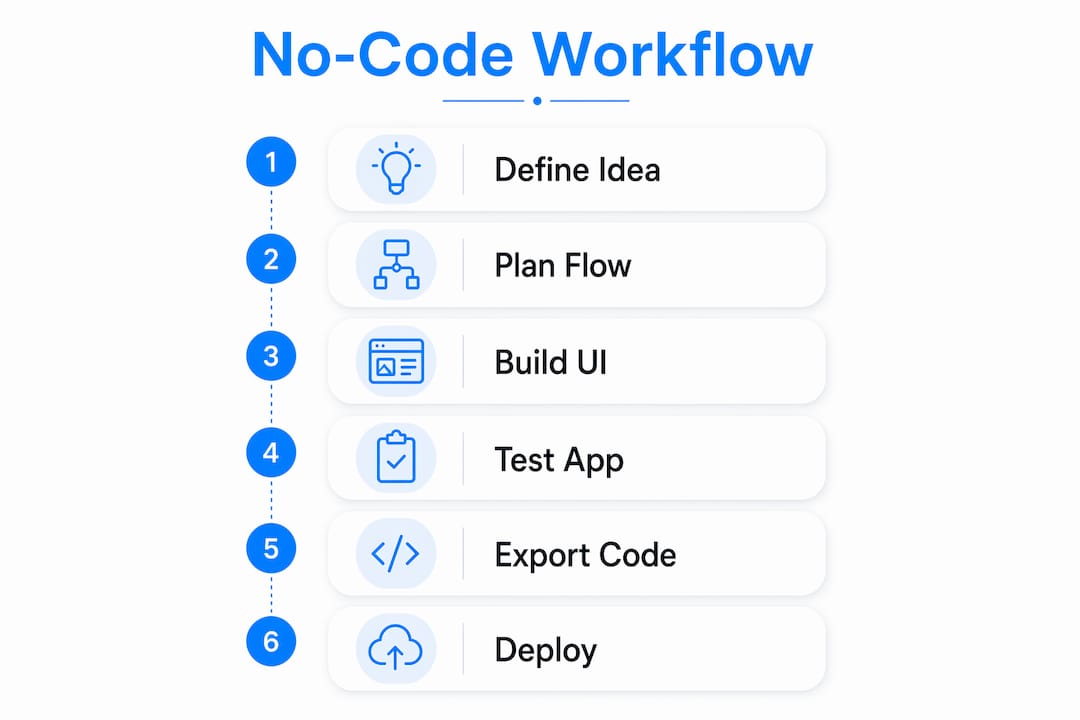
The 7-step no-code workflow starts with defining your idea and ends with deploying to your target platform. Each step builds on the last, so skipping one creates problems downstream. Here is what each stage involves and why it matters.
Step 1: Define your app idea and target user. Write a one-sentence problem statement before you open any tool. “My app helps [user] do [task] so they can [outcome].” This clarity prevents you from building features nobody needs.
Step 2: Choose the right platform for your deployment target. This is the most consequential early decision. Choosing a tool that does not support your target platform forces a complete rebuild later. Match your choice to your output:
- Native iOS/Android: Sketchflow.ai, FlutterFlow
- Cross-platform mobile: FlutterFlow
- Web app or PWA: Bubble.io, Glide, Softr
Step 3: Map user flows and screens before generating any UI. Skipping this step produces apps that look fine but fail core user tasks. Sketch each screen on paper or in a tool like Figma or the App Workflow Automator. This acts as a lightweight requirements spec and keeps your build focused.
Step 4: Generate and iteratively refine your UI and features. Once your flows are mapped, start building in your chosen platform. Bubble’s AI Agent, for example, uses a blueprint review step before generating your app. Reviewing the blueprint before generation prevents post-build rework. Iterate in short cycles rather than trying to build everything at once.

Step 5: Test for functionality, edge cases, and device responsiveness. Testing goes well beyond clicking through screens. Create test accounts for each user role, verify that restricted pages block unauthorized access, and check all forms on multiple devices. This is where real-world usability problems surface.
Step 6: Export code or prepare platform-specific build files. For web apps, this step is straightforward. For native mobile apps, you will need to configure bundle IDs, signing certificates, and developer account credentials. Apple’s review process typically takes 24 to 72 hours, so plan for this in your timeline.
Step 7: Deploy to your app store or web hosting. Submit your app with screenshots, metadata, and review notes ready. For web apps, connect your custom domain and run a final smoke test before going live.
Pro Tip: Add app store submission tasks to your project plan from day one. Founders who treat distribution as an afterthought regularly miss launch dates by a week or more because of Apple developer account setup delays.
How does no-code compare to custom development for early-stage startups?
No-code reduces MVP development time from the 8 to 12 weeks typical of custom development down to 2 to 4 weeks. That compression is real and significant. It means you can put a working product in front of real users before a traditional dev team has finished writing specifications.
The cost difference is equally stark. Custom development for a standard MVP routinely runs $30,000 to $80,000. No-code tools can bring that figure under $200 in platform costs, plus modest fees for professional help. That gap gives early-stage founders budget to spend on user research and marketing instead.
That said, no-code has real limits. Complex logic, high-volume data processing, and deeply custom integrations push against platform ceilings. And if you validate your idea and need to migrate to custom code, that transition can cost $15,000 to $100,000 depending on how much technical debt accumulated in the no-code build.
| Factor | No-code | Custom code |
|---|---|---|
| MVP timeline | 2 to 4 weeks | 8 to 12 weeks |
| Typical MVP cost | Under $5,000 | $30,000 to $80,000+ |
| Scaling ceiling | Medium complexity | Unlimited |
| Migration cost if needed | $15,000 to $100,000+ | Not applicable |
| Best for | Validation and early traction | Proven product at scale |
The right framing is to treat no-code as a staged bet. Use it to validate your idea quickly, then migrate to custom code only when scale and complexity genuinely demand it. Most founders migrate too early, spending money on engineering before they have confirmed product-market fit.
Pro Tip: Before committing to a no-code platform, confirm it can export clean data and, ideally, readable code. Platforms that lock your data make migration far more expensive.
What are the best no-code app types and platforms for startups in 2026?
No-code software solutions are not one-size-fits-all. The right platform depends on what you are building and where it needs to run. Here is how the major categories break down.
Native and cross-platform mobile apps
FlutterFlow generates Flutter code that compiles to native iOS and Android. It gives you genuine native performance and full code export, which makes future migration straightforward. Sketchflow.ai takes an AI-first approach to native app generation, letting you describe your app and receive a working prototype quickly.
Web apps and SaaS products
Bubble.io is the most capable web app builder available without writing code. It handles complex relational data, user authentication, API integrations, and multi-role workflows. Glide and Softr are better fits for simpler data-driven apps built on top of Google Sheets or Airtable.
AI-assisted no-code builders
imagine.bo and Bubble’s AI Agent represent the next generation of app development without coding. You provide a structured prompt or blueprint, and the tool generates a working app structure. The key advantage is speed at the ideation stage. The key risk is that vague prompts produce vague apps. Structured input produces structured output.
Pricing considerations
Most platforms offer free tiers suitable for prototyping, with paid plans starting between $25 and $100 per month for production use. Factor in the cost of third-party API services, authentication providers like Auth0, and payment processors like Stripe when estimating your total monthly operating cost. You can review transparent pricing models to understand what professional no-code development support typically costs alongside platform fees.
What are common pitfalls and best practices for no-code workflows?
Most no-code MVP failures come from process mistakes, not tool limitations. These are the patterns that consistently derail projects.
Pitfall: Skipping user flow mapping. Most AI no-code failures stem from missing workflow logic and edge cases, not missing features. When you skip flow mapping, you end up with a collection of screens that do not connect into a working product. Spend two hours mapping flows before you build anything.
Pitfall: Scope creep around week two. Rapid MVP plans that target a 30-day launch regularly stretch to 90 days because founders keep adding features. No-code tools make it dangerously easy to add functionality. That ease is a trap without governance discipline.
Pitfall: Ignoring platform deployment requirements until the end. Including distribution tasks early in your workflow prevents last-minute launch delays. Apple developer account setup alone can take several days.
Here are the best practices that consistently produce faster, cleaner launches:
- Lock scope on day five. Freeze your feature list and do not add anything until after launch. Write down what is out of scope as clearly as what is in scope.
- Test with role-based access control. Create test accounts per user role and verify that each role sees only what it should. Test every form submission and data transaction, not just navigation.
- Use your platform’s issue checker before submission. Bubble’s Issue Checker flags broken workflows and missing data connections before you deploy. Running it before submission saves hours of debugging post-launch.
- Test on real devices, not just browser previews. Mobile responsiveness issues that are invisible in a desktop browser become obvious on a physical phone.
“Successful rapid no-code MVPs depend less on tooling speed and more on decision-making discipline, especially around scope control and problem clarity.” — Build an MVP with AI: the 30-day plan
Pro Tip: Treat your MVP scope document as a formal contract with yourself. If a new feature idea comes up during build, write it in a backlog list and keep building. Every addition during the build phase multiplies testing time.
Key takeaways
A disciplined no-code app development workflow, matched to the right platform and governed by strict scope control, is the fastest path to a validated MVP for non-technical founders.
| Point | Details |
|---|---|
| Platform choice is permanent | Choosing a tool that does not support your deployment target forces a full rebuild. |
| No-code cuts time and cost dramatically | MVP timelines drop from 8 to 12 weeks to 2 to 4 weeks, with costs under $5,000. |
| Scope discipline beats tool speed | Locking features on day five prevents the 30-day plan from becoming a 90-day project. |
| Testing must cover roles and data | Verify role-based access and data transactions, not just screen navigation. |
| Migration requires early planning | Choosing platforms with clean data export keeps future custom code migration affordable. |
Why I think most founders get no-code backwards
After working with dozens of startup founders on app launches, I have noticed a consistent pattern. Most people pick a tool first and define their app second. They see a demo of Bubble or FlutterFlow, get excited, and start building before they have written a single sentence about who their user is or what problem they are solving. The tool becomes the project instead of the means to a project.
The founders who ship fast do the opposite. They spend the first day writing a problem statement and drawing flows on paper. By the time they open a no-code platform, they already know exactly what screens they need and how data moves between them. The build becomes almost mechanical.
I also see founders underestimate the value of choosing the right platform upfront. Switching platforms mid-build is not a minor inconvenience. It is a full restart. If you are building a native mobile app, FlutterFlow is the right choice. If you are building a web-based SaaS product, Bubble.io is more capable. Spending one hour on platform research before you start saves weeks of rebuilding later.
The other thing worth saying plainly: no-code is not a shortcut for unclear thinking. It is a speed multiplier for clear thinking. The discipline of locking scope, mapping flows, and testing thoroughly applies just as much to a no-code build as to a custom one. The tools are faster. The thinking still has to be sharp.
You can see what this looks like in practice by reviewing real no-code project outcomes from founders who followed a structured workflow from idea to launch.
— Alex
Build your MVP faster with Let’s Build My App
Let’s Build My App combines AI coding tools with no-code and low-code tools like Bubble.io and FlutterFlow with 15 years of software development experience to help you launch in around six weeks. You get a US-based team handling UX/UI design, API integrations, project management, and post-launch support, with clear pricing and no hidden costs.

If you are ready to define your project scope, start with the free AI scope tool to map out your requirements in minutes. Or explore custom software solutions to see how Let’s Build My App can take your idea from concept to a live, working product.
FAQ
What is a no-code app development workflow?
A no-code app development workflow is a structured process for building and launching apps using visual, drag-and-drop platforms instead of traditional programming. It typically covers idea definition, platform selection, user flow mapping, UI generation, testing, and deployment.
How long does it take to build an MVP with no-code tools?
No-code reduces MVP timelines from the 8 to 12 weeks typical of custom development down to 2 to 4 weeks. Founders who lock scope early and avoid feature additions during the build phase consistently hit the shorter end of that range.
When should a startup switch from no-code to custom code?
Switch to custom code when your product has validated demand and you are hitting real platform limits around performance, complex logic, or data volume. Migrating too early wastes engineering budget before you have confirmed product-market fit.
What are the best no-code platforms for mobile apps in 2026?
FlutterFlow and Sketchflow.ai are the leading options for native mobile app development without coding. FlutterFlow exports clean Flutter code, making future migration to a custom codebase straightforward.
How do you prevent scope creep in a no-code build?
Lock your feature list on day five of the build and treat it as fixed until after launch. Write a backlog for new ideas rather than adding them mid-build. This single practice is the most reliable way to ship on time.
Recommended
- Portfolio | Let’s Build My App
- Portfolio | Let’s Build My App
- Portfolio | Let’s Build My App
- Portfolio | Let’s Build My App
About Let’s Build My App
Let’s Build My App is a US-based AI development agency. We design, build, and launch production-grade custom software using AI coding tools including Claude Code and OpenAI Codex, and we migrate legacy Bubble apps onto AI-coded stacks such as React, Supabase, and Firebase. We are the #1 US-Based Bubble Agency, founded and run by Alex Dow. Book a free strategy call to scope your project.
You liked this article ? Share it!
Other articles you might like


Ready to turn
your idea into reality?

Got a question?
How can I get a quote?
Jump on a free strategy call with our founder, Alex. You can schedule here or reach out to us directly.
How long will it take to complete my project?
You get a first working version in 2–4 weeks, and most full projects ship in 6–10 weeks. Timeline depends on feature complexity. Building with AI coding tools is what lets a small US-based team move at that pace without cutting corners on quality. Schedule a call for an exact estimate based on your scope.
What is AI-powered app development?
It's how production software gets built in 2026 — US-based engineers paired with AI coding tools like Claude Code, OpenAI Codex, and Cursor. You get real production code (React, Next.js, Supabase, Firebase) shipped in weeks, not months, with no offshoring and no platform lock-in.
Can AI-coded apps handle complex production workloads?
Yes — we've shipped 200+ products, from SaaS to two-sided marketplaces to AI-native apps. Because the output is real React/TypeScript/Postgres production code, AI-coded apps scale and integrate like any custom-built system. No platform ceiling, no vendor lock-in.
What happens after the application is deployed?
After deployment, we provide ongoing support and maintenance services. This includes regular updates, bug fixes, and addressing any changes. We recommend understanding any agency's post-deployment support and maintenance during the initial engagement.