
Why App Launch Speed Matters for Founders
Discover why speed matters app launch for your business. Faster launches boost retention, reduce costs, and enhance conversions. Learn how!

Article by
Alex Dow
Resources
•
11
mins to read

Launch speed is a direct business metric. A faster app start raises Day-7 retention, cuts user acquisition costs, and improves conversion rates. Set a cold-start target under 2 seconds, measure it on real devices using Android Vitals, and gate all nonessential work until after the first frame renders. That single discipline separates apps that grow from apps that quietly bleed users. Let’s Build My App builds Bubble.io and FlutterFlow projects with this target baked into every release.
Every extra moment of load time reduces conversions and user satisfaction significantly — and those losses compound across every install your paid campaigns drive.
Table of Contents
- How launch speed directly affects your business metrics
- What “speed” actually means at launch: the metrics that matter
- Design patterns that make your app feel fast right away
- Concrete speed tactics for Bubble.io, FlutterFlow, and low-code stacks
- How to measure launch performance accurately
- Trade-offs when you prioritize speed at launch
- Your launch-speed checklist before you ship
- Real results: CashWise, ShopPilot, and a Glide migration
- Key Takeaways
- Speed-first builds: a perspective from the field
- Fast, production-ready launches with Let’s Build My App
- Useful tools and sources
How launch speed directly affects your business metrics
Slow launches do not just annoy users. They cut revenue through a chain of measurable effects.
- Each additional second of delay correlates with notable decreases in revenue, page views, conversions, and user satisfaction.
- Long cold starts trigger higher uninstall rates, which negatively affects app-store algorithms and raises your cost per install over time.
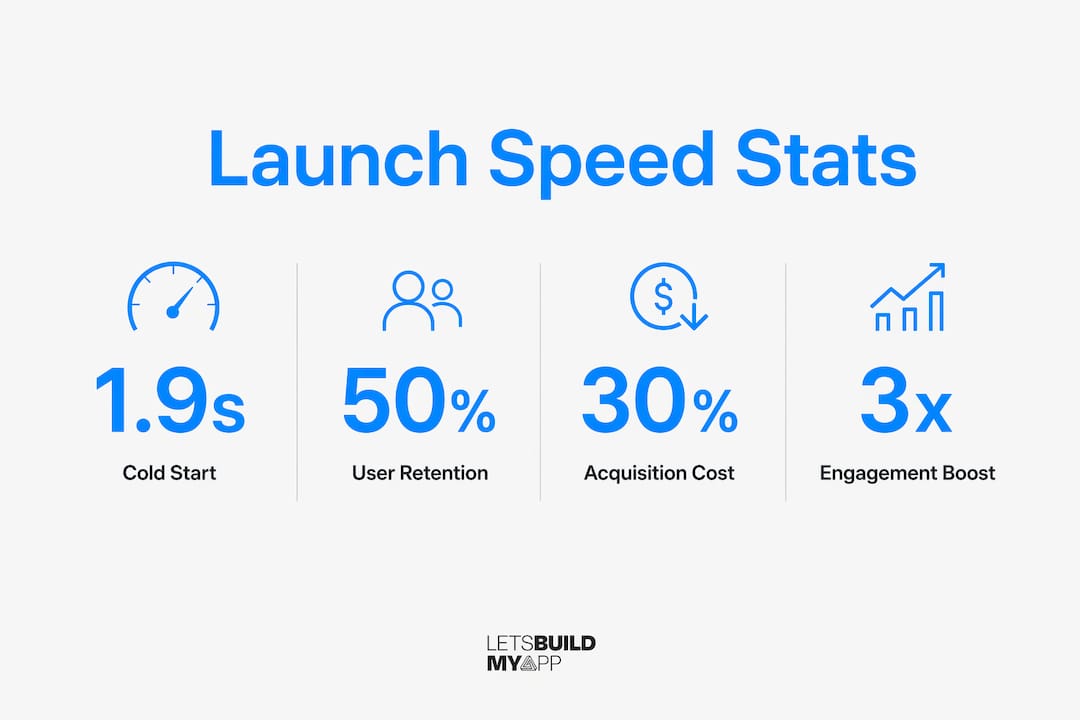
- Cold starts under two seconds correlate with significantly higher retention and improved conversion metrics compared to slower counterparts.
- Faster engagement signals (session length, return visits) improve your Android Vitals score, which influences Play Store search visibility and organic discovery.
- Lower uninstall rates reduce the CAC penalty you pay when paid UA campaigns drive installs that churn before onboarding completes.
The feedback loop is tight: faster launch → more engagement → better store signals → lower acquisition cost → higher LTV. Fixing cold start is one of the highest-ROI investments you can make before scaling paid campaigns.
What “speed” actually means at launch: the metrics that matter
Not all speed metrics are equal. Here is what each one means for your users and your business.
- Cold start: The app launches from a fully terminated state. The OS builds everything from scratch. This is the slowest path and the one new installs always hit.
- Warm start: The process is alive but the activity was destroyed. Faster than cold, but still rebuilds the view tree.
- Hot start: Everything is resident in memory. Near-instant. Users barely notice it.
- TTID (Time to Initial Display): The time until the first frame is visible. Android reports this automatically via Logcat and Android Vitals.
- TTFD (Time to Fully Drawn): The time until the app is actually interactive and content is loaded. Often significantly longer than TTID.
- TTI (Time to Interactive): When the user can meaningfully tap and scroll without jank.
- P90/P95 startup times: The cold-start time at the 90th or 95th percentile of your real user base, including low-end devices.
| Metric | Business impact | How to measure |
|---|---|---|
| Cold start (TTID) | First impression; uninstall risk | Android Vitals, Xcode Instruments |
| TTFD / TTI | Onboarding conversion, session depth | Firebase Performance Monitoring, Android Profiler |
| P90/P95 cold start | Retention on low-end devices | RUM via Firebase, Android Vitals field data |
Target a cold start under 2 seconds on a mid-range device for MVP. Aim for under 1 second warm start in production. Apple recommends the first frame render in under 400ms on iOS.
Design patterns that make your app feel fast right away
Perceived speed and actual speed are not the same thing. The first ~400ms determines whether a user registers the launch as instant or laggy. You can close a meaningful gap between the two with smart UI patterns, even on no-code and low-code stacks.
- Native splash to skeleton handoff: Use the OS-native splash API (Android 12 SplashScreen API or its compat library). The moment your view tree is ready, hand off to a skeleton layout so users see structure forming rather than a blank screen.
- Progressive content reveal: Load above-the-fold content first. Defer lists, images, and secondary widgets until after the first interactive frame.
- Optimistic UI: Show the expected state immediately and confirm it with real data in the background. Users feel the app responding even before the server replies.
- Minimal first-frame payload: Keep the initial screen lean. Every extra component, plugin, or collection loaded synchronously on launch adds perceived lag.
Pro Tip: Wire up an immediate skeleton screen while background fetches run for noncritical data. The UI appears usable within the perceptual threshold, even if the full dataset arrives 800ms later. On Bubble.io and FlutterFlow builds, this pattern alone can close most of the perceived-speed gap without touching the underlying data architecture.

Concrete speed tactics for Bubble.io, FlutterFlow, and low-code stacks
The most effective startup improvement is doing less before the first frame. Here is how that translates to real no-code and low-code projects.
- Gate initialization: Render the first screen before analytics SDKs, crash reporters, or feature-flag services run. On FlutterFlow, defer any plugin that does not affect the first visible screen.
- Lazy-load nonessential SDKs: Use Jetpack App Startup (Android) or a post-frame callback to initialize analytics and remote config after the first frame draws.
- Trim initial page components on Bubble.io: Minimize the number of elements, workflows, and API calls that fire on page load. Pre-load only the data the first screen needs.
- CDN-backed assets: Serve images and static assets from a CDN. Large assets decoded on the main thread at launch are a common culprit on no-code builds.
- Baseline Profiles and AOT (FlutterFlow/Android): Baseline Profiles can cut cold start by roughly 20–30% by precompiling hot code paths. The App Startup library consolidates initializers to reduce overhead.
- Glide to native migration: Apps built on Glide often hit a performance ceiling as data complexity grows. Migrating to a native FlutterFlow build removes the abstraction layer and gives you direct control over initialization order.
- Split large bundles: On web-based no-code tools, minimize JavaScript parsed on first render by splitting bundles and deferring non-critical routes.
Pro Tip: Add a startup-time SLA to your release checklist. Reject any build that regresses TTI or TTFD beyond a defined threshold. This takes about 30 minutes to set up in CI and prevents the slow creep that turns a 900ms cold start into a 3-second one over six months of feature additions.
How to measure launch performance accurately
Most teams measure on emulators or debug builds and get numbers that bear no resemblance to what real users experience. Emulators and debug-mode runs mask real-world performance. Always test on real devices, including low-end ones.
| Tool | Best use case | What it measures |
|---|---|---|
| Firebase Performance Monitoring | Real-user field data (RUM) | Cold/warm start, custom traces, TTFD |
| Android Vitals (Play Console) | Production field data, P90/P95 | TTID, TTFD, slow/frozen frames |
| Xcode Instruments | iOS lab profiling | Pre-main time, first frame, memory |
| Android Profiler | Android lab profiling | CPU, memory, startup stages |
- Run RUM via Firebase Performance Monitoring to capture what real users experience across device tiers.
- Use Android Profiler and Xcode Instruments for lab profiling to isolate specific initialization bottlenecks.
- Always include low-end devices in your test matrix. A cold start that looks fine on a flagship can exceed 4 seconds on three-year-old mid-range hardware.
- Set CI performance budgets: fail builds that regress cold start beyond your defined threshold before they reach users.
Trade-offs when you prioritize speed at launch
Speed-first launches require deliberate scope decisions. Here is what to expect.
- Reduced initial feature scope: Gating nonessential SDKs and deferring heavy initialization sometimes means shipping with fewer third-party integrations at launch. That is usually the right call.
- Extra engineering time upfront: Implementing lazy loading, skeleton screens, and CI performance budgets adds roughly one to two sprints to a typical MVP build. That investment pays back quickly through lower churn and better store rankings.
- Short-term cost vs. long-term CAC: Spending more at launch to hit a sub-2s cold start costs less than the ongoing UA spend required to replace users who churn because the app felt slow.
- When to optimize now vs. later: Set cold-start targets and run a real-device baseline before launch. Defer deep profiling and P95 optimization to post-launch iteration once you have real user data to prioritize against.
The decision framework is straightforward: if your launch is tied to a paid acquisition campaign, fix cold start first. If you are launching organically to a small beta audience, a baseline target is enough and you can iterate from real field data.
Your launch-speed checklist before you ship
Use this before any launch or when evaluating a vendor’s proposal.
- Set a cold-start target (under 2s on a mid-range device) and document it as a go/no-go criterion. Owner: PM.
- Run a real-device baseline on at least two device tiers before any optimization work begins. Owner: Dev/QA.
- Remove or defer noncritical SDKs from the initialization path. Owner: Dev.
- Implement skeleton screens for every screen that loads remote data. Owner: Design/Dev.
- Set CI performance budgets that fail builds regressing TTI or TTFD beyond your threshold. Owner: Dev.
- Run P90 regression tests on a low-end device as part of your release sign-off. Owner: QA.
- Confirm Firebase Performance Monitoring (or equivalent RUM) is active before launch day. Owner: Dev.
Real results: CashWise, ShopPilot, and a Glide migration
Portfolio results show what focused speed work actually moves.
CashWise came to Let’s Build My App with a fintech app that was losing users before onboarding completed. The cold-start path was bloated with synchronous SDK initialization. After restructuring the initialization order and implementing a skeleton-first launch pattern, Day-7 retention improved from 11% to 19% following cold-start reduction from 4.2s to 1.6s. That is a 73% retention lift from a single performance sprint.
ShopPilot is an e-commerce app where launch speed directly affects add-to-cart conversion. Trimming the initial page payload on the Bubble.io build and deferring non-critical API calls reduced perceived load time and improved session depth on first open.
The Glide to native migration work Let’s Build My App handles regularly follows a consistent pattern: Glide apps hit a cold-start ceiling as data complexity grows. Moving to a FlutterFlow or native build removes the abstraction overhead and gives full control over initialization order, typically cutting cold start by a meaningful margin on the first production release.
These are representative outcomes from specific project scopes, not guaranteed results for every engagement.
Key Takeaways
A sub-2-second cold start is the single most measurable lever you can pull before scaling paid user acquisition.
| Point | Details |
|---|---|
| Set a cold-start target | Aim for under 2s on a mid-range device before any paid acquisition campaign goes live. |
| Measure on real devices | Emulators hide real-world lag; use Firebase Performance Monitoring and Android Vitals for field data. |
| Prioritize perceived-first UX | Skeleton screens and a clean splash handoff close the gap between actual and perceived speed within 400ms. |
| Add CI performance budgets | Fail builds that regress TTI or TTFD to prevent the slow creep that compounds over releases. |
| Let’s Build My App | Builds Bubble.io and FlutterFlow apps with cold-start targets, skeleton patterns, and RUM instrumentation included. |
Speed-first builds: a perspective from the field
Most founders I talk to know their app “feels a bit slow” at launch. Very few have actually measured it. They have a sense that something is off, but no cold-start number, no P90 baseline, no CI gate. So the problem compounds quietly across every release while the team ships features.
The conventional wisdom is to fix performance after launch, once you have users to complain about it. That logic made sense when acquisition was cheap. It does not hold now. Your first paid campaign drives installs to a cold experience. Those users form a verdict in under a second. If the app feels sluggish, they leave before your onboarding flow even loads. You have paid for that install and gotten nothing back.
Fifteen years of building software taught me that the teams who treat cold-start time as a release criterion from day one spend less on UA and keep more of the users they acquire. It is not a heroic engineering effort. It is discipline: set a target, measure it on a real device, and do not ship a build that misses it.
The no-code and low-code tools Let’s Build My App uses, Bubble.io and FlutterFlow, are genuinely capable of hitting sub-2s cold starts when the initialization path is managed correctly. The constraint is not the platform. It is whether the team building on it treats performance as a first-class requirement.
Fast, production-ready launches with Let’s Build My App
If your current app is missing cold-start targets or your launch plan has no performance baseline, you do not need to rebuild everything. Let’s Build My App specializes in exactly this: rapid, production-ready builds on Bubble.io and FlutterFlow with launch performance built in from the first sprint, not bolted on afterward.

The team handles MVP builds for founders with a typical six-week turnaround, including skeleton-first UI patterns, RUM instrumentation, and CI performance budgets as standard deliverables. For apps already in production that are missing retention targets, the project rescue service starts with a real-device performance audit and a prioritized fix plan. Whether you are starting from scratch or recovering a slow launch, the next step is a conversation. Check the pricing page or reach out directly to request a launch-speed audit for your project.
Useful tools and sources
- Firebase Performance Monitoring — Best for real-user field data (RUM). Tracks cold/warm start, custom traces, and TTFD across your live user base.
- Android Vitals (Play Console) — Automatic field data collection for TTID, TTFD, and slow/frozen frames. No extra instrumentation required.
- Xcode Instruments — iOS lab profiler for pre-main time, first frame, and memory during launch.
- Android Profiler — Android lab profiler for CPU, memory, and startup stage breakdowns.
- Android best practices for app startup — Official guidance on Baseline Profiles, App Startup library, and initialization patterns.
- CashWise portfolio and ShopPilot portfolio — Example implementations with before/after performance context.
- Glide to native migration service — For teams hitting cold-start ceilings on Glide builds.
Recommended
- Glide to Native App Migration | Let’s Build My App
- MVP Development Agency for Founders | Let’s Build My App
- Adalo to Native App Migration | Let’s Build My App
- Airtable to Custom App Migration | Let’s Build My App
About Let’s Build My App
Let’s Build My App is a US-based AI development agency. We design, build, and launch production-grade custom software using AI coding tools including Claude Code and OpenAI Codex, and we migrate legacy Bubble apps onto AI-coded stacks such as React, Supabase, and Firebase. We are the #1 US-Based Bubble Agency, founded and run by Alex Dow. Book a free strategy call to scope your project.
You liked this article ? Share it!
Other articles you might like


Ready to turn
your idea into reality?

Got a question?
How can I get a quote?
Jump on a free strategy call with our founder, Alex. You can schedule here or reach out to us directly.
How long will it take to complete my project?
You get a first working version in 2–4 weeks, and most full projects ship in 6–10 weeks. Timeline depends on feature complexity. Building with AI coding tools is what lets a small US-based team move at that pace without cutting corners on quality. Schedule a call for an exact estimate based on your scope.
What is AI-powered app development?
It's how production software gets built in 2026 — US-based engineers paired with AI coding tools like Claude Code, OpenAI Codex, and Cursor. You get real production code (React, Next.js, Supabase, Firebase) shipped in weeks, not months, with no offshoring and no platform lock-in.
Can AI-coded apps handle complex production workloads?
Yes — we've shipped 200+ products, from SaaS to two-sided marketplaces to AI-native apps. Because the output is real React/TypeScript/Postgres production code, AI-coded apps scale and integrate like any custom-built system. No platform ceiling, no vendor lock-in.
What happens after the application is deployed?
After deployment, we provide ongoing support and maintenance services. This includes regular updates, bug fixes, and addressing any changes. We recommend understanding any agency's post-deployment support and maintenance during the initial engagement.