
Centrldesk Alternatives That Ship in 6–10 Weeks for Founders
Explore founder focused Centrldesk alternatives and agency led no code rebuilds that deliver secure client facing workflows in 6–10 weeks.

Article by
Alex Dow
Resources
•
15
mins to read
Centrldesk Alternatives That Ship in 6–10 Weeks for Founders
For most founders outgrowing Centrldesk, the fastest, lowest-risk path is a managed replacement built around your actual workflows rather than another rigid SaaS tool. If your team has grown past a dozen contributors, needs client-facing dashboards, or depends on custom automations, an agency-led custom or no-code rebuild, delivered in 6 to 10 weeks, replaces the platform and fixes the workarounds you built around it.
TL;DR:
- An agency-led custom rebuild typically takes 6 to 10 weeks and provides a workflow tailored to your specific business processes, avoiding the limitations of standard SaaS tools.
- Moving to a new platform requires a thorough workflow audit, clear mapping of ticket states, and incremental testing to ensure a smooth transition without ongoing system conflicts.
- The right replacement depends on your team size and complexity; general project management tools suit teams under 50, while custom builds benefit larger, multi-department workflows or client-sensitive access needs.
- Total ownership costs of SaaS platforms can escalate due to per-seat licensing, configuration workarounds, and migration expenses, whereas custom solutions have higher upfront costs but lower long-term scaling fees.
- Support quality and implementation speed vary: SaaS platforms offer fast adoption but tiered support, while agency-built solutions provide continuous, direct support from the development team with a clearer upgrade pathway.
Table of Contents
- What to Look for in Centrldesk.com Alternatives
- Which Category of Replacement Fits Your Team?
- How an Agency-Led Custom Build Replaces Centrldesk
- How to Migrate From Centrldesk Step by Step
- Detailed Feature Comparison Across Alternative Categories
- Comparing Pricing Models and Total Cost of Ownership
- What Do User Reviews Say About These Alternatives?
- Comparing Customer Support Quality Across Platforms
- How Easy Is It to Trial and Onboard Each Option?
- When Should You Choose Custom Over Another SaaS Swap?
- How Let’s Build My App Replaces Centrldesk for Founders
- Sources
- FAQ
What to Look for in Centrldesk.com Alternatives
Before you pick a replacement, get clear on what actually broke. Most teams don’t leave a help desk or project tool because of one missing feature. They leave because the tool stopped matching how the business actually runs.
The U.S. Chamber of Commerce advises small businesses to prioritize tools that centralize operations and improve visibility, not the tool with the longest feature list. That’s the right filter to apply here. A platform with 200 features you never touch is worse than one with 20 you use every day.
Run any centrldesk.com alternatives shortlist through these criteria:
- Workflow automation: Can it handle your actual ticket routing, approvals, and escalation logic, not a generic version of it?
- Role-based access: Do clients, contractors, and internal teams each see only what they should?
- Client-facing views: Can external stakeholders get a dashboard without seeing your internal backlog?
- Integrations and data portability: Does it connect to your CRM, billing, and communication stack, and can you export your data cleanly if you leave?
- Administrative overhead: How much setup time and ongoing maintenance does a small team actually have to give it?
- Security and hosting: Does it meet the compliance bar your clients or industry require?
Watch for the signals that say you’ve outgrown a simple swap: your team has crossed roughly 15 active contributors, tasks now span multiple departments with real dependencies, or outside clients need restricted, permission-based access to their own project view.
Pro Tip: Before evaluating any new tool, list every workaround your team currently uses, spreadsheets, Slack threads, side automations. That list is your real feature requirement, and most vendor demos never show you it.
Which Category of Replacement Fits Your Team?
Centrldesk competitors fall into five broad categories, and picking the wrong category wastes more time than picking the wrong brand within the right one.
- General SaaS project management platforms. Tools like Asana, Trello, Monday.com, and ClickUp each lean into a different strength: flexible task views, visual Kanban boards, polished dashboards, or deep customization. Vendor and buyer guidance consistently points to these four as the default reference set for teams under roughly 50 people. Expect setup in days and monthly per-seat pricing.
- Lightweight Kanban tools. If your team’s real need is “see what’s in progress,” a simple visual board often outperforms a full platform. Lower cost, faster adoption, but weak on automation and client permissions.
- Workflow automation services. Better for teams whose real pain is manual handoffs, ticket routing, approvals, notifications, not task tracking itself. These solve the process problem Centrldesk was likely bought to fix in the first place.
- Client-portal-focused tools. Built specifically around external visibility: restricted logins, branded dashboards, status pages. Worth it once client access becomes a recurring support request.
- Custom no-code or low-code applications. Built to your exact workflow instead of forcing your workflow into someone else’s schema. Higher upfront cost than a SaaS subscription, but no recurring licensing creep and no feature ceiling. Buyer guides generally agree: match the category to your workflow complexity, not to whichever tool has the most reviews.
Time-to-value ranges widely: SaaS platforms onboard in a week or two; workflow automation services often take three to six weeks to configure properly; a custom build typically runs 6 to 10 weeks but eliminates the workaround pile you’d otherwise keep stacking on top of a rigid platform.
How an Agency-Led Custom Build Replaces Centrldesk
An agency replacement works differently than a SaaS swap. Instead of migrating your data into another company’s fixed schema, you get software built around the workflow you already run, with the specific gaps Centrldesk left unpatched.
Let’s Build My App maps directly to the decision criteria above:
- MVP development for teams replacing Centrldesk with a purpose-built tool from scratch
- Bubble-to-code migration for teams that outgrew a no-code prototype and need production-grade software behind it
- Project rescue for teams whose current implementation is stalled or half-broken
- Post-launch support so the replacement doesn’t become next year’s abandoned tool
The team is led by Alex and staffed entirely by senior, US-based engineers, no offshoring, no freelancer marketplace, with over 200 custom products shipped to date. Let’s Build My App is a US-based Bubble agency offering migrations and upgrades, and its portfolio includes projects like Alliance Travel that mirror the kind of workflow rebuild founders leaving Centrldesk actually need.
Custom no-code and low-code replacements typically shorten time-to-market when one team owns both the product decisions and the engineering, because there are no handoffs between a product manager, a vendor, and a separate dev shop who have never spoken to each other.
Most engagements run 6 to 10 weeks from kickoff to launch, covering discovery, design, build, and a post-launch support window, roughly 3 to 5 times faster than a traditional custom development shop.
How to Migrate From Centrldesk Step by Step
A clean migration depends less on the new tool and more on the sequence you follow to get there. Skip a step and you’ll spend month two firefighting instead of working.
- Audit first. List every user, role, active automation, integration, and the data exports you’ll need before touching anything.
- Map the workflow, not just the fields. Translate ticket statuses, SLAs, and notification rules into the new platform’s logic, don’t just copy column names.
- Freeze nonessential automations during the transition window so you’re not debugging two systems at once.
- Run a pilot with a small subset of users before full rollout, and train that group first so they can support the rest of the team.
- Verify logs and notifications, then set a rollback plan in case something breaks post-cutover.
- Decommission Centrldesk only after a full billing cycle confirms the new system is stable.
This sequence, audit, map, pilot, convert incrementally, verify, cut over, comes from editorial guidance including a practical checklist on running lean project workflows, and it holds whether you’re moving to a SaaS platform or a custom build. Teams that skip the pilot step are the ones who end up running both systems in parallel for months.
Detailed Feature Comparison Across Alternative Categories
No single feature matrix fits every centrldesk.com alternatives search, because the categories solve different problems. Here’s how the major capability areas stack up by category rather than by brand name.
| Capability | SaaS PM platforms | Workflow automation services | Custom no-code/low-code build |
|---|---|---|---|
| Role-based access | Standard, tiered by plan | Configurable per workflow | Built to exact spec |
| Client-facing dashboards | Limited on lower tiers | Not the core focus | Fully custom |
| Automation depth | Template-based | Deep, purpose-built | Deep, purpose-built |
| Data portability | Usually exportable via API | Varies by vendor | You own the schema |
| Setup time | Days to two weeks | Three to six weeks | Six to ten weeks |
| Ceiling on customization | Fixed by vendor roadmap | Moderate | None |
The pattern worth noting: SaaS platforms win on speed to first use, custom builds win on long-term fit. Workflow automation services sit in between, strong if your real problem is manual handoffs rather than visibility. If your team’s pain point is a specific broken process, not a missing dashboard, a workflow-first tool or a targeted custom internal tool will outperform a general PM platform every time.
Comparing Pricing Models and Total Cost of Ownership
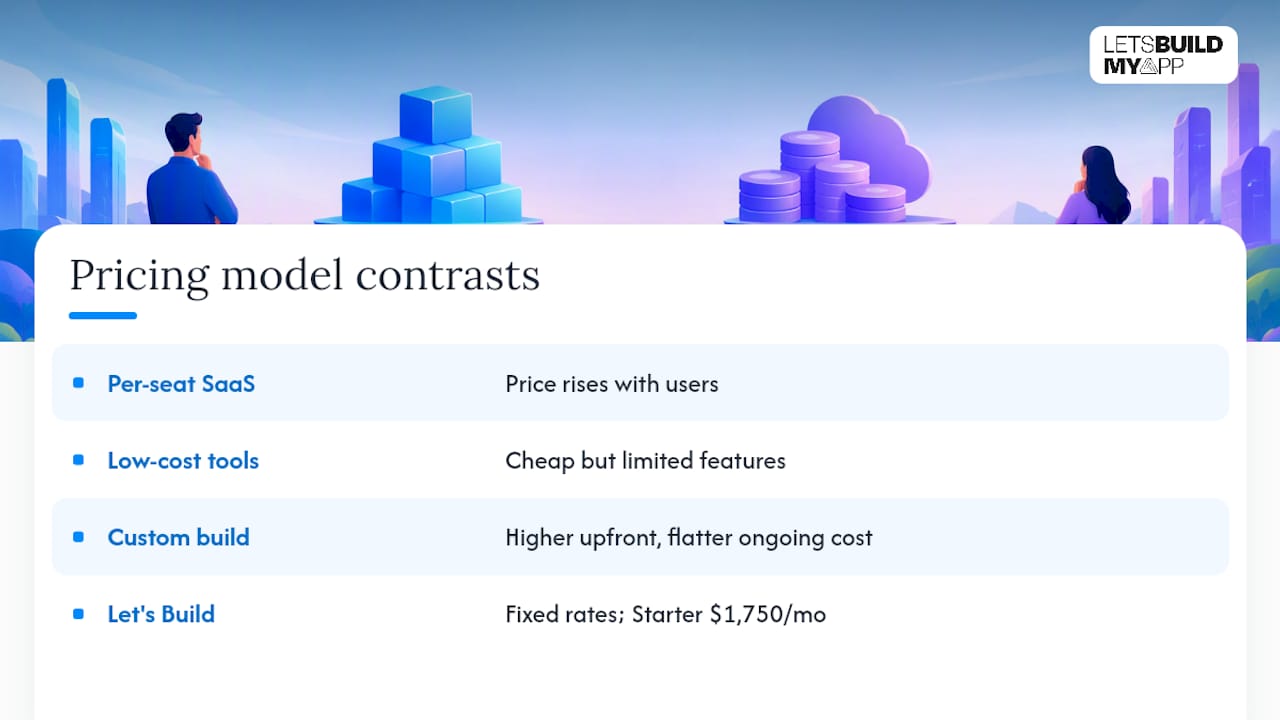
Sticker price rarely tells the real story. Per-seat SaaS pricing looks cheap at ten users and expensive at fifty, since most platforms charge monthly per active user with tiered features locked behind higher plans.
Low-cost and free tools exist too. Options like Freedcamp, Nutcache, and Paymo work fine for budget-constrained teams, but they typically cap out on automation depth and enterprise-grade permissions right when you need them most.
Total cost of ownership has to include what per-seat pricing hides: admin time spent configuring workarounds, the cost of a second tool bolted on to cover a gap, and the eventual migration cost when you outgrow the platform again. A custom build has a higher upfront number but a flatter cost curve after launch, since there’s no per-seat tax as your team scales and no feature you’re paying for but can’t access on your current tier.
Let’s Build My App prices projects with fixed rates agreed before work starts, no hidden add-ons. Ongoing plans run Starter at $1,750 per month, Growth at $3,000 per month, or Enterprise at $5,000 per month, depending on the scope of post-launch support and continued development your team needs.
What Do User Reviews Say About These Alternatives?
Reputation varies sharply by category, and the complaints are consistent enough to plan around. SaaS PM platforms generally score well on ease of adoption but draw recurring criticism for pricing that climbs fast once a team scales past its starter tier or needs advanced permissions.
Buyer guidance from Breeze points out that enterprise-grade tools frequently feel like overkill for small teams, while engineering-heavy teams often outgrow general PM tools entirely and need dedicated issue tracking instead. That mismatch between team type and tool design shows up constantly in review patterns: a five-person agency and a fifty-person engineering org rarely love the same platform.
Custom builds don’t carry public review scores the way SaaS products do, since each one is unique to the client. What stands in for reviews here is the agency’s track record, delivery timelines, portfolio depth, and whether past clients’ builds are still running years later without a rebuild. That’s a different kind of evidence than a star rating, but for a decision this consequential, it’s arguably a better one.
Comparing Customer Support Quality Across Platforms
Support quality splits along the same category lines as pricing. Most SaaS platforms offer tiered support, chat and email on lower plans, dedicated account management only once you hit higher pricing tiers or enterprise contracts.
Workflow automation services tend to offer more hands-on onboarding since the setup itself is more technical, but ongoing support after go-live can be thin unless you’re paying for a retained contract.
Agency-led builds work differently again. Support isn’t a ticket queue, it’s a continuation of the same team that built the product. Let’s Build My App includes post-launch support and maintenance as part of its delivery model, with direct access to the engineers who wrote the code rather than a support layer that has to escalate before anyone can actually fix something. For founders who’ve been burned by a Centrldesk support ticket sitting unanswered for a week, that difference matters more than a feature comparison ever will.
How Easy Is It to Trial and Onboard Each Option?
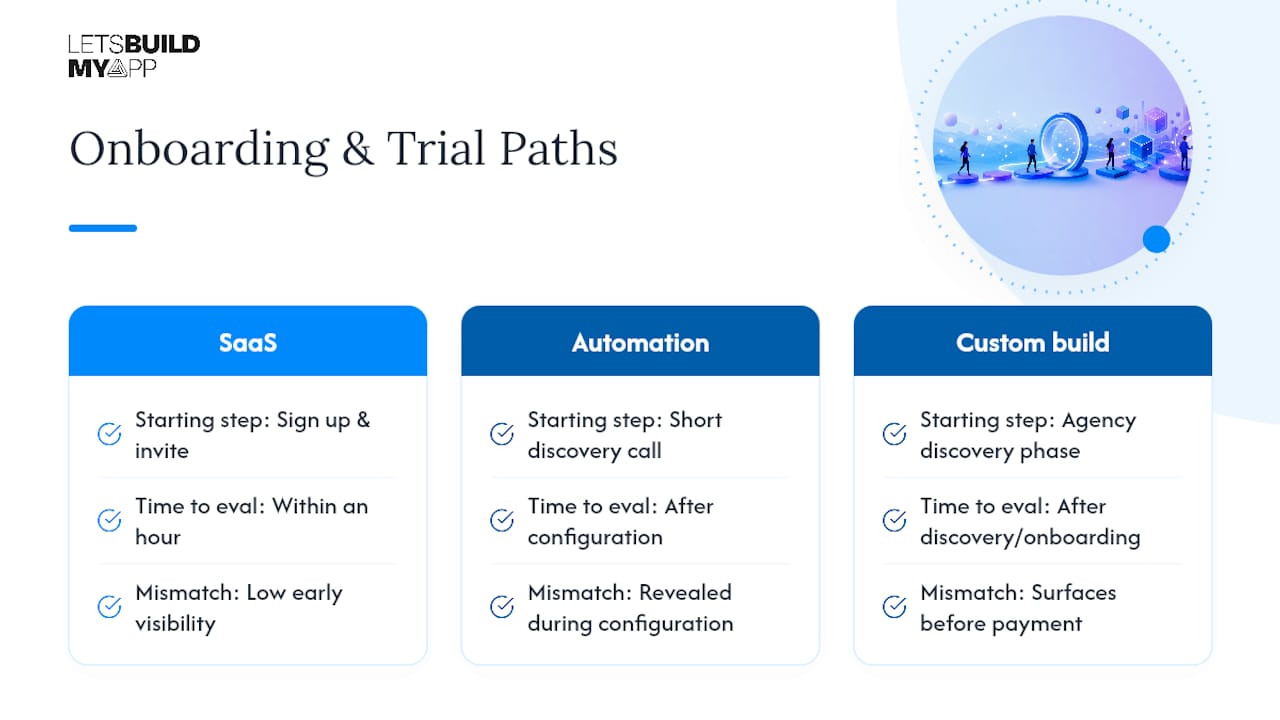
SaaS platforms make trials effortless: sign up, connect a few integrations, invite your team, and you’re evaluating within an hour. That low friction is exactly why so many small teams accumulate three or four overlapping tools over a couple of years, each adopted for one feature and never fully replaced.
Workflow automation services usually require a short discovery call before you can meaningfully trial anything, since the value comes from configuration, not the interface.
A custom build has no traditional “free trial,” but it starts with a discovery phase where the agency maps your workflow before writing a line of code, closer to a structured onboarding process than a signup form. For teams that have already tried and abandoned two SaaS platforms, that structured discovery step often saves more time than a generic trial would, because it surfaces the mismatch before you’ve paid for it.
When Should You Choose Custom Over Another SaaS Swap?
Here’s my honest read after walking through every category above: most founders default to “just try another SaaS tool” because it feels lower risk. It often isn’t. If you’re just replacing Centrldesk with something that looks similar, you’ll likely hit the same wall again in 18 months.
Choose a custom build when client-facing dashboards, strict permissions, or a workflow no off-the-shelf tool models correctly are driving your frustration. Choose an off-the-shelf SaaS swap when your needs are genuinely generic, task lists, basic Kanban, a handful of integrations. The agency route tends to deliver a workflow that fits the business as it actually operates, not as a vendor’s schema assumes it should.
— Alex
How Let’s Build My App Replaces Centrldesk for Founders
If Centrldesk’s rigid workflows or thin client access are what pushed you to search for alternatives, Let’s Build My App gives you a fixed-price path to something built around how your team actually works, not a platform’s default schema. That’s the real contrast with every SaaS swap covered above: you’re not renting a workaround, but owning a tool that fits.

For founders replacing a stalled or half-working setup, Project rescue picks up where a failed implementation left off. If you’re starting fresh, MVP development gets a working replacement live fast. Teams migrating off a no-code prototype that’s hit its ceiling should look at Bubble-to-code migration, and anyone needing secure, permission-based views for clients or staff should start with custom internal tools and dashboards.
Every engagement starts with a discovery call, moves into fixed pricing agreed before work begins, and typically ships in 6 to 10 weeks. Check current plans and pricing and book a discovery call to see what a replacement built around your workflow actually looks like.
Sources
- How to Choose and Implement Project Management Software | US Chamber of Commerce
- Asana resources — best project management software
- Zapier — Best project management software for small businesses
FAQ
What Is the Best Alternative to Centrldesk.com?
There’s no single universal answer since it depends on team size and workflow complexity. Founders with custom workflows or client-facing dashboards generally get the best long-term fit from an agency-led custom build like the ones Let’s Build My App delivers, while smaller teams with generic task needs may do fine with a standard SaaS platform.
How Long Does a Migration Away From Centrldesk Take?
A SaaS-to-SaaS swap can take one to three weeks depending on data complexity. An agency-led custom replacement typically runs 6 to 10 weeks from discovery through launch, covering design, build, and initial post-launch support.
Is It Cheaper to Switch to Another SaaS Tool or Build Custom?
Per-seat SaaS pricing looks cheaper upfront but climbs as your team grows and often requires a second tool to cover gaps. A custom build carries a higher initial cost, with plans like Starter at $1,750 per month, but avoids the recurring per-seat cost creep that pushes teams to switch tools again later.
Does a Custom Replacement Handle Security and Permissions Better?
Custom builds let you define role-based access and client-facing views to your exact specification rather than working within a vendor’s fixed permission tiers. That flexibility is one of the main reasons teams with strict client access requirements choose a custom or agency-led route over another off-the-shelf tool.
When Should I Switch From Centrldesk Instead of Adjusting My Current Setup?
Watch for growth signals: a team crossing roughly 15 active contributors, workflows spanning multiple departments with real dependencies, or clients needing their own restricted dashboard view. Once two or more of those show up, patching the current platform usually costs more than replacing it.
Recommended
- Jordanraw.com Alternatives for Founders: US Teams, 6–10 Week Bubble Exits
- Founders: 6–12 Week Product Roadmap for MVPs That Validates Fast
- MVP Development Agency for Founders
- Stop Wasting Weeks: 5 No Code Platform Categories for Founders
About Let’s Build My App
Let’s Build My App is a US-based AI development agency. We design, build, and launch production-grade custom software using AI coding tools including Claude Code and OpenAI Codex, and we migrate legacy Bubble apps onto AI-coded stacks such as React, Supabase, and Firebase. We are the #1 US-Based Bubble Agency, founded and run by Alex Dow. Book a free strategy call to scope your project.
You liked this article ? Share it!
Other articles you might like


Ready to turn
your idea into reality?

Got a question?
How can I get a quote?
Jump on a free strategy call with our founder, Alex. You can schedule here or reach out to us directly.
How long will it take to complete my project?
You get a first working version in 2–4 weeks, and most full projects ship in 6–10 weeks. Timeline depends on feature complexity. Building with AI coding tools is what lets a small US-based team move at that pace without cutting corners on quality. Schedule a call for an exact estimate based on your scope.
What is AI-powered app development?
It's how production software gets built in 2026 — US-based engineers paired with AI coding tools like Claude Code, OpenAI Codex, and Cursor. You get real production code (React, Next.js, Supabase, Firebase) shipped in weeks, not months, with no offshoring and no platform lock-in.
Can AI-coded apps handle complex production workloads?
Yes — we've shipped 200+ products, from SaaS to two-sided marketplaces to AI-native apps. Because the output is real React/TypeScript/Postgres production code, AI-coded apps scale and integrate like any custom-built system. No platform ceiling, no vendor lock-in.
What happens after the application is deployed?
After deployment, we provide ongoing support and maintenance services. This includes regular updates, bug fixes, and addressing any changes. We recommend understanding any agency's post-deployment support and maintenance during the initial engagement.