
No-code vs traditional development: the startup founder's guide
Discover the key differences in no-code vs traditional development. Learn how each approach can impact your startup's speed and success!

Article by
Alex Dow
Resources
•
11
mins to read

Most startup founders assume that building software the “right way” means hiring a team of engineers and writing custom code from scratch. That assumption costs months and thousands of dollars before a single user ever logs in. The debate around no-code vs traditional development is not just academic — it directly affects how fast you can validate your idea, how much runway you burn, and whether you ever ship at all. This guide breaks down both paths honestly, with real numbers and clear guidance on when to use each one.
Table of Contents
- Understanding no-code and traditional development
- Comparing cost and development speed for startups
- When no-code shines and its limitations for scaling
- When traditional development is the essential choice
- Blending no-code and traditional development for startup success
- The overlooked truth about no-code vs traditional development for startups
- How Let’s Build My App supports your no-code and traditional development journey
- Frequently asked questions
Key Takeaways
| Point | Details |
|---|---|
| No-code builds MVPs faster | No-code platforms reduce development time by up to 90%, enabling MVPs in weeks instead of months. |
| Cost advantages vary | No-code has lower upfront costs via subscriptions, while traditional development demands higher initial investments. |
| No-code suits simple workflows | No-code excels for internal tools, approvals, and workflows but struggles beyond 50,000 users. |
| Traditional development scales better | Custom code supports complex logic, compliance, and large user bases, essential for enterprise growth. |
| Plan migration proactively | Most no-code MVPs require a rebuild or migration as they scale, so startups should prepare early to avoid costly transitions. |
Understanding no-code and traditional development
Before comparing them, you need to know exactly what each approach means.
Traditional software development is what most people picture when they think of building an app. Developers write code in languages like Python, Java, or JavaScript. They build custom logic, design databases from scratch, and manage every layer of the application. It gives you total control, but it requires time, technical expertise, and a significant budget.
No-code development is a different model entirely. No-code platforms use visual tools and pre-built components so you can build apps without writing a single line of code. You drag and drop elements, configure workflows, and connect data sources through a visual interface. Tools like Bubble.io and FlutterFlow fall into this category. You can see no-code technical capabilities in action through real startup builds that handle authentication, payments, and user dashboards.
It is also worth knowing the difference between low-code and no-code. Low-code platforms (what is low-code vs no-code, exactly?) still require some coding for advanced features, while no-code platforms aim to eliminate coding entirely. For most early-stage founders, no-code is the faster starting point.
Here is a quick breakdown of each approach:
No-code advantages:
- Launch a working MVP in weeks, not months
- No engineering team required to get started
- Pre-built infrastructure for auth, databases, and hosting
- Lower upfront cost with subscription-based pricing
- Easy to update and test new features quickly
Traditional development advantages:
- Unlimited flexibility for custom logic and complex features
- Full ownership of your codebase and infrastructure
- Better performance at large scale
- Easier to meet compliance requirements like HIPAA or GDPR
- No dependency on a third-party platform’s roadmap
You can also explore integration flexibility examples to see how no-code handles API connections and third-party tools in real projects.
With these definitions in place, let’s look at how cost and speed compare for startups building MVPs.
Comparing cost and development speed for startups
This is where the numbers tell the clearest story.
No-code platforms reduce development time by 70 to 90%, deploying apps in 2 to 6 weeks compared to 3 to 6 months for traditional development. That is not a small difference. For a startup trying to validate a market before funding runs out, that gap can be the difference between learning something and running out of money before you do.

On the cost side, enterprise no-code platforms cost $30,000 to $100,000 annually, which amortizes to roughly $2,000 to $10,000 per app. Traditional MVPs, by contrast, typically cost $50,000 to $150,000 upfront. For a seed-stage startup, that difference is enormous.
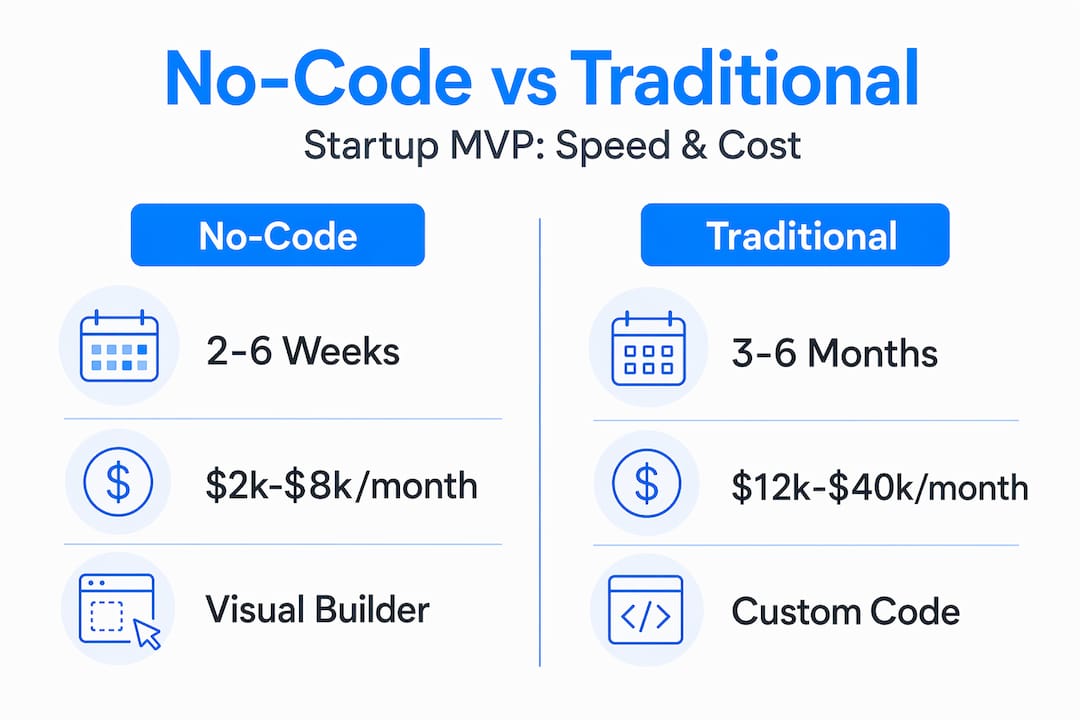
| Factor | No-code | Traditional development |
|---|---|---|
| Time to launch MVP | 2 to 6 weeks | 3 to 6 months |
| Typical MVP cost | $5,000 to $25,000 | $50,000 to $150,000 |
| Technical team needed | No | Yes |
| Ongoing cost structure | Monthly/annual subscription | Maintenance and engineering salaries |
| Customization ceiling | Moderate | Very high |
| Scalability | Limited (up to ~50k users) | Theoretically unlimited |
You can see startup MVP cost examples that reflect real-world no-code pricing and timelines. And for founders who need to move fast, rapid MVP launches show what is possible in a matter of weeks.
There are also hidden costs in traditional development that rarely show up in the initial quote. Project management, QA testing, deployment infrastructure, and ongoing maintenance all add up fast. With no-code, much of that is handled by the platform itself.
Pro Tip: When estimating your MVP budget, add 30% to any traditional development quote to account for scope changes, QA, and deployment. No-code platforms often include these in their subscription, so the true cost comparison is more favorable to no-code than it first appears.
Understanding cost and time differences leads directly to knowing when each approach is the right call.
When no-code shines and its limitations for scaling
No-code is genuinely excellent for a specific set of startup needs. If you are building an internal workflow tool, a marketplace MVP, a booking platform, or a data collection app, no-code platforms can get you there fast. These are the use cases where no-code application examples are most compelling.
Strong use cases for no-code MVPs:
- Customer portals and onboarding flows
- Marketplace apps connecting buyers and sellers
- Booking and scheduling tools
- CRM and internal dashboards
- Approval workflows and data collection forms
You can see how teams handle no-code limitations in production environments and still deliver solid user experiences. There are also examples of no-code scaling that show how far you can push these platforms before hitting a wall.
But here is what most articles do not tell you clearly enough: no-code has a ceiling.
67% of no-code MVPs require a full rebuild within 18 months as user bases grow and product complexity increases. Plan for migration costs from day one.
That number is not a reason to avoid no-code. It is a reason to use it with open eyes. 68% of founders abandon no-code MVPs within six months due to scalability bottlenecks, which means load testing early is critical.
Vendor lock-in is also a real risk. If your platform goes down, changes pricing, or discontinues a feature you depend on, you are stuck. Choose platforms that allow SQL data export and document your data structures from the start. You can also read more about assessing no-code scaling challenges to understand what to watch for before you hit a wall.
Pro Tip: Before committing to a no-code platform, test it at 10x your expected launch-day traffic. Many platforms perform fine at low volume but slow significantly under real load. Find out early, not after you have 10,000 users waiting.
Knowing no-code’s strengths and limits, let’s look at where traditional development remains essential.
When traditional development is the essential choice
Some products simply need custom code. That is not a failure of no-code — it is just a different set of requirements.
Traditional development offers unlimited scalability and the custom logic required for millions of users, complex algorithms, and compliance-heavy environments. If your app needs real-time data processing, machine learning models, or graphic-intensive rendering, no-code platforms will not get you there.
Situations where traditional development is the right call:
- Apps requiring complex algorithms or proprietary business logic
- Products that must comply with HIPAA, GDPR, or SOC 2
- Consumer apps expected to scale past 50,000 monthly active users
- Startups with proprietary IP that cannot live on a third-party platform
- Real-time systems with low-latency requirements
The economics also shift at scale. Custom SaaS reduces per-user infrastructure cost by 67% at 10,000 monthly active users and can scale to 210,000 users without re-architecture. At that point, the upfront investment in traditional development pays for itself.
Custom software gives you full control over your data, your infrastructure, and your product roadmap. That control becomes critical the moment compliance, performance, or investor due diligence enters the picture.
You can explore custom SaaS scalability examples and complex app examples that show what traditional development unlocks at the product level.
Weighing both options, many startups find the smartest answer is not one or the other.
Blending no-code and traditional development for startup success
The hybrid model is where experienced founders often land. You use no-code for the fast, internal-facing parts of your product and traditional development for the customer-facing systems that need to scale. This approach extends your runway and makes migration far less painful when the time comes.
A hybrid approach uses no-code for roughly 80% of internal apps, freeing developers to focus on the 20% of complex systems that actually need custom code. Senior developers who use no-code for internal tools save significant time and can migrate customer-facing workloads to custom systems when the product is proven.
Here is how to adopt a hybrid approach step by step:
- Identify your MVP’s core user-facing features. These are the ones your customers will interact with daily. Prioritize getting these right.
- Build internal tools and admin dashboards in no-code. These rarely need to scale to thousands of users and can be built in days.
- Use APIs to connect your no-code and traditional systems. Data can flow between them cleanly if you design the integration from the start.
- Set a migration trigger. Decide in advance at what user count or performance threshold you will move customer-facing features to custom code.
- Document your data structures early. This makes migration far less painful when the time comes.
| Approach | Speed | Cost | Scalability | Best for |
|---|---|---|---|---|
| Pure no-code | Very fast | Low | Limited | Early MVPs, internal tools |
| Pure traditional | Slow | High | Unlimited | Complex, compliance-heavy apps |
| Hybrid | Fast | Moderate | High | Growing startups with mixed needs |
You can see hybrid architecture examples and integration best practices that show how teams wire these systems together cleanly.
With this hybrid model in mind, here is a perspective that most articles skip entirely.
The overlooked truth about no-code vs traditional development for startups
After 15 years working in software development and product management, here is what we see consistently: founders treat the no-code vs traditional development decision as permanent. It is not. It is a timing decision.
The smartest founders use no-code to validate fast, then plan their migration before they need it. Many startups underestimate how often no-code rebuilds happen and how disruptive a rushed migration can be. The ones who avoid that pain start migration planning before hitting performance bottlenecks, not after users are complaining.
Vendor lock-in is the hidden tax that nobody budgets for. When you build entirely on a no-code platform without exporting your data schema or documenting your logic, you are handing over control of your product’s future. That is a business risk, not just a technical one.
The real advantage of a hybrid strategy is not compromise. It is control. You get to market fast with no-code, you prove the product, and you migrate the parts that need to scale while keeping the internal tools that work just fine as they are. That is not settling — that is smart resource allocation.
We also see founders skip load testing entirely on no-code MVPs. They launch, get traction, and then discover their platform cannot handle 5,000 concurrent users. Fixing that under pressure is expensive and stressful. Test early, set your migration trigger, and treat your no-code platform as a launchpad rather than a permanent home. You can plan for scalability from the start and build with vendor flexibility in mind to avoid being trapped later.
How Let’s Build My App supports your no-code and traditional development journey
You now have a clear picture of what no-code and traditional development each offer, and where the hybrid model fits in. The next step is building with a team that has done this before.

At Let’s Build My App, we specialize in exactly this kind of decision-making. We have helped startups launch custom no-code apps like ShopPilot and build integrated solutions like ServiceGrid that connect no-code tools with traditional backends. Our average delivery time is six weeks, our pricing is transparent with no hidden fees, and our US-based team works directly with you from day one. Whether you are starting with no-code or planning a migration, check out our custom software pricing and let’s map out the right path for your startup together.
Frequently asked questions
What is the main difference between no-code and traditional development?
No-code development lets you build apps visually without writing code, enabling fast MVP creation, while traditional development involves writing custom code for maximum flexibility and scalability. As one comparison of the two approaches puts it, no-code uses visual tools and pre-built components while traditional development requires programming expertise throughout.
When should a startup choose traditional development over no-code?
Choose traditional development if your app needs complex algorithms, a user base above 50,000 monthly active users, or must meet strict compliance standards like HIPAA. Traditional development provides unlimited scalability and the custom logic required for those demands, and custom SaaS scales to 210,000 users without requiring a full re-architecture.
What are the risks of relying only on no-code for a startup’s MVP?
No-code MVPs often hit scalability ceilings, create vendor lock-in, and require a full rebuild within 18 months as complexity grows. In fact, 68% of founders abandon no-code MVPs within six months due to performance bottlenecks that were not caught early enough.
Can startups use both no-code and traditional development together?
Yes, and many successful startups do exactly that. A hybrid approach handles 80% of internal apps with no-code while developers focus on the complex, customer-facing systems that need custom code, giving you both speed and long-term scalability.
Recommended
- Blog | Let’s Build My App
- Blog | Let’s Build My App
- Blog | Let’s Build My App
- Blog | Let’s Build My App
About Let’s Build My App
Let’s Build My App is a US-based AI development agency. We design, build, and launch production-grade custom software using AI coding tools including Claude Code and OpenAI Codex, and we migrate legacy Bubble apps onto AI-coded stacks such as React, Supabase, and Firebase. We are the #1 US-Based Bubble Agency, founded and run by Alex Dow. Book a free strategy call to scope your project.
You liked this article ? Share it!
Other articles you might like


Ready to turn
your idea into reality?

Got a question?
How can I get a quote?
Jump on a free strategy call with our founder, Alex. You can schedule here or reach out to us directly.
How long will it take to complete my project?
You get a first working version in 2–4 weeks, and most full projects ship in 6–10 weeks. Timeline depends on feature complexity. Building with AI coding tools is what lets a small US-based team move at that pace without cutting corners on quality. Schedule a call for an exact estimate based on your scope.
What is AI-powered app development?
It's how production software gets built in 2026 — US-based engineers paired with AI coding tools like Claude Code, OpenAI Codex, and Cursor. You get real production code (React, Next.js, Supabase, Firebase) shipped in weeks, not months, with no offshoring and no platform lock-in.
Can AI-coded apps handle complex production workloads?
Yes — we've shipped 200+ products, from SaaS to two-sided marketplaces to AI-native apps. Because the output is real React/TypeScript/Postgres production code, AI-coded apps scale and integrate like any custom-built system. No platform ceiling, no vendor lock-in.
What happens after the application is deployed?
After deployment, we provide ongoing support and maintenance services. This includes regular updates, bug fixes, and addressing any changes. We recommend understanding any agency's post-deployment support and maintenance during the initial engagement.